TL;DR
- Learn how to scrape Google’s AI Overview results using Python.
- Use Webshare rotating residential proxies to bypass geo-restrictions and avoid Google’s anti-bot detection.
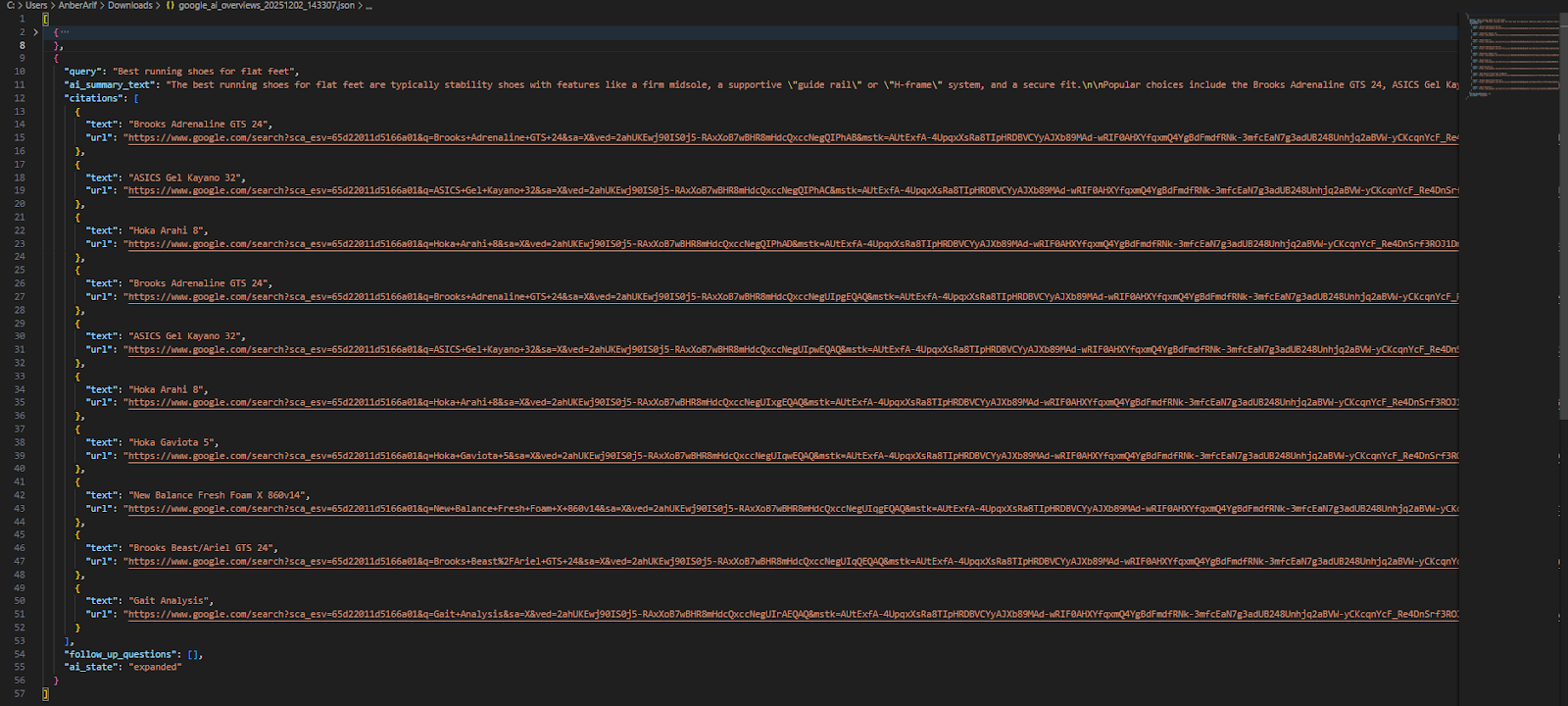
- Extract key data from AI Overviews and save the results in JSON and CSV.
Google search is shifting away from the classic list of blue links and toward short, AI-generated answers that sit right at the top of the page. For many informational or complex queries, users now read the AI Overview instead of clicking through to websites – which has huge implications for visibility. For SEOs, the real question becomes: Is Google’s AI citing our content or not? Scraping these AI Overviews helps you see when and where your site is mentioned, what citations Google pulls, and how your topics are being summarized.
In this guide, you’ll learn how to build an AI Overview scraper using Playwright and Webshare proxies – including how to handle streaming text, expand hidden responses, capture citations, and save structured results for analysis.
Prerequisites
Before building and running the Google AI Overview scraper, make sure your environment is set up with the necessary tools and dependencies.
- Python: Ensure you have Python 3.9+ installed. Check this by running:
python --version- Required Python Packages: The scraper uses asynchronous scraping, browser automation, and data handling libraries. Install them with:
pip install playwright- Built-in Modules: These are included with Python, but make sure they are available in your environment:
- asyncio
- json
- csv
- random
- time
- urllib.parse
After installing Playwright, you must also install the browser binaries (Chromium) once:
playwright install chromium- Webshare Proxy Access: Google AI Overviews are not yet available in all regions and are protected against automated access. Use Webshare rotating residential proxies to simulate real user traffic, bypass geo-restrictions, and prevent IP blocking.
Scraping Google AI Overviews
Follow these steps to scrape AI Overviews from Google for your queries. Make sure you have completed all prerequisites before starting.
Step 1: Prepare your queries
Create a list of search queries you want to scrape. These can be informational or complex topics.
search_queries = [
    "History of the Roman Empire",
    "Best running shoes for flat feet"
]
Step 2: Set up proxy (recommended)
Google AI Overviews are not yet available in all regions, and accessing them repeatedly may trigger rate limits.
- Use Webshare rotating residential proxies to simulate traffic from a specific country.
USE_PROXY = True
PROXY_COUNTRY = 'US'  # Change to your desired country code
Step 3: Launch the scraper
Initialize the scraper and launch a browser session using Playwright. The scraper will handle viewport, user-agent, and other browser configurations.
scraper = GoogleAIOOverviewScraper()
await scraper.setup_browser(use_proxy=USE_PROXY, proxy_country=PROXY_COUNTRY)
Step 4: Navigate to Google and handle cookies
For each query, open Google Search using the query string. If a cookie consent popup appears, click Accept or I Agree. This ensures that you can access the AI Overview container without interruptions.
Step 5: Detect AI Overview
Check if Google has provided an AI Overview for the query:
- Look for the AI Overview container.
- If you see a Generate button, it means the AI answer is collapsed. You must click it to reveal the content.
- If the AI is already visible, proceed to the next step.
Step 6: Wait for the AI answer to finish loading
Some AI Overviews appear gradually (streaming text). Wait until:
- The text stops changing for several seconds.
- Citations or follow-up questions appear.
- A substantial summary is visible.
Step 7: Expand collapsed sections
If the AI Overview has a Show more button, click it to reveal the full content. If there are View related links buttons, click them to ensure all citations are captured.
Step 8: Extract data
Once the AI Overview is fully loaded, extract the summary text, citations and follow-up Questions (if any).
Step 9: Repeat for all queries and save the results
Process each query in your list, adding a small delay (5-8 seconds) between requests to avoid rate limiting. After scraping all queries, save the results to JSON and CSV for further analysis.
Here’s the complete code:
import asyncio
import json
import csv
import time
import random
from urllib.parse import quote
from playwright.async_api import async_playwright
class GoogleAIOOverviewScraper:
def __init__(self):
self.browser = None
self.page = None
self.playwright = None
self.base_url = "https://www.google.com/search"
self.selectors = {
'ai_container': 'div.WaaZC',
'ai_content': 'div.rPeykc',
'summary_text': 'span[data-huuid] span',
'citation_links': 'a.DTlJ6d[jsname="TGaAqd"]',
'citation_images': 'img.ez24Df',
'view_links_button': 'div[aria-label="View related links"], div[jsname="HtgYJd"]',
'show_more_button': 'button:has-text("Show more"), div[jsname="rPRdsc"].Jzkafd',
'follow_up_container': 'div.rXoQtd',
'follow_up_question': 'div.zwS7bb',
'error_message': '.YWpX0d',
'generate_button': 'button:has-text("Generate"), div[aria-label="Generate"]',
'ai_overview_title': 'h2:has-text("AI Overview"), div:has-text("AI Overview")',
}
async def setup_browser(self, use_proxy=False, proxy_country='US'):
await self.close()
self.playwright = await async_playwright().start()
launch_options = {
'headless': True,
'args': [
'--no-sandbox',
'--disable-setuid-sandbox',
'--disable-blink-features=AutomationControlled',
'--disable-dev-shm-usage',
'--disable-accelerated-2d-canvas',
'--disable-gpu',
]
}
if use_proxy:
username = f"username-{proxy_country}-rotate" # Enter username
password = "password" # Enter password
launch_options['proxy'] = {
'server': 'http://p.webshare.io:80',
'username': username,
'password': password
}
self.browser = await self.playwright.chromium.launch(**launch_options)
context = await self.browser.new_context(
viewport={'width': 1920, 'height': 1080},
user_agent='Mozilla/5.0 (Windows NT 10.0; Win64; x64) AppleWebKit/537.36 (KHTML, like Gecko) Chrome/120.0.0.0 Safari/537.36',
locale='en-US',
timezone_id='America/New_York'
)
await context.add_init_script("""
Object.defineProperty(navigator, 'webdriver', {get: () => undefined});
Object.defineProperty(navigator, 'plugins', {get: () => [1, 2, 3, 4, 5]});
Object.defineProperty(navigator, 'languages', {get: () => ['en-US', 'en']});
""")
self.page = await context.new_page()
async def random_delay(self, min_seconds=1, max_seconds=3):
delay = random.uniform(min_seconds, max_seconds)
await asyncio.sleep(delay)
async def handle_cookie_consent(self):
try:
cookie_selectors = [
'button:has-text("Accept all")',
'button:has-text("I agree")',
'#L2AGLb',
'div[role="dialog"] button:has-text("Accept")',
'button:has-text("Reject all")',
'button:has-text("Accept All")'
]
for selector in cookie_selectors:
try:
cookie_button = await self.page.query_selector(selector)
if cookie_button and await cookie_button.is_visible():
await cookie_button.click()
await asyncio.sleep(1)
break
except:
continue
except:
pass
async def check_ai_availability(self):
try:
# Check for error messages first
error_element = await self.page.query_selector(self.selectors['error_message'])
if error_element and await error_element.is_visible():
print("AI error message detected")
return False
# Multiple strategies to detect AI Overview
detection_strategies = [
# 1. Check for the main AI container
lambda: self.page.query_selector(self.selectors['ai_container']),
# 2. Check for AI content div
lambda: self.page.query_selector(self.selectors['ai_content']),
# 3. Check for AI summary text elements
lambda: self.page.query_selector(self.selectors['summary_text']),
# 4. Check for citation links
lambda: self.page.query_selector(self.selectors['citation_links']),
# 5. Check for "Generate" button (collapsed AI)
lambda: self.page.query_selector(self.selectors['generate_button']),
# 6. Check for "Show more" button (expanded AI)
lambda: self.page.query_selector(self.selectors['show_more_button']),
# 7. Check for AI Overview title
lambda: self.page.query_selector(self.selectors['ai_overview_title']),
# 8. Check for any element with data-huuid attribute
lambda: self.page.query_selector('[data-huuid]'),
# 9. Check for common AI Overview patterns in page text
lambda: self.page.evaluate('''() => {
const text = document.body.innerText;
return text.includes('AI Overview') || text.includes('Generative AI') ||
text.includes('View related links') || text.includes('Ask a follow up');
}'''),
]
for i, strategy in enumerate(detection_strategies):
try:
result = await strategy()
if result:
# For evaluate function, result is a boolean
if isinstance(result, bool):
if result:
print(f"AI detected via strategy {i+1} (text pattern)")
return True
# For element queries, check if element exists and is visible
elif hasattr(result, 'is_visible'):
if await result.is_visible():
print(f"AI detected via strategy {i+1} (element found)")
return True
else:
# Element exists but may not have is_visible method
print(f"AI detected via strategy {i+1} (element exists)")
return True
except Exception as e:
continue
# Additional check: Look for streaming text indicators
try:
streaming_indicators = await self.page.query_selector_all('.wDYxhc:has-text("Generating"), div[aria-label="Loading"]')
if streaming_indicators:
print("AI detected (streaming in progress)")
return True
except:
pass
print("No AI Overview detected with any strategy")
return False
except Exception as e:
print(f"Error checking AI availability: {str(e)}")
return False
async def check_ai_state(self):
"""Check if AI Overview is expanded or collapsed"""
try:
# Check for "Generate" button (collapsed state)
generate_button = await self.page.query_selector(self.selectors['generate_button'])
if generate_button and await generate_button.is_visible():
print("AI is in collapsed state (has 'Generate' button)")
return 'collapsed'
# Check for "Show more" button or AI content (expanded state)
show_more_button = await self.page.query_selector(self.selectors['show_more_button'])
ai_content = await self.page.query_selector(self.selectors['ai_content'])
summary_text = await self.page.query_selector(self.selectors['summary_text'])
if (show_more_button and await show_more_button.is_visible()) or \
(ai_content and await ai_content.is_visible()) or \
(summary_text and await summary_text.is_visible()):
print("AI is in expanded state")
return 'expanded'
# Check for AI container with visible content
ai_container = await self.page.query_selector(self.selectors['ai_container'])
if ai_container and await ai_container.is_visible():
container_text = await ai_container.text_content()
if container_text and len(container_text.strip()) > 50:
print("AI container has content")
return 'expanded'
return 'unknown'
except Exception as e:
print(f"Error checking AI state: {str(e)}")
return 'unknown'
async def click_generate_button(self):
"""Click the 'Generate' button if AI Overview is collapsed"""
try:
generate_buttons = await self.page.query_selector_all(self.selectors['generate_button'])
for button in generate_buttons:
try:
if await button.is_visible():
print("Clicking 'Generate' button...")
await button.click()
await self.random_delay(2, 4)
# Wait for AI to start generating
await asyncio.sleep(2)
return True
except:
continue
except:
pass
return False
async def wait_for_ai_completion(self, timeout=60000):
"""Wait for AI Overview to finish loading/generating"""
start_time = time.time()
last_text = ""
no_change_count = 0
max_no_change = 3 # Wait for 3 cycles of no change
print("Waiting for AI completion...")
while time.time() - start_time < timeout / 1000:
try:
# Check for loading indicators
loading_selectors = [
'.wDYxhc:has-text("Generating")',
'div[aria-label="Loading"]',
'div:has-text("AI is thinking")',
'div:has-text("is generating")',
'div[aria-busy="true"]'
]
is_loading = False
for selector in loading_selectors:
try:
loading_elem = await self.page.query_selector(selector)
if loading_elem and await loading_elem.is_visible():
is_loading = True
print("AI is still loading/generating...")
break
except:
continue
if is_loading:
no_change_count = 0
await asyncio.sleep(1.5)
continue
# Extract current text
current_text = await self.extract_ai_summary()
if current_text:
print(f"Text length: {len(current_text)} chars")
# Check if text has stabilized
if current_text == last_text:
no_change_count += 1
print(f"No change count: {no_change_count}")
else:
no_change_count = 0
print("Text changed, resetting no_change_count")
# Check for completion indicators
has_final_punctuation = any(punct in current_text for punct in ['.', '!', '?'])
has_citations = await self.page.query_selector(self.selectors['citation_links'])
# If text hasn't changed for several cycles and has final punctuation or citations
if no_change_count >= max_no_change and (has_final_punctuation or has_citations):
print("AI generation appears complete (no change for several cycles)")
return True
# If we have substantial text and citations are visible
if len(current_text) > 100:
if has_citations and await has_citations.is_visible():
print("Substantial text with citations found")
return True
# Even without citations, if text is long and stable
elif no_change_count >= 2 and has_final_punctuation:
print("Substantial stable text found")
return True
last_text = current_text
await asyncio.sleep(2)
except Exception as e:
print(f"Error in wait_for_ai_completion: {str(e)}")
await asyncio.sleep(1)
# Fallback: Check if we have any text at all
final_text = await self.extract_ai_summary()
if final_text and len(final_text.strip()) > 50:
print(f"Timeout reached but got text: {len(final_text)} chars")
return True
print("Timeout reached with no substantial text")
return False
async def click_show_more(self):
"""Click 'Show more' button if present"""
try:
show_more_selectors = [
self.selectors['show_more_button'],
'button:has-text("Show more")',
'div[aria-label="Show more"]',
'div[jsname="rPRdsc"]',
'button.Jzkafd',
'div:has-text("Show more")'
]
for selector in show_more_selectors:
try:
show_more_button = await self.page.query_selector(selector)
if show_more_button and await show_more_button.is_visible():
print("Clicking 'Show more' button...")
await show_more_button.click()
await self.random_delay(3, 5)
return True
except:
continue
except Exception as e:
print(f"Error clicking show more: {str(e)}")
return False
async def click_view_links(self):
"""Click 'View related links' buttons"""
clicked = False
try:
view_buttons = await self.page.query_selector_all(self.selectors['view_links_button'])
print(f"Found {len(view_buttons)} 'View related links' buttons")
for button in view_buttons:
try:
if await button.is_visible():
print("Clicking 'View related links' button...")
await button.click()
await self.random_delay(1, 2)
clicked = True
except:
continue
if clicked:
await self.random_delay(2, 3)
except Exception as e:
print(f"Error clicking view links: {str(e)}")
return clicked
async def extract_ai_summary(self):
"""Extract the AI summary text"""
try:
# Try multiple text extraction strategies
all_text_parts = []
# Strategy 1: Get text from data-huuid spans (main method)
summary_spans = await self.page.query_selector_all(self.selectors['summary_text'])
for span in summary_spans:
try:
text = await span.text_content()
if text and text.strip():
clean_text = text.strip()
if len(clean_text) > 5: # Reduced threshold
all_text_parts.append(clean_text)
except:
continue
# Strategy 2: Get text from AI container
container = await self.page.query_selector(self.selectors['ai_container'])
if container:
try:
container_text = await container.text_content()
if container_text:
lines = [line.strip() for line in container_text.split('\n') if line.strip()]
# Filter out very short lines and navigation/button text
for line in lines:
if len(line) > 20 and not any(x in line.lower() for x in ['view related links', 'feedback', 'share', 'generate', 'show more', 'more']):
all_text_parts.append(line)
except:
pass
# Strategy 3: Get text from AI content div
content_div = await self.page.query_selector(self.selectors['ai_content'])
if content_div:
try:
content_text = await content_div.text_content()
if content_text:
lines = [line.strip() for line in content_text.split('\n') if line.strip()]
for line in lines:
if len(line) > 10 and line not in all_text_parts:
all_text_parts.append(line)
except:
pass
# Strategy 4: Get text from elements with data-huuid attribute
data_huuid_elements = await self.page.query_selector_all('[data-huuid]')
for element in data_huuid_elements:
try:
text = await element.text_content()
if text and text.strip():
clean_text = text.strip()
if len(clean_text) > 20 and clean_text not in all_text_parts:
all_text_parts.append(clean_text)
except:
continue
if all_text_parts:
# Remove duplicates while preserving order
seen = set()
unique_parts = []
for part in all_text_parts:
if part not in seen:
seen.add(part)
unique_parts.append(part)
# Filter out common non-AI text
filtered_parts = []
for part in unique_parts:
# Skip parts that look like navigation/buttons
if not any(x in part.lower() for x in ['view related links', 'feedback', 'share', 'generate', 'thumbs', 'positive', 'negative', 'show more', 'more']):
filtered_parts.append(part)
result = '\n\n'.join(filtered_parts)
print(f"Extracted {len(result)} characters of AI text")
return result
except Exception as e:
print(f"Error extracting AI summary: {str(e)}")
return ""
async def extract_citations(self):
"""Extract citation links and images"""
citations = []
try:
print("Extracting citations...")
# Extract citation links
product_links = await self.page.query_selector_all(self.selectors['citation_links'])
print(f"Found {len(product_links)} citation links")
for link in product_links:
try:
if not await link.is_visible():
continue
citation = {}
text = await link.text_content()
if text and text.strip():
citation['text'] = text.strip()
href = await link.get_attribute('href')
if href:
if href.startswith('/'):
href = f'https://www.google.com{href}'
citation['url'] = href
if citation:
citations.append(citation)
print(f" Citation: {citation.get('text', 'No text')}")
except:
continue
# Extract citation images
citation_imgs = await self.page.query_selector_all(self.selectors['citation_images'])
print(f"Found {len(citation_imgs)} citation images")
for img in citation_imgs:
try:
if not await img.is_visible():
continue
citation = {}
alt_text = await img.get_attribute('alt')
if alt_text and alt_text.strip():
citation['alt_text'] = alt_text.strip()
src = await img.get_attribute('src')
if src:
citation['image_src'] = src
# Try to find parent link
parent_link = await img.evaluate_handle('el => el.closest("a")')
if parent_link:
href = await parent_link.get_attribute('href')
if href:
if href.startswith('/'):
href = f'https://www.google.com{href}'
citation['url'] = href
if citation:
citations.append(citation)
except:
continue
# Also look for citation text in other elements
try:
# Look for source attribution text
source_elements = await self.page.query_selector_all('div:has-text("Source:"), div:has-text("source:")')
for elem in source_elements:
try:
text = await elem.text_content()
if text and text.strip():
citations.append({
'type': 'source_attribution',
'text': text.strip()
})
except:
continue
except:
pass
except Exception as e:
print(f"Error extracting citations: {str(e)}")
print(f"Total citations extracted: {len(citations)}")
return citations
async def extract_follow_up_questions(self):
"""Extract follow-up questions"""
questions = []
try:
print("Extracting follow-up questions...")
container = await self.page.query_selector(self.selectors['follow_up_container'])
if not container:
# Try alternative selectors
container_selectors = [
'div.rXoQtd',
'div[jsaction="queryChipClick"]',
'div:has-text("Ask a follow up")',
'div[aria-label="Ask a follow up"]'
]
for selector in container_selectors:
container = await self.page.query_selector(selector)
if container:
break
if container:
question_elements = await container.query_selector_all(self.selectors['follow_up_question'])
# Also try other question selectors
if not question_elements:
question_elements = await container.query_selector_all('div.zwS7bb, button div, .zQvzzc div, div[role="button"] div')
for element in question_elements:
try:
question_text = await element.text_content()
if question_text and question_text.strip():
clean_text = question_text.strip()
if clean_text and len(clean_text) > 10: # Filter out very short text
questions.append(clean_text)
except:
continue
# Remove duplicates
seen = set()
unique_questions = []
for q in questions:
if q not in seen:
seen.add(q)
unique_questions.append(q)
questions = unique_questions[:10] # Limit to 10 questions
except Exception as e:
print(f"Error extracting follow-up questions: {str(e)}")
print(f"Found {len(questions)} follow-up questions")
return questions
async def scrape_ai_overview(self, query):
"""Main method to scrape AI Overview for a single query"""
result = {
'query': query,
'ai_summary_text': '',
'citations': [],
'follow_up_questions': [],
'ai_state': 'unknown' # Track the state of AI Overview
}
try:
encoded_query = quote(query)
search_url = f"{self.base_url}?q={encoded_query}"
print(f"\nNavigating to: {search_url}")
await self.page.goto(search_url, wait_until='networkidle', timeout=45000)
await self.random_delay(2, 4)
# Handle cookie consent
await self.handle_cookie_consent()
await self.random_delay(1, 2)
# Check if AI Overview is available
ai_available = await self.check_ai_availability()
if not ai_available:
print(f"No AI Overview detected for query: {query}")
return result
print(f"AI Overview detected for query: {query}")
# Check AI state
ai_state = await self.check_ai_state()
result['ai_state'] = ai_state
# Handle different AI states
if ai_state == 'collapsed':
# Click 'Generate' button if present (collapsed AI)
await self.click_generate_button()
# Wait for AI to complete generation
generation_complete = await self.wait_for_ai_completion()
if not generation_complete:
print(f"Warning: AI generation may not have completed for: {query}")
elif ai_state == 'expanded':
# AI is already expanded, wait for any ongoing generation
generation_complete = await self.wait_for_ai_completion(30000) # Shorter timeout for expanded state
if not generation_complete:
print(f"Warning: AI generation may not have completed for: {query}")
# Click 'Show more' button if available (works for both states)
show_more_clicked = await self.click_show_more()
if show_more_clicked:
# Wait a bit more after clicking show more
await self.wait_for_ai_completion(15000)
# Click 'View related links' buttons
await self.click_view_links()
# Extract all data
result['ai_summary_text'] = await self.extract_ai_summary()
result['citations'] = await self.extract_citations()
result['follow_up_questions'] = await self.extract_follow_up_questions()
except Exception as e:
print(f"Error scraping AI Overview for '{query}': {str(e)}")
import traceback
traceback.print_exc()
return result
async def scrape_queries(self, queries, use_proxy=False, proxy_country='US'):
"""Scrape multiple queries"""
all_results = []
print("Setting up browser...")
await self.setup_browser(use_proxy=use_proxy, proxy_country=proxy_country)
try:
for i, query in enumerate(queries):
print(f"\n{'='*60}")
print(f"Processing query {i+1}/{len(queries)}: '{query}'")
print(f"{'='*60}")
result = await self.scrape_ai_overview(query)
all_results.append(result)
has_content = bool(result['ai_summary_text'] or result['citations'] or result['follow_up_questions'])
status = "has AI Overview" if has_content else "no AI Overview found"
print(f"Completed '{query}': {status} (State: {result['ai_state']})")
if i < len(queries) - 1:
delay = random.uniform(5, 8) # Increased delay to avoid rate limiting
print(f"Waiting {delay:.1f} seconds before next query...")
await asyncio.sleep(delay)
finally:
await self.close()
return all_results
async def close(self):
"""Clean up resources"""
try:
if self.page:
await self.page.close()
self.page = None
except:
pass
try:
if self.browser:
await self.browser.close()
self.browser = None
except:
pass
try:
if self.playwright:
await self.playwright.stop()
self.playwright = None
except:
pass
def save_to_json(self, results, filename):
"""Save results to JSON file"""
with open(filename, 'w', encoding='utf-8') as f:
json.dump(results, f, indent=2, ensure_ascii=False)
print(f"Saved {len(results)} results to {filename}")
def save_to_csv(self, results, filename):
"""Save results to CSV file"""
if not results:
return
flat_results = []
for result in results:
flat_result = result.copy()
# Format citations
if flat_result['citations']:
citation_strings = []
for citation in flat_result['citations']:
parts = []
if citation.get('text'):
parts.append(f"Text: {citation['text']}")
if citation.get('alt_text'):
parts.append(f"Alt: {citation['alt_text']}")
if citation.get('url'):
parts.append(f"URL: {citation['url']}")
if citation.get('image_src'):
parts.append(f"Image: {citation['image_src']}")
if citation.get('type'):
parts.append(f"Type: {citation['type']}")
if parts:
citation_strings.append(' | '.join(parts))
flat_result['citations'] = ' || '.join(citation_strings)
else:
flat_result['citations'] = ''
# Format follow-up questions
flat_result['follow_up_questions'] = ' || '.join(flat_result['follow_up_questions'])
flat_results.append(flat_result)
fieldnames = [
'query', 'ai_summary_text', 'citations', 'follow_up_questions', 'ai_state'
]
with open(filename, 'w', newline='', encoding='utf-8') as f:
writer = csv.DictWriter(f, fieldnames=fieldnames)
writer.writeheader()
writer.writerows(flat_results)
print(f"Saved {len(results)} results to {filename}")
async def main():
search_queries = [
"History of the Roman Empire",
"Best running shoes for flat feet"
]
USE_PROXY = True
PROXY_COUNTRY = 'US'
print("Starting Google AI Overview Scraper")
print(f"Queries: {search_queries}")
print("=" * 60)
scraper = GoogleAIOOverviewScraper()
start_time = time.time()
results = await scraper.scrape_queries(
queries=search_queries,
use_proxy=USE_PROXY,
proxy_country=PROXY_COUNTRY
)
end_time = time.time()
elapsed_time = end_time - start_time
print(f"\nTotal scraping time: {elapsed_time:.2f} seconds")
if results:
timestamp = time.strftime("%Y%m%d_%H%M%S")
json_filename = f"google_ai_overviews_{timestamp}.json"
csv_filename = f"google_ai_overviews_{timestamp}.csv"
scraper.save_to_json(results, json_filename)
scraper.save_to_csv(results, csv_filename)
successful = sum(1 for r in results if r['ai_summary_text'])
print(f"\n{'='*60}")
print("SCRAPING COMPLETED!")
print(f"{'='*60}")
print(f"Total queries processed: {len(results)}")
print(f"Successful scrapes: {successful}")
print(f"\nFiles saved:")
print(f" JSON: {json_filename}")
print(f" CSV: {csv_filename}")
else:
print("No results obtained!")
await main()
Note: This code uses await main() which works in Google Colab and Jupyter notebooks. For regular Python scripts, use this instead:
if __name__ == "__main__":
    asyncio.run(main())
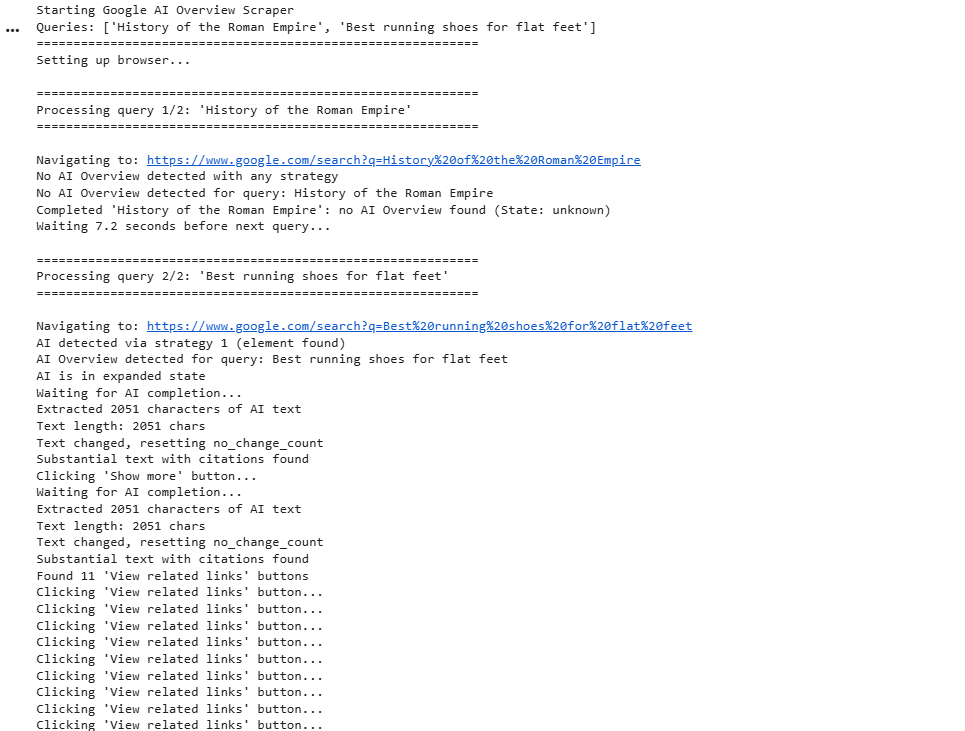
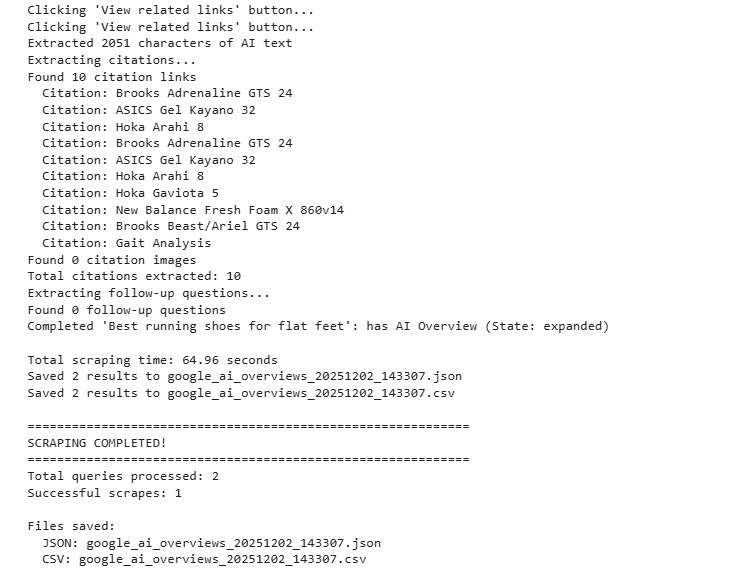
Here’s the console output:
Wrapping up: Scrape Google AI Overviews
In this article, we built a Google AI Overview scraper using Playwright and Webshare rotating residential proxies to handle region restrictions and prevent IP blocking. By following this guide, you can monitor how Google’s AI cites your content, track emerging trends for informational and complex queries, and capture structured data for SEO analysis.