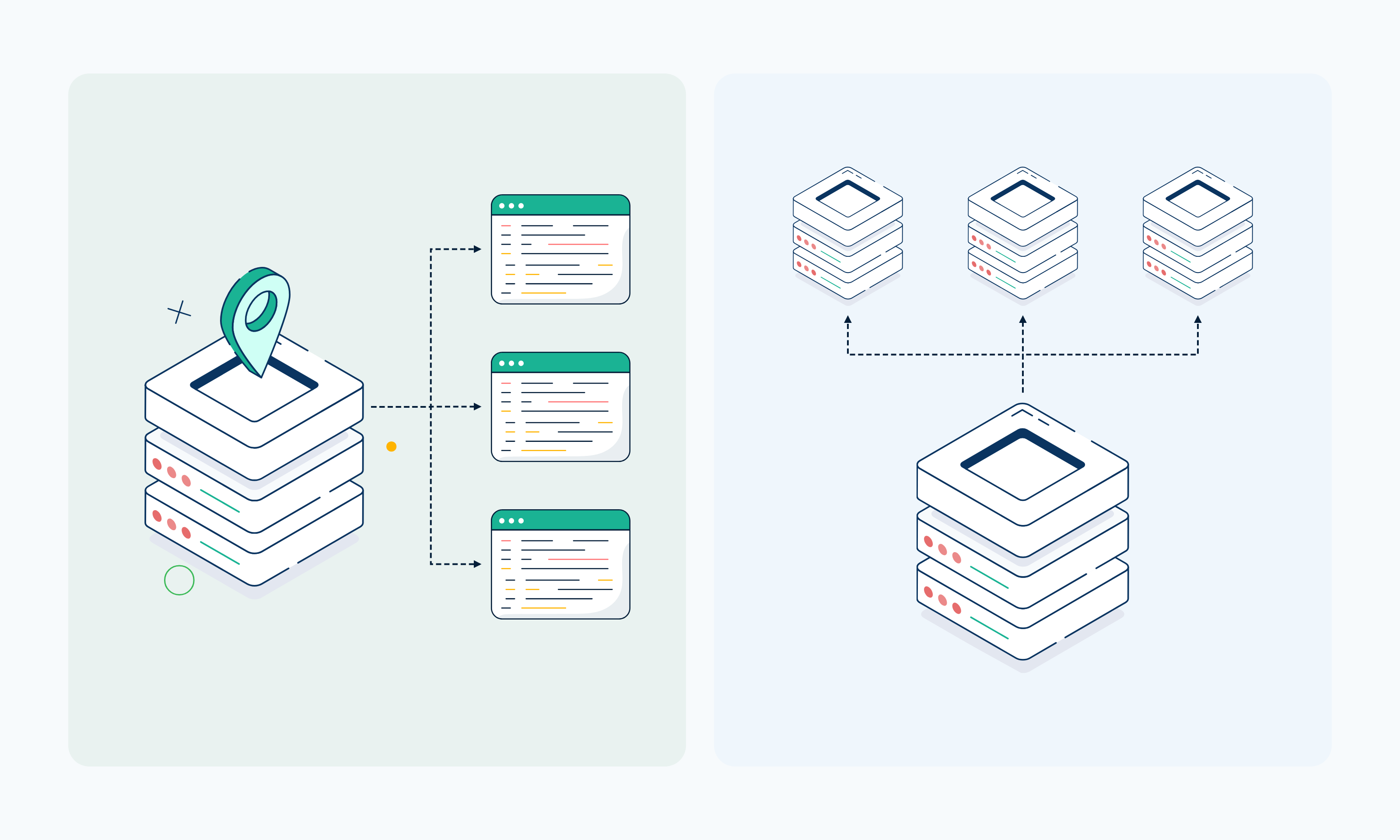
The difference between a forward proxy and a reverse proxy is which side of the connection each one represents. A forward proxy works on the client's side and sends its requests out to other servers, while a reverse proxy serves one or more servers and receives traffic before it gets to them.
This guide starts with what a proxy is, then explains how forward and reverse proxies each work. From there, you'll see the key differences, a diagram and hands-on examples of both, the common use cases of each, and how a reverse proxy compares to a load balancer.
TL;DR
- A forward proxy takes the client's side and passes its requests on to destination servers.
- A reverse proxy takes the server's side, accepting incoming requests and passing them on to origin servers.
- Backconnect and rotating proxy gateways are still forward proxies, even when some providers describe them as "reverse rotating" proxies.
- Common forward proxy jobs include outbound traffic routing, data collection, location-based access, and distributing requests across multiple IPs.
- On the server side, a reverse proxy handles load distribution, caching, TLS termination, and shielding origin servers from direct traffic.
- Webshare provides forward proxy infrastructure that can support outbound data collection and automation workflows.
- Webshare doesn't provide reverse proxy services, so it isn't built to manage traffic coming into your own servers.
What Is a Proxy?
A proxy is a middle layer that sits between your client and another network resource, like a website, API, or backend server. The client doesn't connect to that resource directly. Its request reaches the proxy first, which forwards it, and the response travels back the same way.
What the proxy does with that traffic depends on where it is placed in the architecture. On the client side, a proxy server handles outgoing requests for the users or applications behind it.
Placed ahead of a server, a proxy takes incoming requests for it. These two positions give you the two common models: forward proxies and reverse proxies.
That's why a "proxy server vs reverse proxy" comparison isn't quite like-for-like, since a reverse proxy is itself a proxy server. What separates them is which side of the connection the proxy works for.
What Is a Forward Proxy?
A forward proxy server sits between your client and the server it wants to reach, and contacts that server for the client.
Because the forward proxy makes the request, the server on the other end typically treats the proxy as the source and logs its IP address in place of the client's.
The client usually knows the proxy is there because it's configured to use it. That might be a proxy URL in your HTTP client, a browser setting, or an environment variable your scripts read.
Teams rely on forward proxies for outbound traffic and proxy-based workloads, such as collecting public web data, running automation, or sending requests from a specific location. Webshare provides forward proxy infrastructure for this kind of outbound work, with HTTP and SOCKS5 included on every plan.
How Does a Forward Proxy Work?
A forward proxy handles a request in four steps:
- The proxy receives the request from your client.
- The proxy opens its own connection to the target server and passes the request along.
- The target server answers, and its reply goes back through the proxy.
- The proxy hands that reply back to your client.
Because the proxy makes its own connection in step 2, the destination receives the request from the proxy's IP address. Your client's IP isn't on that connection, though some proxies pass it along in headers such as X-Forwarded-For.
For HTTPS, step 2 works a little differently. Your client sends a CONNECT request, the proxy opens a tunnel to the target, and the encrypted traffic passes through without the proxy reading it.
What Is a Reverse Proxy?
A reverse proxy is the public entry point for one or more origin servers, accepting requests from clients so those servers don't face them directly. Clients connect to its address, such as api.example.com, and it chooses which backend server should handle each request.
From the client's point of view, the proxy looks like the whole site, with no sign of how many origin servers are behind it or which one answered.
The team that runs the servers sets up the reverse proxy, either with software like NGINX or HAProxy, or by putting a CDN that works as a reverse proxy in front of the site. Webshare doesn't provide reverse proxy infrastructure, since its proxies handle outbound requests for clients.
If you're trying to tell a reverse proxy vs a forward proxy setup apart, check the configuration. If a client has to be set up to use the proxy, it's usually a forward proxy. If a client just talks to what looks like the server, it's usually a reverse proxy. The main exception is a transparent forward proxy, which some corporate networks use to intercept outbound traffic without any client setup.
How Does a Reverse Proxy Work?
Every request to a reverse-proxied site or API passes through the proxy before any origin server sees it:
- A request goes out to the site's public address, where the reverse proxy is listening.
- The reverse proxy receives the request and reads details such as the hostname, path, and headers.
- Based on those details and its configuration, it passes the request to a chosen origin server.
- That server sends its answer back through the reverse proxy.
- The client gets the answer from the proxy, never from the origin directly.
Since all traffic goes through that single point, it's also where server teams add extra handling: load distribution, request routing, caching, TLS termination, and keeping origin servers out of public view. Each of these is covered in the reasons to use a reverse proxy below.
Is a Backconnect or "Reverse Rotating" Proxy a Reverse Proxy?
No. A backconnect proxy is a forward proxy that gives you a single gateway address and can route each request through a different IP from a proxy pool. Some providers sell the same setup as a "reverse rotating" proxy, which is where a lot of the reverse vs forward proxy confusion comes from.
Your client connects to the gateway, which picks an exit IP from the pool, and the request goes out to the destination server from that IP. The client is still configured to use the proxy, and the proxy still acts for the client, so it's a forward proxy whatever the name says.
Webshare's rotating proxy setup follows this pattern, with your client pointed at one gateway address (p.webshare.io) while the IP behind it can change with each request.
A true reverse proxy runs the other way. It's the entrance to the origin servers, accepting incoming traffic for them.
Forward Proxy vs Reverse Proxy: Key Differences
The table below sets out the differences between forward proxy and reverse proxy setups, factor by factor:
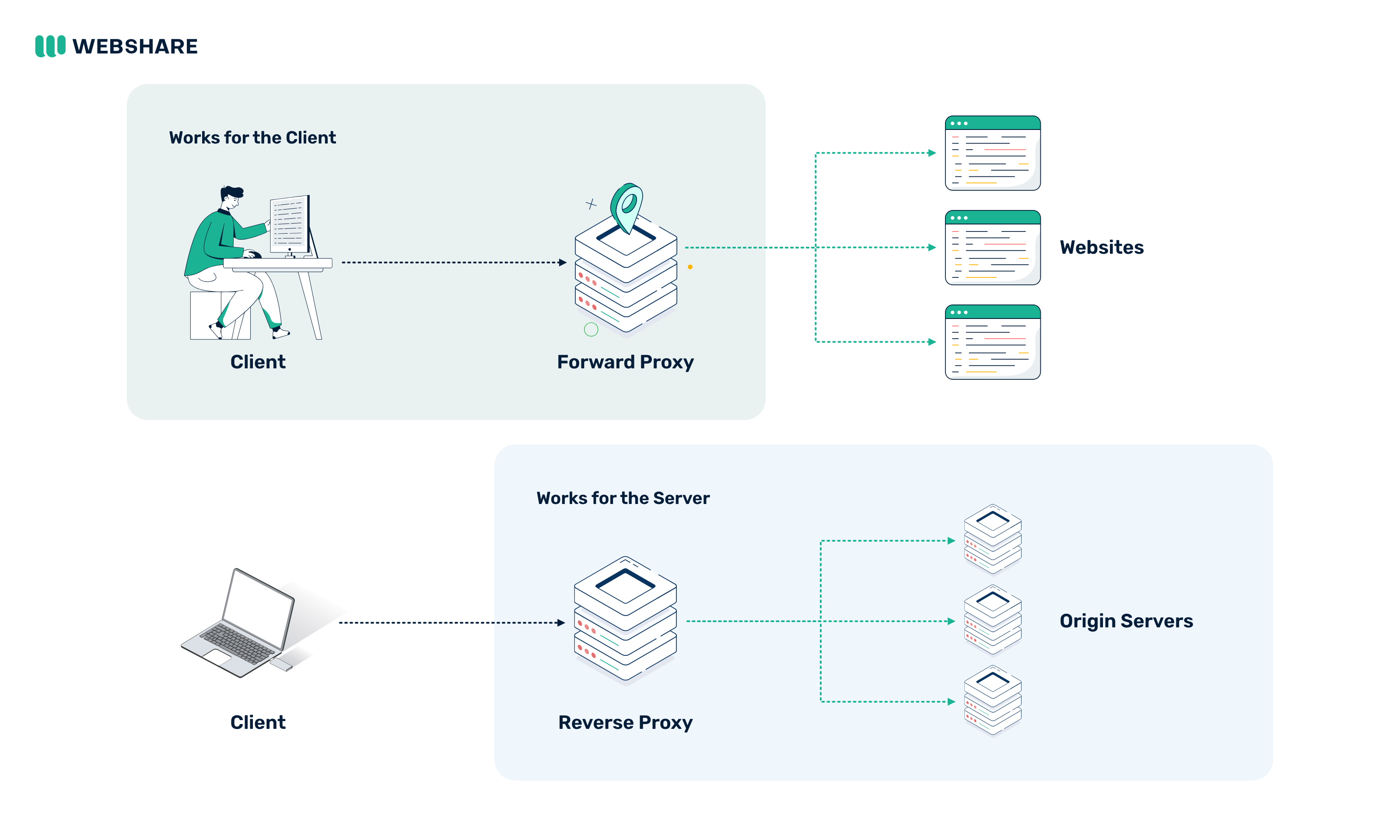
Forward Proxy vs Reverse Proxy Diagram
The diagram below shows both models side by side. In each one, the proxy sits in the middle, but it works for a different side of the connection.
Forward vs Reverse Proxy in Practice
The difference is easiest to see in configuration. With a forward proxy, the client is told where the proxy is. With a reverse proxy, only the server side knows the proxy exists.
Forward Proxy: Send a Request Through a Proxy
This curl command sends a request through a Webshare proxy. Replace the username and password with the proxy credentials from your dashboard:
curl -v -x http://username:password@p.webshare.io:80 https://ipv4.webshare.io/The response body is the IP address the destination saw, which is the proxy's IP rather than yours. Because the target uses HTTPS, the verbose output also shows curl sending a CONNECT ipv4.webshare.io:443 request to the proxy first. That's the tunnel described in the forward proxy steps above.
Reverse Proxy: Put NGINX in Front of Two Servers
On the server side, a few lines of NGINX configuration turn it into a reverse proxy that spreads requests across two application servers:
upstream app_servers {
    server 10.0.0.11:8080;
    server 10.0.0.12:8080;
}

server {
    listen 80;
    server_name api.example.com;

    location / {
        proxy_pass http://app_servers;
        proxy_set_header Host $host;
        proxy_set_header X-Forwarded-For $proxy_add_x_forwarded_for;
    }
}
Clients only ever connect to api.example.com. NGINX picks one of the two servers in the upstream block for each request (round robin by default), and the X-Forwarded-For header passes the client's IP to the origin, which would otherwise only see the proxy's address.
In the first example, the client is configured to use the proxy. In the second, the client has no idea the proxy is there.
Types of Forward Proxies
You can usually group forward proxies by where their IPs come from and how those IPs are assigned.
Datacenter Proxies
The IP addresses behind datacenter proxies belong to hosting and cloud providers, served from servers in a datacenter. They're fast and cost less per IP than other types, which suits high-volume, cost-sensitive jobs and targets with light bot protection.
Residential Proxies
Residential proxies route traffic through IP addresses that ISPs assign to real home devices, so websites see a consumer ISP connection. This type fits work where residential-origin IPs or wide geographic coverage matter, such as checking localized search results or ads in specific countries.
Static Residential (ISP) Proxies
Static residential proxies, also called ISP proxies, use IP addresses issued by residential ISPs but hosted on datacenter servers. You keep the same IP for as long as your plan is active, which suits longer sessions and work where a consistent IP reputation matters.
Rotating Proxies
Rotating proxies are defined by how they assign IPs. They switch to a new IP on every request or at set intervals, so your traffic is distributed across many addresses. That rotation can run on datacenter, ISP, or residential IPs.
Why Use a Forward Proxy?
Below are some reasons teams use a forward proxy:
Outbound Traffic Routing
A forward proxy gives you a single, controlled exit for outbound requests, so your clients and services send traffic through proxy infrastructure instead of connecting to external sites directly. With static proxy IPs, that gives APIs that allowlist by IP a consistent exit address, and lets you change those IPs without touching client code.
Geographic Access
Proxies located in specific countries or cities let your requests reach a site from that region. This can be used for checking localized prices, search results, or ad placements, or for testing how a site behaves for users in another market.
Data Collection
Forward proxies support distributed scraping and public data collection across many targets. A shared proxy layer lets you add more workers without giving each one its own network setup.
Automation
Automated applications and data pipelines can route their outbound calls through proxy infrastructure the same way a scraper would. Scheduled jobs and monitoring scripts can read proxy credentials from environment variables, so you manage the proxy setup in configuration and keep it out of your code.
Request Distribution
Sending every request from one IP makes a workload depend on a single address. Routing traffic across several proxy IPs reduces that dependence, so one slow or unavailable IP doesn't stall the whole job.
Types of Reverse Proxies
You can sort reverse proxies by the job they handle for a server setup.
Load-Balancing Reverse Proxies
A load-balancing reverse proxy shares incoming traffic among a group of backend servers running the same application, and stops sending traffic to any server that fails a health check.
CDN and Edge Reverse Proxies
A CDN or edge reverse proxy runs on servers in many locations and caches content close to users, contacting the origin only when a cached copy is missing or expired.
Application Reverse Proxies
An application reverse proxy routes requests to different internal services based on the hostname or path, so one public domain can front several apps or microservices.
API Gateways and Edge Routing
An API gateway is a reverse proxy built for API traffic, handling tasks like routing, API key checks, and rate limiting for the services behind it.
Why Use a Reverse Proxy?
Here's why server teams add a reverse proxy to their setup:
- Load distribution: A single public address can front as many backend servers as your traffic needs. You can add capacity during a spike, or take one server out for maintenance or a rolling deployment, and clients keep connecting to the same address.
- Caching: The proxy stores copies of responses and answers repeat requests itself. Static assets and popular pages come back faster, and a traffic spike hits the cache before it reaches your application.
- TLS termination: The proxy decrypts HTTPS, so origin servers can receive plain HTTP inside the private network and certificates live in a single location. You update renewals and TLS settings once, without changing any backend server.
- Application routing: Handling routing in the proxy lets you change your backend layout without changing public URLs. You can move a service to new servers or split one app into several, and only the proxy configuration needs updating.
- Origin abstraction: Clients only ever know the proxy's address, so your origin servers can change without anyone outside noticing. You can swap hosts, move providers, or resize the fleet, and the origin IPs stay private.
- Centralized traffic control: A reverse proxy gives you one place to apply rules across every service behind it. Rate limits, access rules, header policies, and request logging are set once in the proxy instead of in each application.
Forward Proxy vs Reverse Proxy Use Cases
This table shows which model usually handles each job. Some tools cross over between the two, so treat these as typical patterns rather than hard limits:
Reverse Proxy vs Load Balancer: What's the Difference?
Scope is the main difference between a reverse proxy and a load balancer. A reverse proxy accepts client connections on behalf of origin servers and can do several jobs at that point, while a load balancer has one defining task: splitting traffic between several backend servers.
Most HTTP load balancers are reverse proxies doing that one job, and the same reverse proxy can also handle caching, TLS termination, and routing from a single place. Layer 4 load balancers in pass-through mode are the exception. They forward packets without ending the client's connection, so they balance traffic without acting as a full reverse proxy.
What Does a Load Balancer Do?
The first stop for incoming traffic to an application that runs on more than one server is the load balancer. Clients connect to its address, and for each request or connection, it picks a backend server to handle it.
That choice follows your configuration and each server's capacity and health. Servers with more capacity can take more requests, and a server that stops responding is skipped until it recovers. That way, no single server ends up carrying all the traffic.
Forward Proxy or Reverse Proxy: Which One Do You Need?
Settling the proxy vs reverse proxy question comes down to which way your traffic flows:
Use a Forward Proxy When:
- You need outbound requests from your application or client to go through proxy infrastructure.
- Your application needs to send requests from different proxy IPs.
- You're running data collection or automation workloads.
- You need proxy access from specific countries or cities.
Use a Reverse Proxy When:
- You run servers or applications that receive inbound traffic.
- You need to distribute traffic across several backend servers.
- You need caching or TLS termination in front of your origin.
- You want one gateway that all traffic to your origin infrastructure passes through.
If your goal is managing outbound proxy traffic, Webshare provides forward proxy infrastructure. If you need a reverse proxy for traffic coming into your own servers, Webshare doesn't offer one.
To route your outbound requests through forward proxies, you can start with Webshare Proxy Servers, which include 10 free datacenter proxies with no credit card required. For high-volume, cost-sensitive workloads, explore Webshare's datacenter proxies.