Camoufox is one of the few antidetect browsers that patches its fingerprint at the engine level instead of bolting JavaScript patches onto Chromium. That solves half the detection problem. The other half - your IP address - is still yours until you route it through a proxy. This guide walks through exactly how to connect Camoufox to a Webshare proxy, which proxy type fits which job, and how to choose between Webshare's three connection methods: Direct, Backbone, and Rotating Proxy Endpoint.
Quick answer: Install Camoufox with the geoip extra, grab your proxy credentials from your Webshare dashboard, and pass them into Camoufox's proxy parameter alongside geoip=True. Which proxy type and connection method you use depends on whether you're testing, scraping at volume, or managing persistent accounts - covered section by section below.
Why Camoufox still needs a proxy
Camoufox modifies Firefox at the C++ level - Canvas, WebGL, AudioContext, navigator properties, and WebRTC are all spoofed before any JavaScript on the page can read them. That handles the fingerprint layer of detection.
But anti-bot systems don't stop at the fingerprint. They also check whether your browser's story matches your network's story. If Camoufox reports a Berlin locale and German fonts, but your request arrives from a datacenter IP in Virginia, that mismatch is itself a signal - often a stronger one than any single fingerprint field. This is exactly why Camoufox ships a built-in geoip option: it's designed to be used with a proxy, not instead of one.
In short: the browser handles what a site can read about your device. The proxy handles what a site can read about your network. You need both.
Choosing a proxy type: Datacenter vs. ISP vs. Residential
Webshare offers three proxy products. Each pairs with Camoufox differently depending on what you're doing.
A practical way to decide: if you're testing your Camoufox setup or hitting a site with light protection, start with datacenter. If you're logging into or managing an account and need the IP to stay put, use static residential (ISP). If you're scraping a hardened target or need to look like a different real user on every request, use rotating residential.
Start free: Webshare's no-cost proxy tier
Before committing to a plan, it's worth testing your Camoufox integration on Webshare's free tier: 10 shared datacenter proxies and 1GB of bandwidth per month, no credit card required, and no expiration. It's not a trial - it's a permanent tier, which makes it a genuinely useful way to confirm your code works before you spend anything.
The free tier is datacenter-only, but for the purpose of this guide - confirming Camoufox connects, rotates, and reports the right IP - it's enough to do everything below except the residential-specific examples.
Installing Camoufox
Camoufox ships as a Python package with an optional geoip extra that pulls in the GeoIP database used for locale/timezone matching. Install both, then fetch the browser binary:
pip install -U "camoufox[geoip]"
camoufox fetch
Getting your Webshare proxy credentials
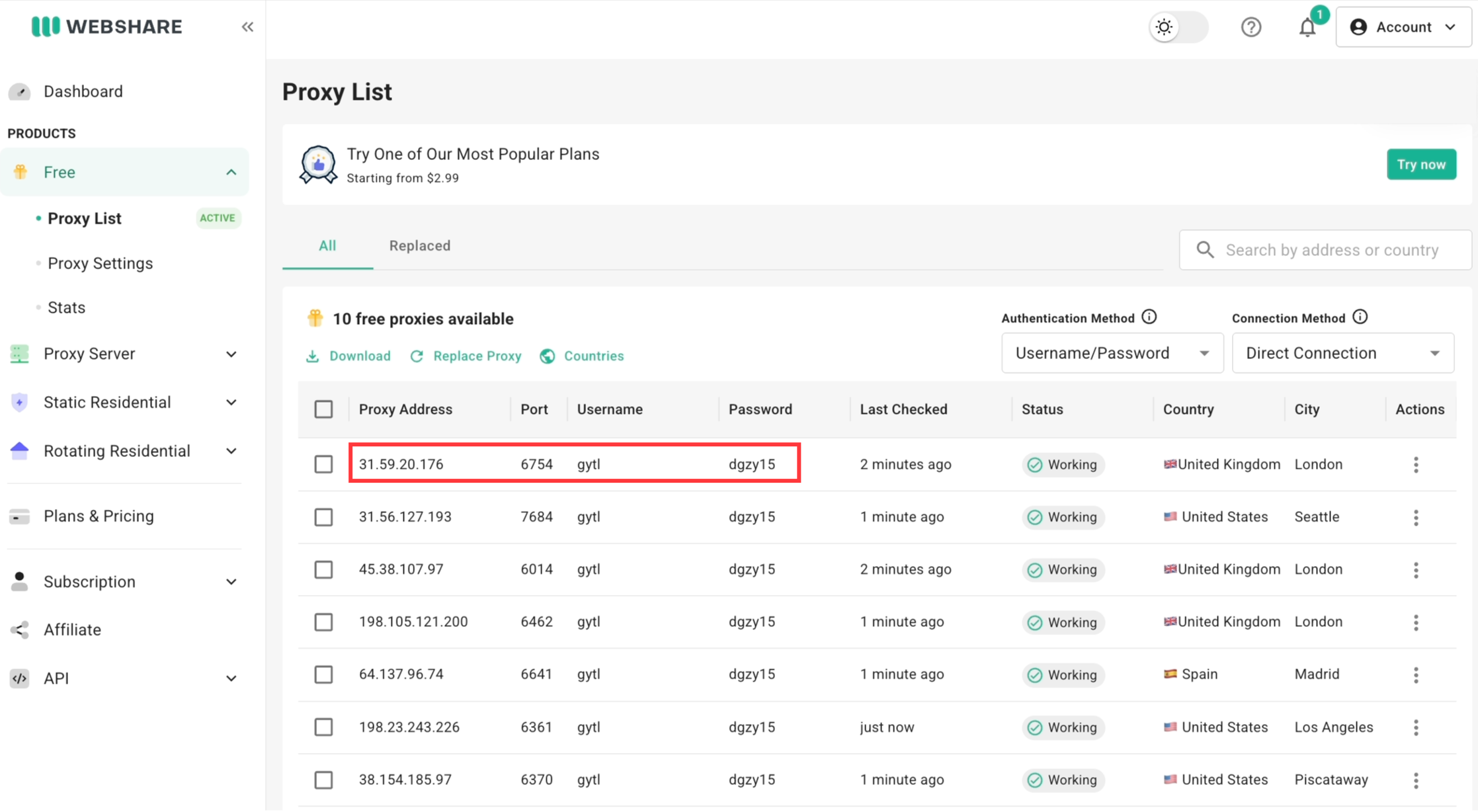
Once you're signed in, your proxy credentials live on the Proxy List page. You'll need three things regardless of which proxy type you pick: a username, a password, and either a direct address (IP:port) or the backbone domain, depending on the connection method you choose in the next section.
Connection methods: Direct vs. Backbone vs. Rotating Endpoint
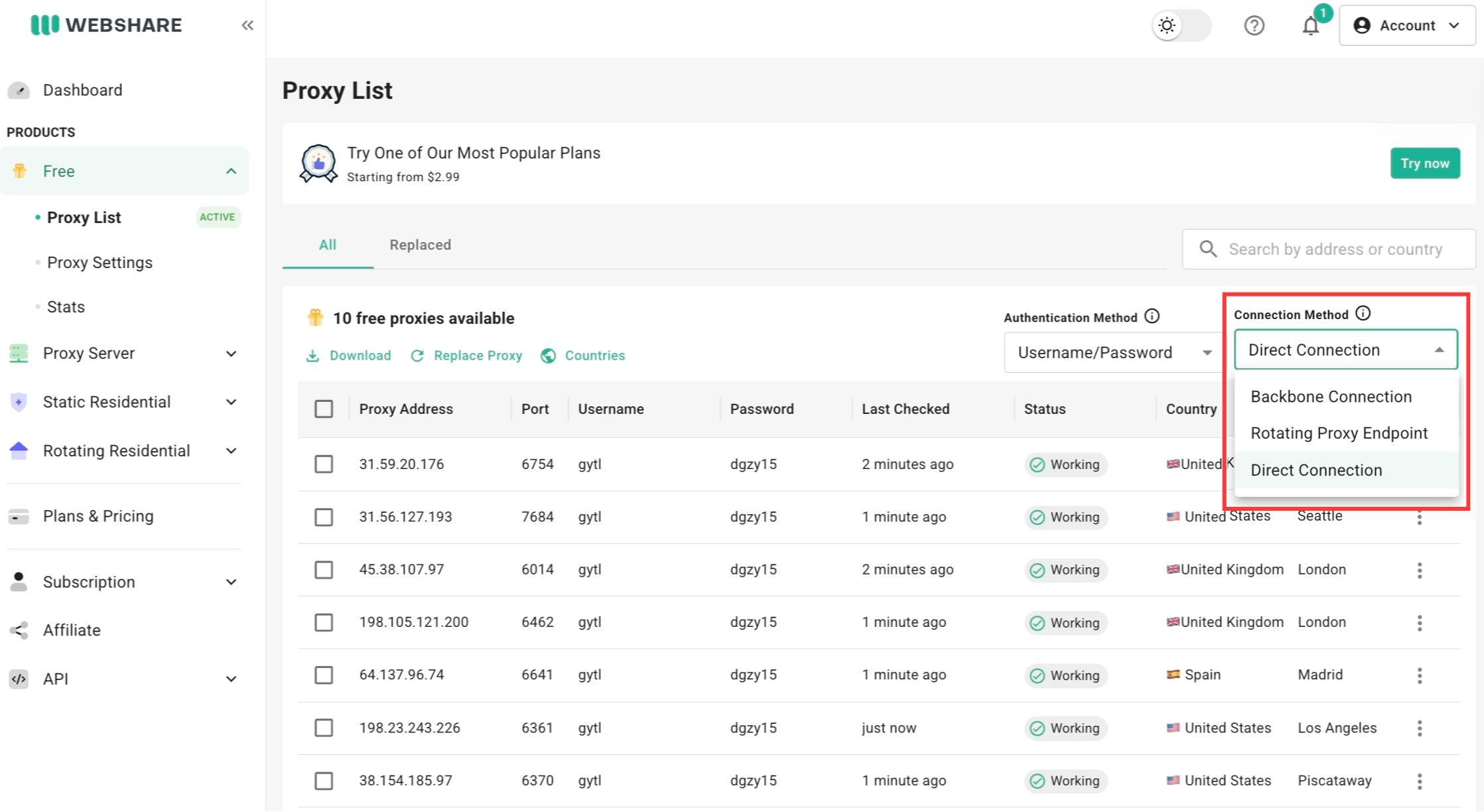
This is the part most Camoufox guides skip, and it's the part that actually determines whether your integration behaves the way you expect. Webshare gives you three ways to connect, selectable from the Connection Method dropdown on the Proxy List page.
Direct Connection
Each proxy has its own fixed IP address and port. This is the simplest option and the one most code examples online default to, because it's a literal IP:PORT pair - no domain, no username string tricks.
from camoufox.sync_api import Camoufox

with Camoufox(
    geoip=True,
    proxy={
        "server": "http://198.51.100.14:6060",   # your proxy's IP:port from the dashboard
        "username": "your_webshare_username",
        "password": "your_webshare_password",
    },
) as browser:
    page = browser.new_page()
    page.goto("https://ipv4.webshare.io/")
    print(page.content())
Use Direct when you need to manage individual endpoints explicitly (e.g., assigning specific IPs to specific worker threads), or when a target site blocks Webshare's shared domain and you want a plain IP instead.
Backbone Connection
Instead of a fixed IP, you connect through a single domain - p.webshare.io - and Webshare routes you to an IP behind the scenes. Your host, port, and credentials stay identical even as the exit IP changes. This is mandatory for Residential proxies (since there's no fixed "list" of IPs to point at - you're drawing from an 80M+ pool), and optional but available for Datacenter and ISP.
Backbone also unlocks username-string targeting: you can append country, city, and session parameters directly to your username, in the format {username}-{country_code}-{geo_params}-{session_id}.
from camoufox.sync_api import Camoufox

with Camoufox(
    geoip=True,
    proxy={
        "server": "http://p.webshare.io:80",
        "username": "your_username-us-rotate",   # US IPs, new one every request
        "password": "your_webshare_password",
    },
) as browser:
    page = browser.new_page()
    page.goto("https://ipv4.webshare.io/")
Supported ports for username/password authentication on Backbone: 80, 1080, 3128, and 9999–19999.
Rotating Proxy Endpoint
This is different from Backbone, and it's easy to confuse the two. The Rotating Proxy Endpoint takes the specific list of proxies you own (e.g., 100 datacenter IPs on your plan) and automatically rotates through them in random order on every request - no domain-based pool, just your own list, auto-shuffled. It's available on Datacenter and ISP plans. If you'd rather not build that address by hand, Webshare's Endpoint Generator can build the correct rotating endpoint string for you based on your selected proxies.
from camoufox.sync_api import Camoufox

with Camoufox(
    geoip=True,
    proxy={
        "server": "http://<your-rotating-endpoint-address>",  # copy exact address from your dashboard - see screenshot above
        "username": "your_webshare_username",
        "password": "your_webshare_password",
    },
) as browser:
    page = browser.new_page()
    page.goto("https://ipv4.webshare.io/")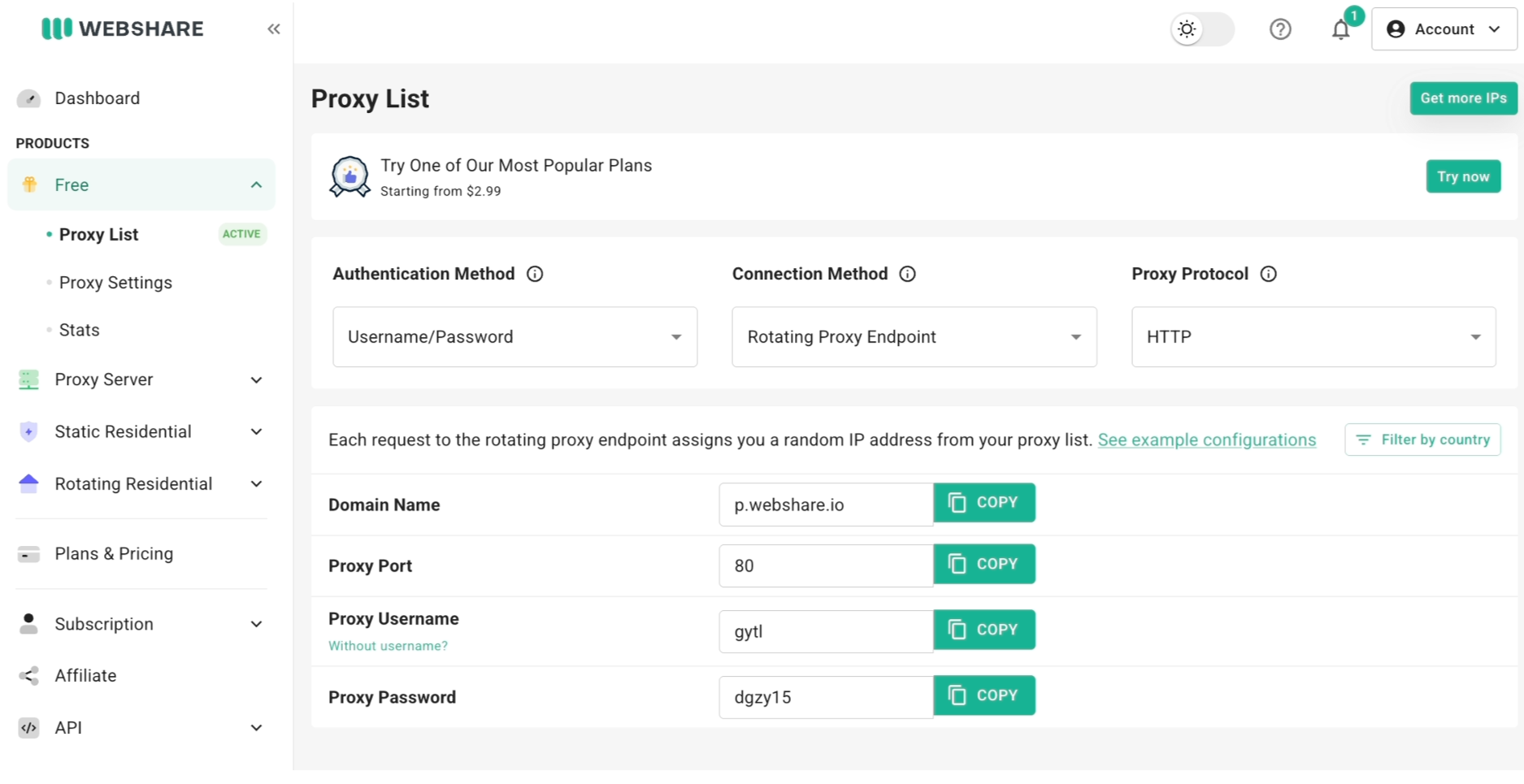
Sticky sessions vs. rotating sessions
When you're on Backbone Connection, the session ID segment of your username controls whether the IP stays the same or changes:
# Sticky session - same IP held until you change the session ID
proxy = {
    "server": "http://p.webshare.io:80",
    "username": "your_username-us-city_newyork-8841",
    "password": "your_webshare_password",
}

# Rotating - new IP on every request
proxy = {
    "server": "http://p.webshare.io:80",
    "username": "your_username-us-rotate",
    "password": "your_webshare_password",
}
Use sticky sessions for anything that needs continuity - logging in, filling out a multi-step form, or any flow where the site would flag a mid-session IP change. Use rotating sessions for high-volume scraping where each request is independent and you want maximum IP diversity.
Matching proxy type + connection method to your use case
GeoIP matching: closing the fingerprint-IP gap
Camoufox's geoip option is what actually closes the gap described at the top of this guide. When set to True, Camoufox detects your proxy's exit IP and automatically sets locale, timezone, and coordinates to match it - so a site can't catch you claiming to be in Munich while your IP resolves to Amsterdam.
from camoufox.sync_api import Camoufox

with Camoufox(
    geoip=True,
    proxy={
        "server": "http://p.webshare.io:80",
        "username": "your_username-de-city_munich-rotate",
        "password": "your_webshare_password",
    },
) as browser:
    page = browser.new_page()
    page.goto("https://browserscan.net")
If your proxy has a known, stable IP (e.g., a static ISP proxy), you can skip the auto-detection step and pass the IP directly for a faster startup:
Camoufox(geoip="203.0.113.14", proxy=proxy_config)
Verifying your setup
Before running anything at scale, confirm the proxy and fingerprint are actually aligned:
from camoufox.sync_api import Camoufox

with Camoufox(geoip=True, proxy=proxy_config) as browser:
    page = browser.new_page()
    page.goto("https://ipv4.webshare.io/")
    print("Exit IP:", page.content())

    page.goto("https://browserscan.net")
    page.wait_for_timeout(3000)
Check that the reported IP matches the country/city you targeted, and that browserscan.net (or a similar fingerprint checker) shows a consistent timezone, locale, and IP location - not a mismatch between where your browser claims to be and where your traffic actually exits.
Common issues and fixes
A target site blocks p.webshare.io outright.Some sites block Webshare's shared Backbone domain specifically, rather than the IP behind it. Switch to the Gateway IP Address (available from the Backbone Connection view in your dashboard) - it behaves identically to Backbone but presents as a plain IP instead of a domain. Keep the port at 80 when using it.
Your fingerprint checker shows the wrong location.If you're checking geolocation against the Gateway IP Address itself rather than your assigned exit IP, you'll see a location near you, not near the proxy - the Gateway IP is auto-selected close to your own location and isn't the proxy's real IP. Always verify against the assigned IP, not the gateway.
geoip=True throws an InvalidProxy error.This usually means Camoufox's IP-check step can't complete through your current proxy config. Confirm your credentials are correct, try the request without geoip first to isolate whether the proxy itself is the problem, and if it persists, pass a known IP manually via geoip="x.x.x.x" instead of True.
High block rates despite rotation.If you're rotating IPs but still getting flagged, check whether your Camoufox fingerprint and proxy geo actually match (see the GeoIP section above) - a mismatch is a stronger signal to most anti-bot systems than IP reputation alone.