


Don’t miss your 10 free proxies
TL;DR
· ISP proxies and residential proxies both help your traffic look like it comes from a normal home connection, and they get you past IP-based blocking, just from opposite directions. One borrows a real device's address and keeps it moving. The other stays fixed on a fast data connection that's still registered to a real ISP.
· Residential proxies route through 80M+ real devices and rotate automatically. They are the stronger pick when scale and stealth are more important than raw speed.
· ISP proxies run on datacenter hardware under a real ISP's network, giving you one address that survives an entire session at up to 1Gbps.
· Rule of thumb: if you need many identities at volume, go residential. However, if you need one identity that has to survive a login or checkout, go ISP.
· Webshare runs both networks. Rotating residential from $1.40/GB,and ISP proxies from $0.23/proxy.
ISP Proxies vs Residential Proxies: The Short Answer
Comparing "ISP proxies vs residential proxies" comes down to two things: where the IP address is located and whether it stays fixed or rotates.
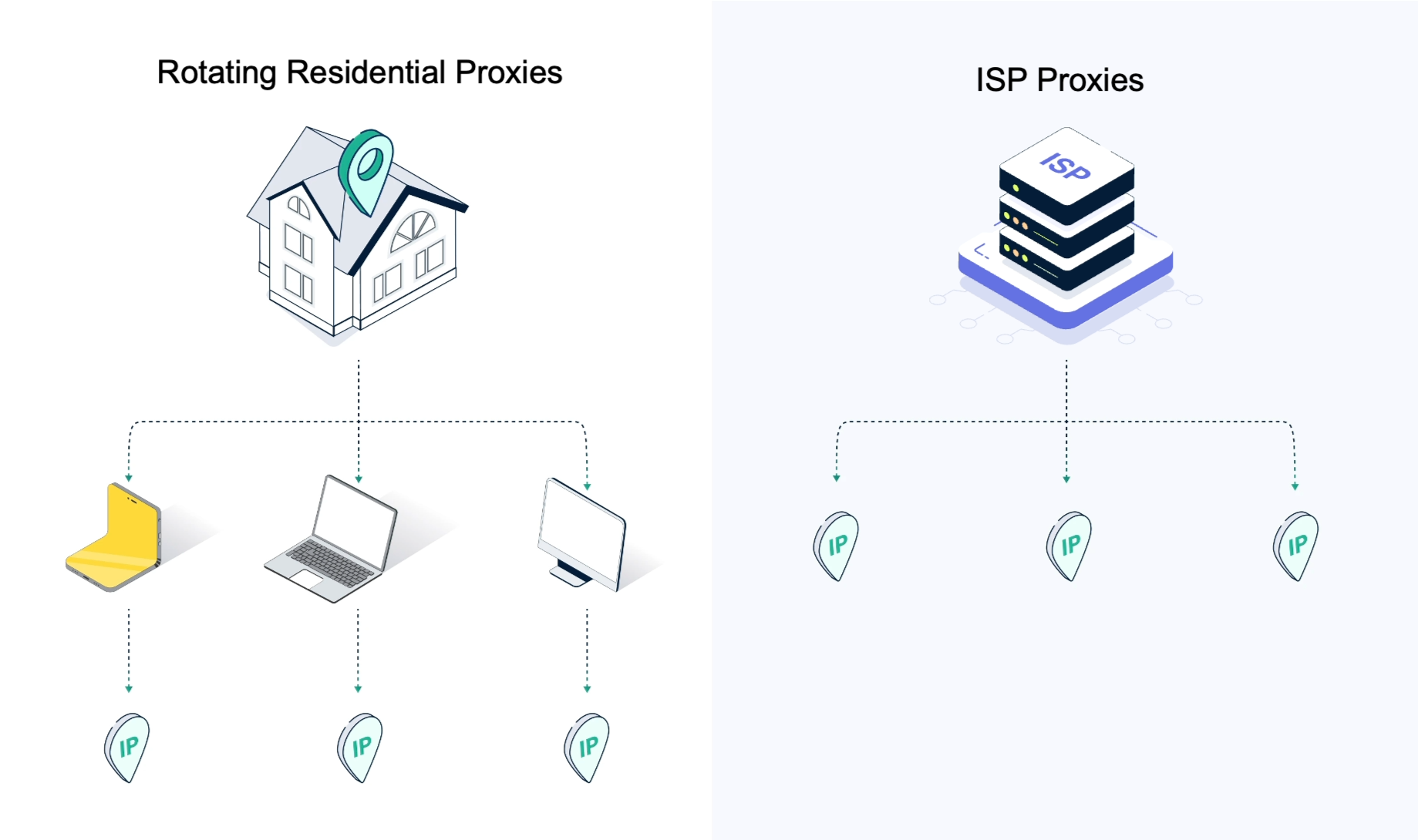
A residential proxy runs on an actual device and rotates automatically. An ISP proxy uses an IP address hosted in a datacenter but registered under a real ISP's name, and stays fixed by default.
Here's the comparison at a glance before we explore the specifics in detail.
What Is a Residential Proxy?
A residential proxy is a proxy server that routes your traffic through a residential IP address assigned by an internet service provider to an actual person's device on a home network. This is what lets your traffic pass as an ordinary visitor instead of a script.
Two things make this proxy type work:
· The IP is tied to a real device, making it hard to flag as automated.
· It rotates constantly, so no single IP carries enough traffic to trigger a rate limit.
Webshare's rotating residential network runs 80M+ IPs across 195 countries, with targeting down to city, state, ASN, and zip code, sourced only from consenting devices
The cost of that stealth is speed and consistency. The IP moves only as fast as the home connection behind it, and stops working the moment that device loses power or drops its connection.
What Is an ISP Proxy (Static Residential Proxy)?
An ISP proxy is a datacenter-hosted IP address that's registered with a real internet service provider. It's also called a static residential proxy; both terms describe the same product.
The mechanism behind it is the ASN (Autonomous System Number), the identifier for whoever owns a block of IP addresses. A site checks incoming traffic against that number to decide whether it's a consumer ISP or a datacenter provider.
Providers lease IP ranges registered under a real ISP's ASN, then run them on datacenter servers instead of consumer devices. The lookup returns a name like AT&T, Sprint, or Cox, and the site treats the traffic as a home connection.
This is the exact setup that Webshare's ISP proxies run on, which is how they hit up to 1 Gbps with 99.97% uptime.
ISP Proxies vs Residential Proxies: How They Actually Differ
ISP and residential proxies pass the same first test because target sites only see residential traffic when they check the ASN.
However, there are a number of practical differences worth knowing, since each one changes whether the proxy is the right fit for your job when dealing with real workloads.
IP source and ownership
Residential proxies live on somebody's actual phone or router, while ISP proxies are located in a datacenter, using IP addresses that, on paper, belong to a consumer ISP.
Rotation and session control
Residential proxies are designed to rotate. Depending on your provider and configuration, you can rotate by request, by session, or use sticky sessions. Sticky sessions hold the same IP for a set window, usually a few minutes up to half an hour, which is useful when a task needs continuity but not a permanent address.
ISP proxies remain fixed. The same IP address stays assigned to you until you replace it. That makes ISP proxies the better option whenever a session depends on maintaining one consistent identity.
Speed and uptime
Datacenter hardware outperforms a home router. ISP proxies push up to 1 Gbps thanks to dedicated network capacity, and hold 99.97% uptime thanks to the redundancy built into datacenter power and cooling systems.
Residential proxies, on the other hand, inherit whatever ceiling the home connection has, and go down when that device loses power or sleeps.
Anonymity and block resistance
Target sites treat both proxy types as residential.
Residential proxies perform slightly better on the most aggressive anti-bot systems because requests originate from genuine consumer devices and rotate across very large pools.
ISP proxies still provide excellent block resistance while offering greater stability for long-running sessions.
Pool size and geo-targeting
Residential proxy networks are much larger. Webshare's residential network offers over 80 million residential IPs across 195 countries, with city, state, ASN, and zip code targeting and 153,000+ subnets.
ISP proxy pools are smaller because every address is leased and maintained as a dedicated static resource. Webshare's ISP network includes more than 100,000 IP addresses.
Pricing model
Residential proxies are billed by bandwidth (per GB used).You pay for the amount of data transferred.
ISP proxies are billed by proxy and bandwidth. Many plans include up to unlimited bandwidth, so your cost depends on how many fixed IPs you need rather than how much traffic you generate.
If your workload constantly rotates across many identities, paying per GB usually makes more sense. If you only need a handful of persistent identities, per-proxy pricing almost always works out cheaper.
Where ISP Proxies Fit, Including Datacenter Proxies
Let's see where ISP and residential proxies fit in the broader proxy landscape that also includes datacenter proxies.
· Datacenter proxies sit at the entry-level price point. Their weakness is that their IP ranges are registered to hosting providers, so any website that checks the ASN can identify and block them quickly. They suit high-volume work against targets that don't inspect the ASN, such as internal tooling, uptime checks, or scraping sites with no anti-bot layer.
· Residential proxies sit at the opposite end of the spectrum. They route traffic through real consumer devices and rotate across large IP pools, making them the strongest choice for anonymity and large-scale scraping. The tradeoff is lower speed and less consistent uptime.
· ISP proxies sit between the two. They use datacenter hardware for speed and reliability while using IP addresses registered under areal internet service provider's ASN. That gives them the performance of a datacenter proxy with the trust signal of a residential connection.
Datacenter and ISP proxies both run on the same class of hardware, so raw speed is comparable between them. The real trade you make moving from datacenter to ISP to residential is a higher price per unit in exchange for a stronger trust signal and better detection resistance.
When to Use ISP Proxies
Choose an ISP proxy when your work depends on keeping the same IP address for an extended period. This makes them great for scenarios where you need to:
· Handle social media management, where each account should always connect from the same IP.
· Manage multiple e-commerce accounts without changing identities between sessions.
· Run long authenticated sessions on dashboards and web applications.
· Verify ads from a consistent geographic location.
· Run browser automation that depends on maintaining cookies and session state.
· Access APIs or partner systems that require your IP to be on an allowlist.
When to Use Residential Proxies
Choose residential proxies when your work depends on distributing requests across many different IP addresses. Residential proxies work best for the following tasks:
· Large-scale web scraping, spreading thousands of requests across as many IPs
· Targets running the most aggressive anti-bot systems
· Market research across different countries
· City-level geo-targeting at real volume
· Price and SERP monitoring across dozens of countries and cities
Common Mistakes When Choosing
Here are the mistakes we see most often, and what theycost you down the line.
· Using rotating residential proxies for login-based workflows. When the IP changes mid-session, websites may request another verification, flag the account, or end the session. An ISP proxy is a better choice because it keeps the same IP throughout the session.
· Using datacenter proxies on websites that can check the ASN behind incoming traffic. Datacenter ASNs are easy to identify, so these requests are more likely to be blocked. ISP proxies avoid this issue because their IP addresses are registered to real internet service providers.
· Paying for residential bandwidth when the task only needs a small number of stable IP addresses. In these situations, ISP proxies with per-proxy pricing are often the more cost-effective option.
· Treating "ISP proxy" and "static residential proxy" as different products. They're not. Different providers just picked different names for the same thing.
· Buying a large residential plan because it offers more IP addresses. If your workload only needs a few stable identities, a smaller ISP proxy plan will perform better and cost less.
ISP vs Residential Proxies with Webshare
Webshare offers both ISP and rotating residential proxies, so you can choose whichever fits your workload instead of forcing every project into the same solution or managing a second vendor relationship just to get the other type.
Webshare's rotating residential network includes more than 80 million ethically sourced IP addresses across 195 countries, with city, state, ASN and ZIP code targeting. It supports both HTTP and SOCKS5 protocols,provides 99.97% uptime, includes 153,000+ subnets, and starts at $1.40 per GB.
Country, city, state, ASN and Zip code targeting are configured through the username, making it easy to route traffic to the locations you need.
The platform's ISP proxy network includes more than 100,000 static residential IPs backed by providers such as AT&T, Sprint, and Cox. Plans start at $0.23 per proxy, provide 99.97% uptime, support speeds up to 1 Gbps, and include up to unlimited bandwidth (subject to the fair usage policy).
You can also choose from three exclusivity tiers:
· Shared proxies are shared by more than two users.
· Private proxies are shared by one or two users.
· Dedicated proxies are reserved exclusively for your account.
Entry-level ISP plan starts at $6.00 per month for 20 proxies, with 250 GB bandwidth and 10 proxy replacements included.
Residential vs ISP Proxies: How to Choose
Choosing the right proxy type is simple once you consider the following:
· If the same IP needs to survive an entire session, choose an ISP proxy.
· If you need to spread requests across thousands of addresses, choose a residential proxy.
· If raw speed and uptime are the priority, choose an ISP proxy.
· If the main goal is a lower-profile footprint across a bigger rotating pool, choose a residential proxy.
· If you are budgeting by fixed proxy count, ISP pricing usually fits better. If you are budgeting by transferred data, residential pricing usually lines up better.
Some teams use both. They run ISP proxies for authenticated sessions and account management, then switch to residential proxies for scraping and large-scale data collection.
Final Words on ISP Proxies vs Residential Proxies
ISP proxies and residential proxies are both designed to make your traffic look like it comes from a real home internet connection. The difference is how they achieve that and the type of workloads they are built for.
When you weigh ISP proxies vs residential proxies, the right approach comes down to one thing: does the IP need to stay the same for the job to work? If yes, that's ISP. If not, that's residential.
Get 10 Free Proxies. Try Webshare's rotating residential ($1.40/GB) or ISP proxies ($0.23/proxy) and see which one clears your target.
-1743061344.png)


