
Free Proxy Checker
Check proxies online in seconds. Test one proxy or a full list from any provider and see connection status, proxy IP, location and response time for HTTP and SOCKS5 proxies.
Target URL
Protocol
Test up to 10 proxies per day for free, with the default endpoint or a custom Target URL. No account needed.
How to Use the Webshare Proxy Checker
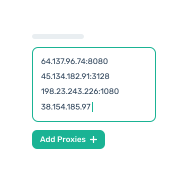
Add your proxies
Click Add Proxies and paste up to 10 proxies, one per line.
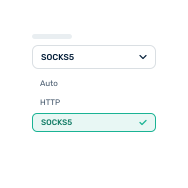
Pick a protocol
Leave it on Auto or choose HTTP or SOCKS5. Add a Target URL to test a specific site.
Run the test
Click Submit & Test. Results appear for each proxy within seconds.
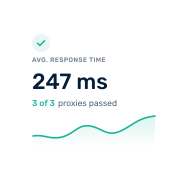
Read your results
See status, exit IP, location, response time and detected protocol.
Dead Proxy, Blocked Target or Code Bug?
Test the same proxy against the default endpoint and against your target URL. Comparing the two results tells you where the problem is.

The proxy works
If your app still fails, the issue is likely in your code: authentication, proxy string format, SSL settings or request headers.
Default endpoint
Success
Your target URL
Success

The target is the problem
The proxy is online, but this website blocks or rejects it. Try a different proxy type or location for this target.
Default endpoint
Success
Your target URL
Failed

The proxy is the problem
The proxy is offline, expired or misconfigured. Check the credentials and format, or replace the proxy with your provider.
Default endpoint
Failed
Your target URL
Failed
When to Use a Proxy Checker
Validate proxies before they reach your scripts, scrapers or automations.

Validate new proxies
Confirm freshly purchased proxies work before you integrate them into your application.

Troubleshoot failures
When a job starts failing, test the proxy on its own to separate proxy issues from code issues.

Verify location
Check that each proxy exits from the country you need for geo-specific data or content.

Compare response times
Spot the fastest and slowest proxies in a list and route traffic accordingly.

Test a specific website
Find out whether a proxy can actually reach the site or API you plan to use.

Bulk-validate a proxy list
Paste a whole list and filter out the dead ones in one run: 10 per day free, 100 per hour with a free account.
Frequently Asked Questions
No. You can test up to 10 proxies per day for free, without signup or login.
Yes. You can test any HTTP or SOCKS5 proxy, whether it comes from Webshare or another provider.
Yes. Paste a list, one proxy per line, and they're tested in a single run. Without an account you can test 10 proxies per day, including tests against a custom target URL. Sign up for free to test up to 100 proxies per hour.
Enter one proxy per line as ip:port, ip:port:username:password or username:password@ip:port.
The exit IP is the public IP address the target website sees when your request goes through the proxy. For static proxies it usually matches the proxy IP; for rotating or backconnect proxies it can be different.
Response time depends on the distance between the checker, the proxy server and the target, plus the load on each. The same proxy can respond faster to a nearby target than to one on another continent.
Yes. Enter a target URL to check whether the proxy can reach the exact site or service you plan to use.
Proxy addresses and credentials are used only to run your test and are not stored after the results are returned.
If the proxy connects in the checker, the problem is usually in your setup: authentication, proxy string format, SSL settings, request headers or restrictions on the target website. Test against your target URL to rule out blocking.
Ready for proxies
that actually work?
Get 10 free proxies to start. No credit card required.