TL;DR
- Learn how to scrape Google Play Books Search and Product pages using Python (BeautifulSoup + Requests).
- Use a Webshare proxy to avoid IP bans.
- Extract and save book titles, authors, prices, ratings, and more to CSV.

Google Play Books hosts millions of titles - a valuable resource for research, data analysis, and content aggregation. In this article, you’ll learn how to build two Python-based scrapers: one to fetch book listings from search results, and another to extract detailed product information such as author, description, price, and ratings.
Prerequisites
- Python: 3.9+ installed
- Libraries: requests, beautifulsoup4
- Proxy Provider: Webshare (free plan)
- Visit Webshare and sign up for a new account.
- Choose the Free Plan which provides 10 shared datacenter proxies with 1 GB/month bandwidth. Proxies can be configured static or rotating.
- In the dashboard after login you’ll find username, password, host, and port.
Scraping Google Play Books Search
Follow these steps to scrape book data from Google Play Books and save it to a neatly structured CSV file:
Step 1: Install required libraries
Make sure you have Python installed. Then install the required libraries:
pip install requests beautifulsoup4 lxml- requests - handles HTTP requests through the proxy.
- BeautifulSoup - parses HTML content.
- lxml - fast parser for HTML.
Step 2: Import the libraries
Import the necessary libraries.
import requests
from bs4 import BeautifulSoup
import csv
import urllib.parse
Step 3: Set up the Python script
You need to create a Python file (e.g., scrape_google_play_books.py) and do the following:
- Define a function that will handle scraping for a list of search terms.
- Create a requests.Session() and set custom headers to mimic a real browser, connecting through Webshare proxies to avoid being blocked.
- For each search term, construct a Google Play Books search URL using urllib.parse.quote and fetch the page content.
- Parse the HTML of the fetched page with BeautifulSoup and locate the book elements.
- For each book, extract the title, book URL, cover image URL, and price.
- Append each book’s details as a dictionary to a list to collect all results.
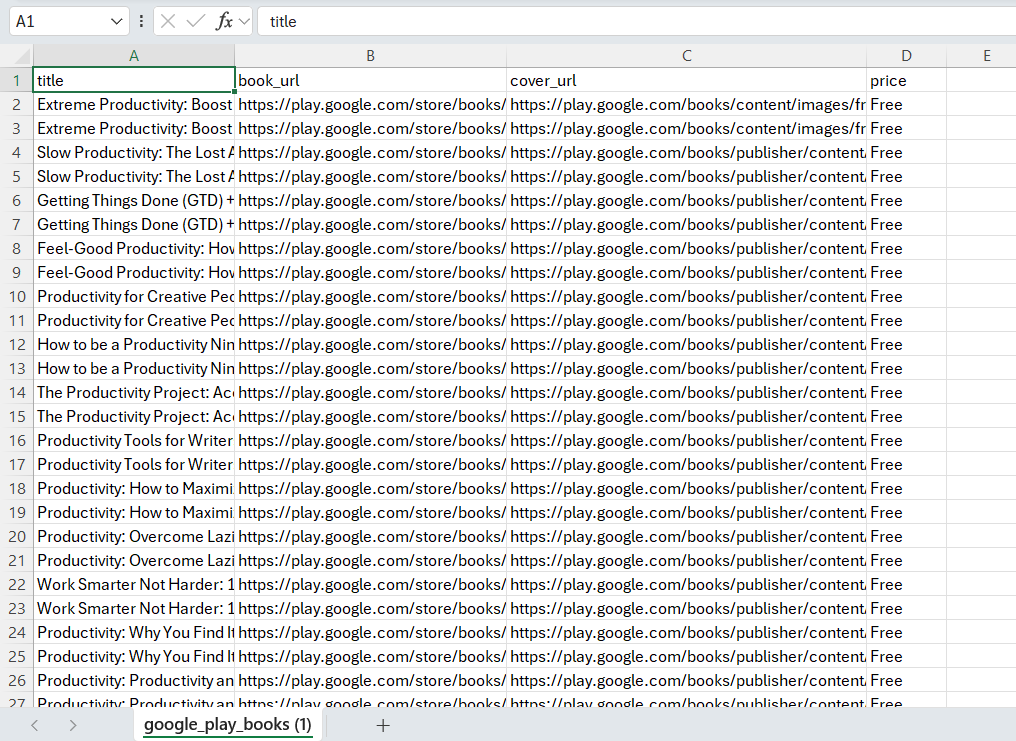
- Write the collected data to a csv file with columns title, book_url, cover_url, and price.
Here’s how the code looks like.
def scrape_play_books(search_terms):
    """Scrape Google Play Books search results for given terms and save to CSV"""
    proxies = {
        "http": "http://username:password@p.webshare.io:80",
        "https": "http://username:password@p.webshare.io:80"
    }

    session = requests.Session()
    session.headers.update({
        'User-Agent': 'Mozilla/5.0 (Windows NT 10.0; Win64; x64) AppleWebKit/537.36'
    })

    all_books = []

    for term in search_terms:
        url = f"https://play.google.com/store/search?q={urllib.parse.quote(term)}&c=books"
        try:
            response = session.get(url, proxies=proxies, timeout=10)
            soup = BeautifulSoup(response.content, 'lxml')

            books = soup.find_all('div', class_=['VfPpkd-WsjYwc', 'ULeU3b'])
            for book in books:
                title_elem = book.find('div', class_='Epkrse')
                link_elem = book.find('a', href=True)
                img_elem = book.find('img', src=True)
                price_elem = book.find('span', class_='VfPpfd ZdBevf')

                if title_elem:
                    book_path = link_elem['href'] if link_elem else ''
                    all_books.append({
                        'title': title_elem.get_text(strip=True),
                        'book_url': f"https://play.google.com{book_path}" if book_path.startswith('/') else book_path,
                        'cover_url': img_elem['src'] if img_elem else 'N/A',
                        'price': price_elem.get_text(strip=True) if price_elem else 'Free'
                    })

        except Exception as e:
            print(f"Error with '{term}': {e}")

    # Write data to CSV
    with open('google_play_books.csv', 'w', newline='', encoding='utf-8') as csv_file:
        writer = csv.DictWriter(csv_file, fieldnames=['title', 'book_url', 'cover_url', 'price'])
        writer.writeheader()
        writer.writerows(all_books)

    print(f"CSV file created successfully with {len(all_books)} books.")

# Example call
scrape_play_books(["Productivity books", "Alex Hormozi books", "Business strategy books"])
Step 4: Run the script
Run the script using Python:
python scrape_google_play_books.py
Open google_play_books.csv in Excel, Google Sheets, or any spreadsheet software. You will see columns:
Scraping Google Play Books Products
Let’s cover how to enrich your previously scraped book data with additional product details from individual book pages.
Step 1: Prepare your CSV input
- Place the CSV generated in the previous scraping step into a folder.
- Ensure it contains the following columns: title; book_url; cover_url; price
- This CSV will serve as the input for the product scraper.
Step 2: Scrape product details
- Open your input CSV with csv.DictReader and normalize header names (strip spaces, lowercase) so book_url is reliably found.
- Limit rows for testing using islice(reader, 10) to process only the first 10 books (just for faster testing).
- For each row, skip if book_url is missing, then fetch the book page with requests using your Webshare proxies and a browser-like User-Agent.
- Parse the page with BeautifulSoup, iterate over all <script type="application/ld+json"> tags, and json.loads() each one until you find the object whose @type is Book (or that contains book fields).
- Safely extract the title, author, truncated description (up to 200 characters), average rating, total reviews, and number of pages.
- Append the enriched row (original fields plus author, reviews_avg, reviews_count, description, pages) to a result list and include a short delay between requests to avoid rate limits.
- After processing, write the enriched rows to a CSV with the desired field order.
Here’s the complete code:
import requests, csv, json, time
from bs4 import BeautifulSoup
from itertools import islice

proxies = {
    "http": "http://username:password@p.webshare.io:80",
    "https": "http://username:password@p.webshare.io:80"
}
headers = {'User-Agent': 'Mozilla/5.0 (Windows NT 10.0; Win64; x64)'}
input_file = 'google_play_books.csv'
output_file = 'enriched_google_play_books_sample.csv'
enriched = []

with open(input_file, 'r', encoding='utf-8') as infile:
    reader = csv.DictReader(infile)
    if reader.fieldnames:
        reader.fieldnames = [fn.strip().lower() for fn in reader.fieldnames]
    for raw_row in islice(reader, 10):
        row = {k.strip().lower(): (v or '').strip() for k, v in raw_row.items()}
        url = row.get('book_url', '')
        if not url:
            continue
        try:
            resp = requests.get(url, headers=headers, proxies=proxies, timeout=10)
            soup = BeautifulSoup(resp.content, 'html.parser')

            book_data = {}
            for script in soup.find_all('script', type='application/ld+json'):
                txt = (script.string or '').strip()
                if not txt:
                    continue
                try:
                    data = json.loads(txt)
                except Exception:
                    continue
                if isinstance(data, list):
                    book = next((d for d in data if d.get('@type') == 'Book'), None)
                    if book:
                        book_data = book
                        break
                    data = data[0] if data else {}
                if isinstance(data, dict) and (data.get('@type') == 'Book' or data.get('author') or data.get('name')):
                    book_data = data
                    break

            def parse_author(d):
                a = d.get('author') if isinstance(d, dict) else None
                if not a:
                    return 'N/A'
                if isinstance(a, list) and a:
                    a0 = a[0]
                    return a0.get('name') if isinstance(a0, dict) else str(a0)
                if isinstance(a, dict):
                    return a.get('name', 'N/A')
                return str(a)

            title = book_data.get('name') or row.get('title') or 'N/A'
            author = parse_author(book_data) if book_data else 'N/A'
            desc = book_data.get('description') if book_data else ''
            if not desc:
                meta = soup.find('meta', {'name': 'description'})
                desc = meta.get('content', '') if meta else ''
            description = (desc.strip()[:200] if desc else 'N/A')
            agg = book_data.get('aggregateRating', {}) if isinstance(book_data.get('aggregateRating', {}), dict) else {}
            reviews_avg = agg.get('ratingValue', 'N/A')
            reviews_count = agg.get('ratingCount', 'N/A')
            pages = book_data.get('numberOfPages') or book_data.get('pageCount') or 'N/A'

            enriched.append({
                'title': title,
                'book_url': url,
                'cover_url': row.get('cover_url', ''),
                'price': row.get('price', ''),
                'author': author,
                'reviews_avg': reviews_avg,
                'reviews_count': reviews_count,
                'description': description,
                'pages': pages
            })
        except Exception:
            enriched.append({
                'title': row.get('title', 'N/A'),
                'book_url': url,
                'cover_url': row.get('cover_url', ''),
                'price': row.get('price', ''),
                'author': 'N/A',
                'reviews_avg': 'N/A',
                'reviews_count': 'N/A',
                'description': 'N/A',
                'pages': 'N/A'
            })
        time.sleep(1)

with open(output_file, 'w', newline='', encoding='utf-8') as out:
    fieldnames = ['title','book_url','cover_url','price','author','reviews_avg','reviews_count','description','pages']
    writer = csv.DictWriter(out, fieldnames=fieldnames)
    writer.writeheader()
    writer.writerows(enriched)

print("Enrichment complete.")
Step 3: Run the script
Run the scraper.

Your enriched CSV will look like this:
Wrapping up: Scrape Google Play Books
In this guide, we demonstrated a two-step approach to scraping Google Play Books: first, collecting search results for specific queries, and second, enriching individual book pages with additional details such as author, pages, reviews, and descriptions, all using Webshare proxies. Using proxies and rotating headers helps mimic real users and avoid detection or temporary bans. When scraping dynamically rendered pages, it’s important to implement polite delays and consider anti-detection techniques to ensure reliable data extraction.