![How to Scrape Google Play Movies & TV? [2026]](https://cdn.sanity.io/images/ndzwi1ua/production/f169d50fbc38a14e4ac0befa7d9c3739b07e7aa2-3200x1920.webp)
TL;DR
- Learn how to scrape Google Play Movies & TV search and product pages using Python (BeautifulSoup + Requests)
- Use a Webshare proxy to bypass IP rate limits and avoid bans.
- Extract and save movie titles, genres, prices, and ratings to CSV.
Google Play Movies & TV hosts thousands of films and shows – an extensive database ideal for data aggregation, analytics, or research. In this article, you’ll learn how to build two Python-based scrapers: one to collect movie and TV show listings from Google Play search results, and another to extract detailed information from individual product pages.
Prerequisites
Before you start, make sure you have the tools and accounts needed to run the scrapers.
- Python - version 3.9 or newer installed on your machine.
- Required Packages - we’ll use requests and beautifulsoup. Install them with:
python -m pip install --upgrade pip
python -m pip install requests beautifulsoup4- Proxy Service (Webshare) - a proxy provider is recommended to reduce the chance of IP blocks and rate limits. Create a Webshare account and pick the free tier (it typically includes a pool of shared datacenter proxies and a small monthly bandwidth allowance). After logging into the Webshare dashboard, you’ll find the credentials and connection details you need i-e., username, password, host, and port.
Scraping Google Play Movie Search
To scrape Google Play Movies & TV data, we’ll build a simple Python script that sends search queries, parses the resulting HTML, and extracts key movie or show information. The idea is to collect listings from search results and save them into a CSV file.
Step 1: Define your search terms
Start by preparing an array of search terms. These can be movie titles, actor names, or keywords such as "Brad Pitt", "John Wick", or "Avengers". The scraper will loop through each search term and build a URL in the format:
https://play.google.com/store/search?q=<your-term>&c=movies&hl=enEach of these URLs points to a results page containing related movies or TV shows.
Step 2: Send requests with a proxy and custom headers
Use the requests library to fetch the HTML content of each search page.
We’ll also pass in a User-Agent header to mimic a regular browser and include Webshare proxy credentials to help prevent IP rate limiting during repeated requests.
Step 3: Parse HTML content using BeautifulSoup
Once the HTML is fetched, parse it with BeautifulSoup. The scraper looks for result containers that hold the movie or TV show details – usually enclosed within <div> tags with specific class names. From each result, it extracts:
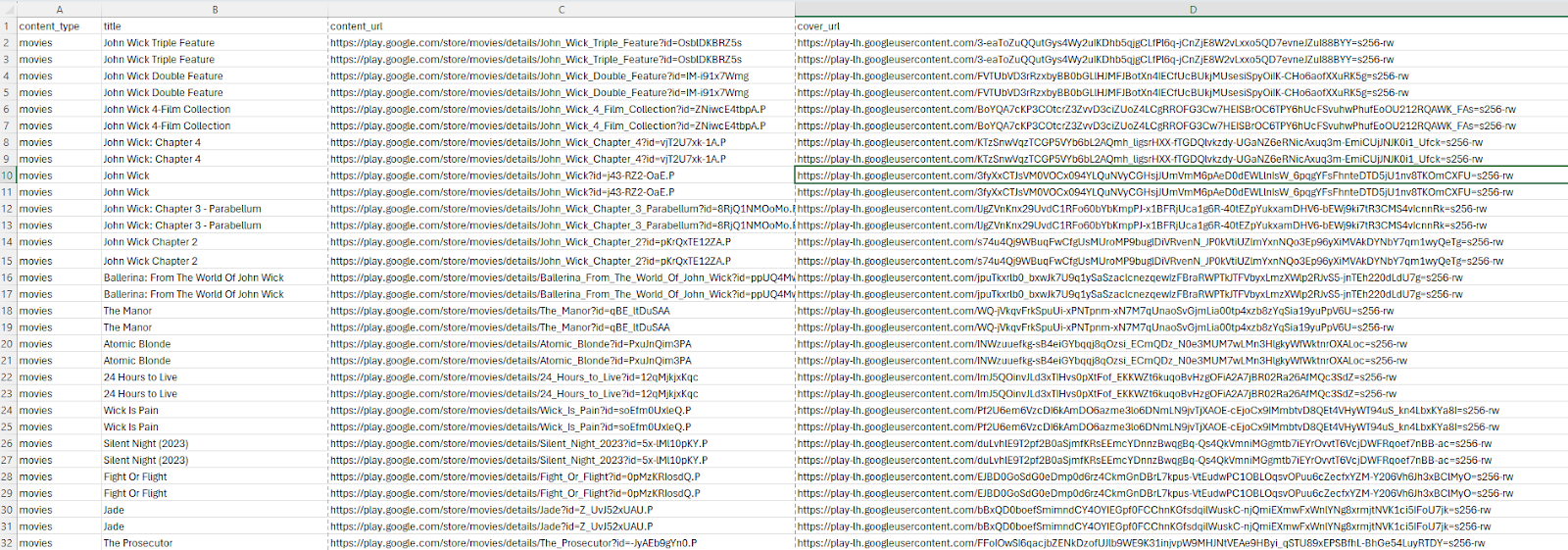
- content_type: whether it’s a movie, TV show, or episode
- title: name of the content
- content_url: direct link to the product page
- cover_url: thumbnail image
Step 4: Extract movie & TV metadata and save to CSV
Save all the collected data into a CSV file using Python’s built-in csv module. Each row in the CSV corresponds to one movie or TV show entry.
Here’s the complete code:
import requests
from bs4 import BeautifulSoup
import urllib.parse
import csv

def scrape_play_movies(search_terms):
    """Scrape Google Play Movies & TV search results for given terms and save to CSV"""

    # Proxy setup
    proxies = {
        "http": "http://username:password@p.webshare.io:80",
        "https": "http://username:password@p.webshare.io:80"
    }

    session = requests.Session()
    session.headers.update({
        'User-Agent': 'Mozilla/5.0 (Windows NT 10.0; Win64; x64) AppleWebKit/537.36 (KHTML, like Gecko) Chrome/120.0.0.0 Safari/537.36'
    })

    all_results = []

    for term in search_terms:
        query = urllib.parse.quote(term)
        url = f"https://play.google.com/store/search?q={query}&c=movies&hl=en"
        print(f"Scraping: {url}")

        try:
            response = session.get(url, proxies=proxies, timeout=15)
            response.raise_for_status()
            soup = BeautifulSoup(response.content, 'lxml')

            # Find movie/show containers
            items = soup.find_all('div', class_=['VfPpkd-WsjYwc', 'ULeU3b'])
            for item in items:
                title_elem = item.find('div', class_='Epkrse')
                link_elem = item.find('a', href=True)
                img_elem = item.find('img', src=True)

                if title_elem and link_elem:
                    title = title_elem.get_text(strip=True)
                    link = link_elem['href']
                    full_url = f"https://play.google.com{link}" if link.startswith('/') else link
                    cover = img_elem['src'] if img_elem else 'N/A'

                    # Determine content type from URL
                    if '/movies/' in link:
                        content_type = 'movies'
                    elif '/tv/' in link and '/episodes/' in link:
                        content_type = 'tv_episodes'
                    elif '/tv/' in link:
                        content_type = 'tv_shows'
                    else:
                        content_type = 'unknown'

                    all_results.append({
                        'content_type': content_type,
                        'title': title,
                        'content_url': full_url,
                        'cover_url': cover
                    })

        except Exception as e:
            print(f"Error while processing '{term}': {e}")

    # Write data to CSV
    with open('google_play_movies.csv', 'w', newline='', encoding='utf-8') as csv_file:
        writer = csv.DictWriter(csv_file, fieldnames=['content_type', 'title', 'content_url', 'cover_url'])
        writer.writeheader()
        writer.writerows(all_results)

    print(f" CSV file created successfully with {len(all_results)} entries.")

# Example call
scrape_play_movies(["John Wick", "Brad Pitt", "Avengers"])
Step 5: Verify the output file
Once the script runs, you’ll find a new file named google_play_movies.csv in your working directory.

Scraping Google Play Movie Titles
Let’s now enrich the previously scraped movie and TV show data with detailed information from each title’s individual page.
Step 1: Prepare your CSV input
- Place the CSV generated in the previous scraping step into a folder.
- Ensure it contains the following columns: content_type, title, content_url, cover_url.
- This CSV will serve as the input for the scraper.
Step 2: Scrape movie and show details
- Read the CSV file row by row.
- For each row, fetch the page url from the content_url column.
- Skip rows where the url is missing or marked as 'N/A'.
- Send an HTTP GET request to the URL using a browser-like User-Agent and proxy for more reliable access.
- Parse the HTML response using BeautifulSoup to extract relevant content.
- Look for JSON-LD <script type="application/ld+json"> tags in the page to extract structured data.
- From the JSON-LD, extract details such as movie title, description, average rating, etc.
- If the JSON-LD data is incomplete, use regex patterns and HTML selectors as fallbacks to retrieve missing values.
Step 3: Store enriched data
- Create a dictionary for each movie containing: content type, title, content_url, cover_url, release year, rating, average reviews, total reviews, description and top_reviews.
- Convert the list of top reviews into JSON format for easy export.
- Append this dictionary to a list that will hold all enriched records.
- Include a small delay between requests (e.g., 2 seconds) to avoid overloading the server or being blocked.
Step 4: Save results to CSV
- After processing all rows, write the enriched data into a new CSV file.
- Use column headers: content_type, title, content_url, cover_url, release_year, rating, reviews_avg, reviews_count, description, top_reviews.
- Make sure the CSV is encoded in UTF-8 to preserve special characters.
Here’s the complete code:
import requests, csv, json, time
from bs4 import BeautifulSoup
from itertools import islice
import re

proxies = {
    "http": "http://username:password@p.webshare.io:80",
    "https": "http://username:password@p.webshare.io:80"
}

headers = {
    'User-Agent': 'Mozilla/5.0 (Windows NT 10.0; Win64; x64) AppleWebKit/537.36 (KHTML, like Gecko) Chrome/91.0.4472.124 Safari/537.36'
}

input_file = 'google_play_movies.csv'
output_file = 'enriched_google_play_movies.csv'
enriched = []

def extract_script_data(soup):
    script_data = {}
    review_json_data = []
    for script in soup.find_all('script', type='application/ld+json'):
        try:
            data = json.loads(script.string)
            if isinstance(data, list):
                for item in data:
                    if item.get('@type') in ['Movie', 'TVSeries', 'TVEpisode']:
                        script_data = item
                    if item.get('@type') == 'Review':
                        review_json_data.append(item)
            elif isinstance(data, dict):
                if data.get('@type') in ['Movie', 'TVSeries', 'TVEpisode']:
                    script_data = data
                if data.get('@type') == 'Review':
                    review_json_data.append(data)
        except:
            continue
    return script_data, review_json_data

def extract_reviews_avg(script_data, soup):
    reviews_avg = 'N/A'
    aggregate_rating = script_data.get('aggregateRating', {})
    if aggregate_rating:
        reviews_avg = aggregate_rating.get('ratingValue', 'N/A')

    if reviews_avg == 'N/A':
        rating_selectors = ['div.TT9eCd', 'div.BHMmbe', 'span[aria-label*="star"]', 'div[aria-label*="star"]']
        for selector in rating_selectors:
            rating_elem = soup.select_one(selector)
            if rating_elem:
                rating_match = re.search(r'(\d+\.\d+)', rating_elem.get_text(strip=True))
                if rating_match:
                    reviews_avg = rating_match.group(1)
                    break

    if reviews_avg == 'N/A':
        rating_pattern = re.search(r'(\d+\.\d+)\s*star', soup.get_text(), re.IGNORECASE)
        if rating_pattern:
            reviews_avg = rating_pattern.group(1)

    return reviews_avg

def extract_release_year(script_data, soup):
    release_year = 'N/A'
    date_published = script_data.get('datePublished', '')
    if date_published:
        year_match = re.search(r'\d{4}', date_published)
        if year_match:
            release_year = year_match.group(0)

    if release_year == 'N/A':
        year_pattern = re.search(r'(19|20)\d{2}', soup.get_text())
        if year_pattern:
            release_year = year_pattern.group(0)

    return release_year

def extract_content_rating(script_data, soup):
    rating = script_data.get('contentRating', 'N/A')
    if rating == 'N/A':
        rating_pattern = re.search(r'(PG-13|PG|R|G|NC-17|TV-Y|TV-Y7|TV-G|TV-PG|TV-14|TV-MA)', soup.get_text(), re.IGNORECASE)
        if rating_pattern:
            rating = rating_pattern.group(1).upper()
    return rating

def extract_reviews_count(script_data, soup):
    reviews_count = 'N/A'
    aggregate_rating = script_data.get('aggregateRating', {})
    if aggregate_rating:
        reviews_count = aggregate_rating.get('ratingCount', 'N/A')

    if reviews_count == 'N/A':
        count_patterns = [
            r'(\d+[,.]?\d*)\s*(reviews|ratings)',
            r'(\d+[,.]?\d*)\s*received',
            r'Rating.*?(\d+[,.]?\d*[KMB]?)'
        ]
        page_text = soup.get_text()
        for pattern in count_patterns:
            match = re.search(pattern, page_text, re.IGNORECASE)
            if match:
                reviews_count = match.group(1)
                break

        if reviews_count == 'N/A':
            review_elem = soup.find(string=re.compile(r'review', re.IGNORECASE))
            if review_elem:
                parent_text = review_elem.parent.get_text() if review_elem.parent else ''
                numbers = re.findall(r'\d+[,.]?\d*', parent_text)
                if numbers:
                    reviews_count = numbers[0]

    return reviews_count

def extract_html_reviews(soup):
    top_reviews = []
    review_containers = soup.select('div.h3YV2d, div[data-review-id], div.review-item, div.single-review')

    if not review_containers:
        potential_reviews = soup.select('div')
        review_containers = [div for div in potential_reviews if
                            (div.select_one('div.X5PpBb') or div.select_one('span.bp9Aid')) and
                            len(div.get_text(strip=True)) > 50]

    for container in islice(review_containers, 5):
        review_data = {}

        author_elem = container.select_one('div.X5PpBb') or container.find_parent().select_one('div.X5PpBb') if container.find_parent() else None
        date_elem = container.select_one('span.bp9Aid') or container.find_parent().select_one('span.bp9Aid') if container.find_parent() else None

        review_data['author'] = author_elem.get_text(strip=True) if author_elem else 'N/A'
        review_data['date'] = date_elem.get_text(strip=True) if date_elem else 'N/A'

        rating_elem = container.select_one('div[aria-label*="Rated"], div[aria-label*="star"], span[aria-label*="Rated"], span[aria-label*="star"]')
        if not rating_elem and container.find_parent():
            rating_elem = container.find_parent().select_one('div[aria-label*="Rated"], div[aria-label*="star"], span[aria-label*="Rated"], span[aria-label*="star"]')

        if rating_elem:
            aria_label = rating_elem.get('aria-label', '')
            rating_match = re.search(r'Rated\s*(\d+(?:\.\d+)?)\s*stars?', aria_label, re.IGNORECASE) or re.search(r'(\d+(?:\.\d+)?)\s*stars?', aria_label, re.IGNORECASE)
            review_data['rating'] = rating_match.group(1) if rating_match else 'N/A'
        else:
            review_data['rating'] = 'N/A'

        description_text = container.get_text(strip=True)
        if review_data['author'] != 'N/A':
            description_text = description_text.replace(review_data['author'], '')
        if review_data['date'] != 'N/A':
            description_text = description_text.replace(review_data['date'], '')

        description_text = re.sub(r'\s+', ' ', description_text).strip()
        review_data['description'] = description_text if description_text else 'N/A'

        if review_data['description'] != 'N/A' and len(review_data['description']) > 10:
            top_reviews.append(review_data)
        else:
            review_text_elem = container.select_one('div.review-text, div.review-body, span.review-text')
            if review_text_elem:
                alt_text = review_text_elem.get_text(strip=True)
                if alt_text and len(alt_text) > 20:
                    review_data['description'] = alt_text
                    top_reviews.append(review_data)

    return top_reviews

with open(input_file, 'r', encoding='utf-8') as infile:
    reader = csv.DictReader(infile)

    for raw_row in islice(reader, 10):
        row = {k.strip().lower(): (v or '').strip() for k, v in raw_row.items()}
        url = row.get('content_url', '')
        if not url or url == 'N/A':
            continue

        try:
            print(f"Scraping: {url}")
            resp = requests.get(url, headers=headers, proxies=proxies, timeout=15)
            resp.raise_for_status()
            soup = BeautifulSoup(resp.content, 'html.parser')

            script_data, review_json_data = extract_script_data(soup)

            title = script_data.get('name') or row.get('title', 'N/A')
            description = script_data.get('description', 'N/A')
            if description == 'N/A':
                desc_elem = soup.find('meta', {'name': 'description'})
                if desc_elem:
                    description = desc_elem.get('content', 'N/A')[:300]

            reviews_avg = extract_reviews_avg(script_data, soup)
            release_year = extract_release_year(script_data, soup)
            rating = extract_content_rating(script_data, soup)
            reviews_count = extract_reviews_count(script_data, soup)

            top_reviews = []
            embedded_reviews = script_data.get('review')
            if embedded_reviews:
                if isinstance(embedded_reviews, list):
                    review_json_data.extend(embedded_reviews)
                elif isinstance(embedded_reviews, dict):
                    review_json_data.append(embedded_reviews)

            for review in islice(review_json_data, 5):
                author_name = review.get('author', {}).get('name') if isinstance(review.get('author'), dict) else review.get('author')
                review_data = {
                    'author': author_name or 'N/A',
                    'date': review.get('datePublished', 'N/A'),
                    'rating': review.get('reviewRating', {}).get('ratingValue', 'N/A') if isinstance(review.get('reviewRating'), dict) else 'N/A',
                    'description': review.get('description', 'N/A')
                }
                if any(v != 'N/A' for k, v in review_data.items()):
                    top_reviews.append(review_data)

            if not top_reviews:
                top_reviews = extract_html_reviews(soup)

            top_reviews_json = json.dumps(top_reviews, ensure_ascii=False)

            enriched.append({
                'content_type': row.get('content_type', 'N/A'),
                'title': title,
                'content_url': url,
                'cover_url': row.get('cover_url', 'N/A'),
                'release_year': release_year,
                'rating': rating,
                'reviews_avg': reviews_avg,
                'reviews_count': reviews_count,
                'description': description,
                'top_reviews': top_reviews_json
            })

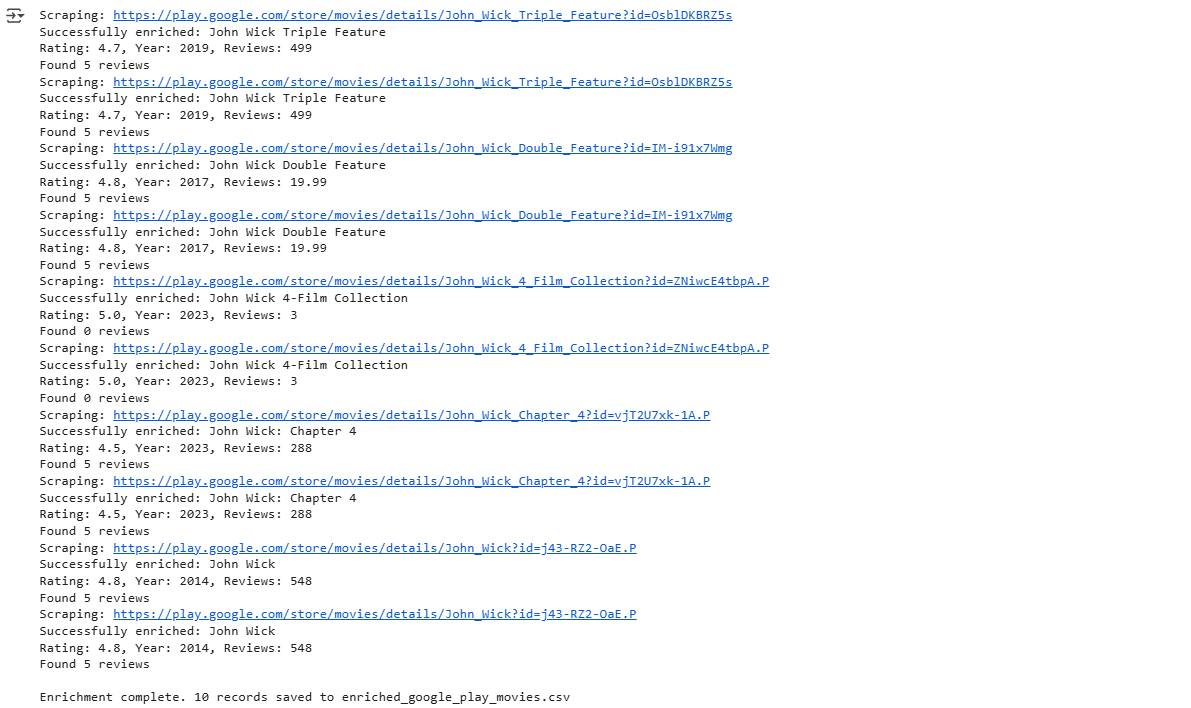
            print(f"Successfully enriched: {title}")
            print(f"Rating: {reviews_avg}, Year: {release_year}, Reviews: {reviews_count}")
            print(f"Found {len(top_reviews)} reviews")

        except Exception as e:
            print(f"✗ Error scraping {url}: {e}")
            enriched.append({
                'content_type': row.get('content_type', 'N/A'),
                'title': row.get('title', 'N/A'),
                'content_url': url,
                'cover_url': row.get('cover_url', 'N/A'),
                'release_year': 'N/A',
                'rating': 'N/A',
                'reviews_avg': 'N/A',
                'reviews_count': 'N/A',
                'description': 'N/A',
                'top_reviews': '[]'
            })

        time.sleep(2)

with open(output_file, 'w', newline='', encoding='utf-8') as out:
    fieldnames = ['content_type', 'title', 'content_url', 'cover_url', 'release_year', 'rating', 'reviews_avg', 'reviews_count', 'description', 'top_reviews']
    writer = csv.DictWriter(out, fieldnames=fieldnames)
    writer.writeheader()
    writer.writerows(enriched)

print(f"\nEnrichment complete. {len(enriched)} records saved to {output_file}")
Step 5: Verify the output file
Once the script runs, you’ll find a new file named enriched_google_play_movies.csv in your working directory.

Wrapping up: Scrape Google Play Movies & TV
In this guide, we covered a two-step approach to scraping Google Play Movies and TV shows. The first scraper focuses on collecting search results for specific queries, while the second scraper enriches individual movie and show pages with detailed information such as release year, content rating, average reviews, total reviews, and descriptions. Using Webshare proxies and rotating headers helps simulate real users and minimize the risk of temporary blocks. Incorporating polite delays between requests and parsing both JSON-LD and HTML content ensures accurate and reliable data extraction from dynamically rendered pages.