TL;DR
- Learn how to scrape Google Knowledge Graph results using Python.
- Use Webshare rotating residential proxies to bypass IP blocks and access localized search results.
- Extract and save structured Knowledge Graph data – including entity names, descriptions, attributes, and URLs – into JSON and CSV files.
Google Knowledge Graph provides a rich source of structured information about entities such as people, organizations, places, products, and more. It appears as information panels alongside regular search results, aggregating verified facts from multiple sources. In this guide, you’ll learn how to build a Python-based scraper that retrieves Knowledge Graph data for multiple search queries.
Prerequisites
Before building and running the Google Knowledge Graph scraper, ensure your environment is properly set up with all required tools and dependencies.
- Python: Ensure you have Python 3.9+ or higher is installed. Verify your version by running:
python --version- Required Python Packages: The scraper relies on Playwright for asynchronous browser automation and web scraping. Install it using:
pip install playwright- Built-in Python Modules: The following libraries are part of Python’s standard library and do not require installation. They are used for managing asynchronous tasks, formatting timestamps, handling XML data, and exporting results:
- asyncio - manages asynchronous scraping tasks.
- json and csv - handle structured data export.
- random and re - introduce randomized delays and clean text content.
- urllib.parse - build and encode dynamic search URLs.
- datetime - timestamp and log scraped data.
- Playwright Browser Setup: After installing Playwright, you’ll need to install the Chromium browser:
playwright install chromium- Webshare Proxy Access: Google Knowledge Graph enforces rate limits and regional variations in search results. To scrape reliably and collect localized data, use Webshare rotating residential proxies. Configure the proxy country and authentication credentials to simulate real user traffic and avoid IP blocks.
Scraping Google Knowledge Graph
Follow the steps below to collect structured knowledge graph data for your search queries.
Step 1: Initialize your scraper
- Start by creating an instance of your Google Knowledge Graph scraper. This prepares the browser environment and sets the foundation for all subsequent scraping tasks.
- At this stage, you also define the base URL for Google searches, which the scraper will use to locate the knowledge graph panels.
Step 2: Configure browser and proxy
- Before sending requests, configure the browser with anti-detection measures. This includes launching a headless browser, adjusting viewport settings, and adding stealth scripts to hide automated browsing behavior.
- If you are targeting localized search results or want to avoid IP-based restrictions, configure Webshare rotating residential proxies. This allows your scraper to mimic real users from different regions, preventing blocking and ensuring access to region-specific knowledge graphs.
Step 3: Handle consent dialogs
- Google often presents consent or cookie dialogs when accessing search results. Implement logic to detect and automatically interact with these dialogs, such as clicking “Reject all” or “I agree”. This ensures that the scraper can access the page content without manual intervention.
Step 4: Build your search query url
- For each search term, construct a Google search URL that includes language and region parameters. This lets you control the interface language and the geographic context of the results, which can affect the knowledge graph content displayed.
Step 5: Navigate and wait for the Knowledge Graph
- Open the search URL in your browser and wait for the knowledge graph panel to load.
- Insert small randomized delays to mimic human browsing behavior, reducing the risk of triggering Google’s anti-bot protections.
Step 6: Extract Knowledge Graph data
Once the knowledge graph panel is visible, extract structured information, including:
- The main title and subtitle of the entity
- Description or summary
- Source references
- Key attributes such as founders, headquarters, net worth, or team members
- Social media profiles
- Related entities (e.g., “People also search for”)
Clean the extracted text to remove JavaScript artifacts, duplicate words, and unwanted formatting, ensuring your data is accurate and readable.
Step 7: Repeat for multiple queries
- If you have multiple search terms, iterate through each query while respecting randomized delays between searches. This prevents your IP from being flagged and allows the scraper to systematically collect knowledge graphs for a list of topics.
Step 8: Export and save the data
- Once all queries are processed, consolidate the collected knowledge graph data into structured files. Export the results to both JSON and CSV formats so you can easily analyze the data.
Here’s the complete code:
import asyncio
import json
import csv
import random
import re
from datetime import datetime
from urllib.parse import urlencode
from playwright.async_api import async_playwright

class GoogleKnowledgeGraphScraper:
    def __init__(self):
        self.browser = None
        self.page = None
        self.base_url = "https://www.google.com/search"

    async def setup_browser(self, proxy_config=None):
        """Setup browser with anti-detection measures"""
        playwright = await async_playwright().start()

        launch_options = {
            'headless': True,
            'args': [
                '--no-sandbox',
                '--disable-setuid-sandbox',
                '--disable-blink-features=AutomationControlled',
                '--disable-dev-shm-usage',
                '--disable-web-security',
                '--disable-features=VizDisplayCompositor',
                '--disable-background-timer-throttling',
                '--disable-backgrounding-occluded-windows',
                '--disable-renderer-backgrounding',
                '--disable-ipc-flooding-protection',
                '--user-agent=Mozilla/5.0 (Windows NT 10.0; Win64; x64) AppleWebKit/537.36 (KHTML, like Gecko) Chrome/120.0.0.0 Safari/537.36'
            ]
        }

        # Proxy configuration
        if proxy_config:
            country = proxy_config.get('country', 'US')
            launch_options['proxy'] = {
                'server': 'http://p.webshare.io:80',
                'username': proxy_config.get('username', f'username-{country}-rotate'),
                'password': proxy_config.get('password', 'password')
            }

        self.browser = await playwright.chromium.launch(**launch_options)

        # Create context with additional stealth measures
        context = await self.browser.new_context(
            viewport={'width': 1920, 'height': 1080},
            user_agent='Mozilla/5.0 (Windows NT 10.0; Win64; x64) AppleWebKit/537.36 (KHTML, like Gecko) Chrome/120.0.0.0 Safari/537.36',
            java_script_enabled=True,
            bypass_csp=False,
            ignore_https_errors=False
        )

        # Add stealth scripts
        await context.add_init_script("""
            Object.defineProperty(navigator, 'webdriver', {get: () => undefined});
            Object.defineProperty(navigator, 'plugins', {get: () => [1, 2, 3, 4, 5]});
            Object.defineProperty(navigator, 'languages', {get: () => ['en-US', 'en']});

            // Override permissions
            const originalQuery = window.navigator.permissions.query;
            window.navigator.permissions.query = (parameters) => (
                parameters.name === 'notifications' ?
                    Promise.resolve({ state: Notification.permission }) :
                    originalQuery(parameters)
            );

            // Mock chrome runtime
            window.chrome = { runtime: {} };

            // Override the permissions property
            const originalPermissions = navigator.permissions;
            Object.defineProperty(navigator, 'permissions', {
                value: {
                    ...originalPermissions,
                    query: (parameters) => (
                        parameters.name === 'notifications' ?
                            Promise.resolve({ state: Notification.permission }) :
                            originalPermissions.query(parameters)
                    )
                }
            });
        """)

        self.page = await context.new_page()

        # Block unnecessary resources to improve performance
        await self.page.route("**/*", lambda route: route.abort()
                            if route.request.resource_type in ["image", "font", "media"]
                            else route.continue_())

        # Set extra headers
        await self.page.set_extra_http_headers({
            'Accept': 'text/html,application/xhtml+xml,application/xml;q=0.9,image/webp,*/*;q=0.8',
            'Accept-Language': 'en-US,en;q=0.5',
            'Accept-Encoding': 'gzip, deflate, br',
            'DNT': '1',
            'Connection': 'keep-alive',
            'Upgrade-Insecure-Requests': '1',
            'Sec-Fetch-Dest': 'document',
            'Sec-Fetch-Mode': 'navigate',
            'Sec-Fetch-Site': 'none',
        })

    async def random_delay(self, min_seconds=3, max_seconds=7):
        """Random delay between requests"""
        delay = random.uniform(min_seconds, max_seconds)
        await asyncio.sleep(delay)

    async def handle_consent_dialog(self):
        """Handle Google consent dialog if it appears"""
        try:
            # Wait for potential consent dialog
            await self.page.wait_for_timeout(2000)

            # Try to click reject all button
            reject_button = await self.page.query_selector('button:has-text("Reject all")')
            if reject_button:
                await reject_button.click()
                await self.page.wait_for_timeout(1000)
                return True

            # Try to click "I agree" if reject is not available
            agree_button = await self.page.query_selector('button:has-text("I agree")')
            if agree_button:
                await agree_button.click()
                await self.page.wait_for_timeout(1000)
                return True

        except Exception as e:
            print(f"Consent dialog handling failed: {e}")

        return False

    async def scrape_knowledge_graph(self, query, search_config):
        """Scrape knowledge graph data for a query"""
        search_params = {
            'q': query,
            'hl': search_config.get('hl', 'en'),
            'gl': search_config.get('gl', 'US')
        }

        search_url = f"{self.base_url}?{urlencode(search_params)}"
        print(f"Scraping: {search_url}")

        try:
            await self.page.goto(search_url, wait_until='domcontentloaded', timeout=30000)
            await self.random_delay(1, 2)

            # Handle consent dialog
            await self.handle_consent_dialog()

            # Wait for knowledge graph to load
            await self.page.wait_for_timeout(3000)

            # Check if knowledge graph exists
            knowledge_panel = await self.page.query_selector('div[data-kpid*="vise"], div.A6K0A.z4oRIf')
            if not knowledge_panel:
                print(f"No knowledge graph found for: {query}")
                return None

            # Extract knowledge graph data
            kg_data = await self.extract_knowledge_graph_data(query)
            return kg_data

        except Exception as e:
            print(f"Error scraping {query}: {e}")
            return None

    async def extract_knowledge_graph_data(self, query):
        """Extract all knowledge graph data with clean description"""
        kg_data = {
            'query': query,
            'scraped_at': datetime.now().isoformat(),
            'title': '',
            'subtitle': '',
            'description': '',
            'source': '',
            'attributes': {},
            'social_media': [],
            'related_entities': []
        }

        try:
            # Extract title
            title_element = await self.page.query_selector('.PZPZlf.ssJ7i.B5dxMb, [data-attrid="title"]')
            if title_element:
                kg_data['title'] = (await title_element.text_content()).strip()

            # Extract subtitle
            subtitle_element = await self.page.query_selector('.iAIpCb.PZPZlf, [data-attrid="subtitle"]')
            if subtitle_element:
                kg_data['subtitle'] = (await subtitle_element.text_content()).strip()

            # Extract description - FIXED: Better selector for description
            desc_element = await self.page.query_selector('.kno-rdesc span, .G0maxb .wtBS9 span, [data-attrid="VisualDigestDescription"]')
            if desc_element:
                raw_description = await desc_element.text_content()
                # Clean up the description by removing JavaScript artifacts
                cleaned_description = self.clean_description(raw_description)
                kg_data['description'] = cleaned_description

            # Extract source - FIXED: Better source extraction
            source_element = await self.page.query_selector('.IQhcI .iJ25xd.AcUlBb.XkISS, .kno-rdesc a')
            if source_element:
                kg_data['source'] = (await source_element.text_content()).strip()

            # Extract attributes - updated for both Google and Yahoo structures
            kg_data['attributes'] = await self.extract_attributes()

            # Extract social media profiles
            kg_data['social_media'] = await self.extract_social_media()

            # Extract related entities
            kg_data['related_entities'] = await self.extract_related_entities()

        except Exception as e:
            print(f"Error extracting knowledge graph data: {e}")

        return kg_data

    def clean_description(self, description):
        """Clean description by removing JavaScript artifacts and duplicates"""
        if not description:
            return ""

        # Remove JavaScript function calls and artifacts
        description = re.sub(r'\(function\(\)\{.*?\}\)\(\)\;', '', description)
        description = re.sub(r'MoreLessDescription', '', description)

        # Remove duplicate "Wikipedia" and clean up - FIXED: Better cleaning
        description = re.sub(r'WikipediaWikipedia', 'Wikipedia', description)
        description = re.sub(r'Source:\s*Wikipedia', '', description)  # Remove source from description
        description = re.sub(r'\s+', ' ', description)  # Normalize whitespace

        # Clean up extra whitespace
        description = ' '.join(description.split()).strip()

        return description

    async def extract_attributes(self):
        """Extract key attributes from knowledge graph - FIXED: Better attribute cleaning"""
        attributes = {}

        # Comprehensive attribute selectors for Google and Yahoo
        attribute_selectors = [
            # Google-style attributes
            ('founders', '[data-attrid="kc:/business/business_operation:founder"]'),
            ('founded', '[data-attrid="kc:/organization/organization:founded"]'),
            ('parent_organization', '[data-attrid="hw:/collection/organizations:parent organization"]'),
            ('headquarters', '[data-attrid="kc:/organization/organization:headquarters"]'),
            ('ceo', '[data-attrid="kc:/organization/organization:ceo"]'),
            ('subsidiaries', '[data-attrid="hw:/collection/organizations:subsidiaries"]'),
            ('cio', '[data-attrid="kc:/organization/organization:cio"]'),

            # Yahoo-style attributes
            ('owners', '[data-attrid="kc:/business/asset:owner"]'),
            ('advertising', '[data-attrid="ss:/webfacts:advertis"]'),
            ('employees', '[data-attrid="ss:/webfacts:employe"]'),
            ('founded_yahoo', '[data-attrid="ss:/webfacts:found"]'),
            ('headquarters_yahoo', '[data-attrid="ss:/webfacts:headquart"]'),
            ('parent_yahoo', '[data-attrid="ss:/webfacts:parent"]'),

            # LeBron James specific attributes
            ('born', '[data-attrid="kc:/people/person:born"]'),
            ('dates_joined', '[data-attrid="hw:/collection/athletes:picked date"]'),
            ('current_teams', '[data-attrid="kc:/sports/pro_athlete:team"]'),
            ('net_worth', '[data-attrid="kc:/people/person:net worth"]'),
            ('children', '[data-attrid="kc:/people/person:children"]'),
            ('spouse', '[data-attrid="kc:/people/person:spouse"]'),
            ('teammates', '[data-attrid="hw:/collection/olympic_athletes:teammates"]'),

            # Generic fallback for any attribute containers
            ('', '.wDYxhc[data-attrid]')
        ]

        for attr_name, selector in attribute_selectors:
            try:
                if selector == '.wDYxhc[data-attrid]':
                    # Handle generic attribute extraction
                    attr_containers = await self.page.query_selector_all(selector)
                    for container in attr_containers:
                        # Extract label and value
                        label_element = await container.query_selector('.w8qArf.FoJoyf')
                        value_element = await container.query_selector('.LrzXr.kno-fv.wHYlTd.z8gr9e')

                        if label_element and value_element:
                            label = (await label_element.text_content()).strip().replace(':', '').replace(' ', '_').lower()
                            value = (await value_element.text_content()).strip()
                            # FIXED: Clean "See more" links from attribute values
                            value = re.sub(r'·\s*See more', '', value).strip()
                            if label and value and label not in attributes:
                                attributes[label] = value
                else:
                    # Handle specific attribute extraction
                    attr_container = await self.page.query_selector(selector)
                    if attr_container:
                        # Extract value
                        value_element = await attr_container.query_selector('.LrzXr.kno-fv.wHYlTd.z8gr9e')
                        if value_element:
                            value = (await value_element.text_content()).strip()
                            # FIXED: Clean "See more" links from attribute values
                            value = re.sub(r'·\s*See more', '', value).strip()
                            attributes[attr_name] = value
            except Exception as e:
                print(f"Error extracting attribute {attr_name}: {e}")

        return attributes

    async def extract_social_media(self):
        """Extract social media profiles"""
        social_media = []

        try:
            social_container = await self.page.query_selector('.OOijTb.P6Tjc.gDQYEd')
            if social_container:
                profile_elements = await social_container.query_selector_all('.PZPZlf.dRrfkf.kno-vrt-t')

                for profile in profile_elements:
                    try:
                        platform_element = await profile.query_selector('.CtCigf')
                        if platform_element:
                            platform = (await platform_element.text_content()).strip()
                            social_media.append(platform)
                    except:
                        continue

        except Exception as e:
            print(f"Error extracting social media: {e}")

        return social_media

    async def extract_related_entities(self):
        """Extract related entities (People also search for)"""
        related_entities = []

        try:
            related_container = await self.page.query_selector('.pCnXsf')
            if related_container:
                entity_elements = await related_container.query_selector_all('.IF221e.EXH1Ce')

                for entity in entity_elements:
                    try:
                        name_element = await entity.query_selector('.Yt787.aAJbCe')
                        if name_element:
                            entity_name = (await name_element.text_content()).strip()
                            related_entities.append(entity_name)
                    except:
                        continue

        except Exception as e:
            print(f"Error extracting related entities: {e}")

        return related_entities

    async def scrape_queries(self, queries, proxy_config=None, search_config=None):
        """Scrape knowledge graph for multiple queries"""
        all_kg_data = []

        # Default configuration
        if search_config is None:
            search_config = {
                'hl': 'en',
                'gl': 'US'
            }

        await self.setup_browser(proxy_config)

        try:
            for i, query in enumerate(queries):
                print(f"Processing query {i+1}/{len(queries)}: {query}")

                kg_data = await self.scrape_knowledge_graph(query, search_config)
                if kg_data:
                    all_kg_data.append(kg_data)
                    print(f"Successfully scraped knowledge graph for '{query}'")
                else:
                    print(f"Failed to scrape knowledge graph for '{query}'")

                # Random delay between queries
                if i < len(queries) - 1:
                    await self.random_delay(4, 8)

        finally:
            await self.close()

        return all_kg_data

    async def close(self):
        """Close browser"""
        if self.browser:
            await self.browser.close()

    def save_to_json(self, kg_data, filename):
        """Save knowledge graph data to JSON file"""
        with open(filename, 'w', encoding='utf-8') as f:
            json.dump(kg_data, f, indent=2, ensure_ascii=False)
        print(f"Saved {len(kg_data)} knowledge graphs to {filename}")

    def save_to_csv(self, kg_data, filename):
        """Save knowledge graph data to CSV file"""
        if not kg_data:
            print("No knowledge graph data to save")
            return

        # Flatten the data structure for CSV
        flattened_data = []
        for item in kg_data:
            flat_item = {
                'query': item.get('query', ''),
                'title': item.get('title', ''),
                'subtitle': item.get('subtitle', ''),
                'description': item.get('description', ''),
                'source': item.get('source', ''),
                'scraped_at': item.get('scraped_at', '')
            }

            # Add attributes as separate columns
            for key, value in item.get('attributes', {}).items():
                flat_item[f'attr_{key}'] = value

            # Add social media as comma-separated string
            flat_item['social_media'] = ', '.join(item.get('social_media', []))

            # Add related entities as comma-separated string
            flat_item['related_entities'] = ', '.join(item.get('related_entities', []))

            flattened_data.append(flat_item)

        # Get all fieldnames
        fieldnames = set()
        for item in flattened_data:
            fieldnames.update(item.keys())
        fieldnames = list(fieldnames)

        with open(filename, 'w', newline='', encoding='utf-8') as f:
            writer = csv.DictWriter(f, fieldnames=fieldnames)
            writer.writeheader()
            writer.writerows(flattened_data)
        print(f"Saved {len(kg_data)} knowledge graphs to {filename}")

async def main():
    # === USER CONFIGURATION ===

    # 1. User inputs list of search queries
    search_queries = ["Google", "LeBron James"]

    # 2. User configures Webshare proxy WITH COUNTRY SELECTION
    country_code = "US"  # User can change this to FR, DE, GB, etc.
    proxy_config = {
        'username': f'username-{country_code}-rotate',
        'password': 'password'     # Enter your password
    }

    # 3. User configures search parameters
    search_config = {
        'hl': 'en',        # Interface language
        'gl': country_code, # Geographic location
    }

    # Initialize scraper
    scraper = GoogleKnowledgeGraphScraper()

    # Scrape knowledge graphs with user configuration
    print("Starting Google Knowledge Graph scraping...")
    kg_data = await scraper.scrape_queries(
        queries=search_queries,
        proxy_config=proxy_config,
        search_config=search_config
    )

    # Save results to JSON and CSV
    if kg_data:
        timestamp = datetime.now().strftime("%Y%m%d_%H%M%S")
        json_filename = f"google_knowledge_graph_{timestamp}.json"
        csv_filename = f"google_knowledge_graph_{timestamp}.csv"

        scraper.save_to_json(kg_data, json_filename)
        scraper.save_to_csv(kg_data, csv_filename)

        # Print summary
        print(f"\nScraping completed!")
        print(f"Total knowledge graphs found: {len(kg_data)}")
        for query in search_queries:
            found = any(kg['query'] == query for kg in kg_data)
            status = "Found" if found else "Not found"
            print(f"  - '{query}': {status}")

    else:
        print("No knowledge graphs found!")

# Run the scraper
await main()
Note: This code uses await main() which works in Google Colab and Jupyter notebooks. For regular Python scripts, use this instead:
if __name__ == "__main__":
    asyncio.run(main())
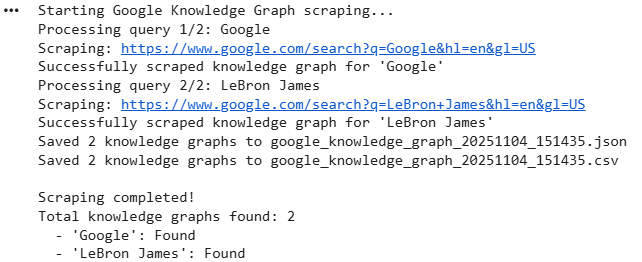
The console output is as:
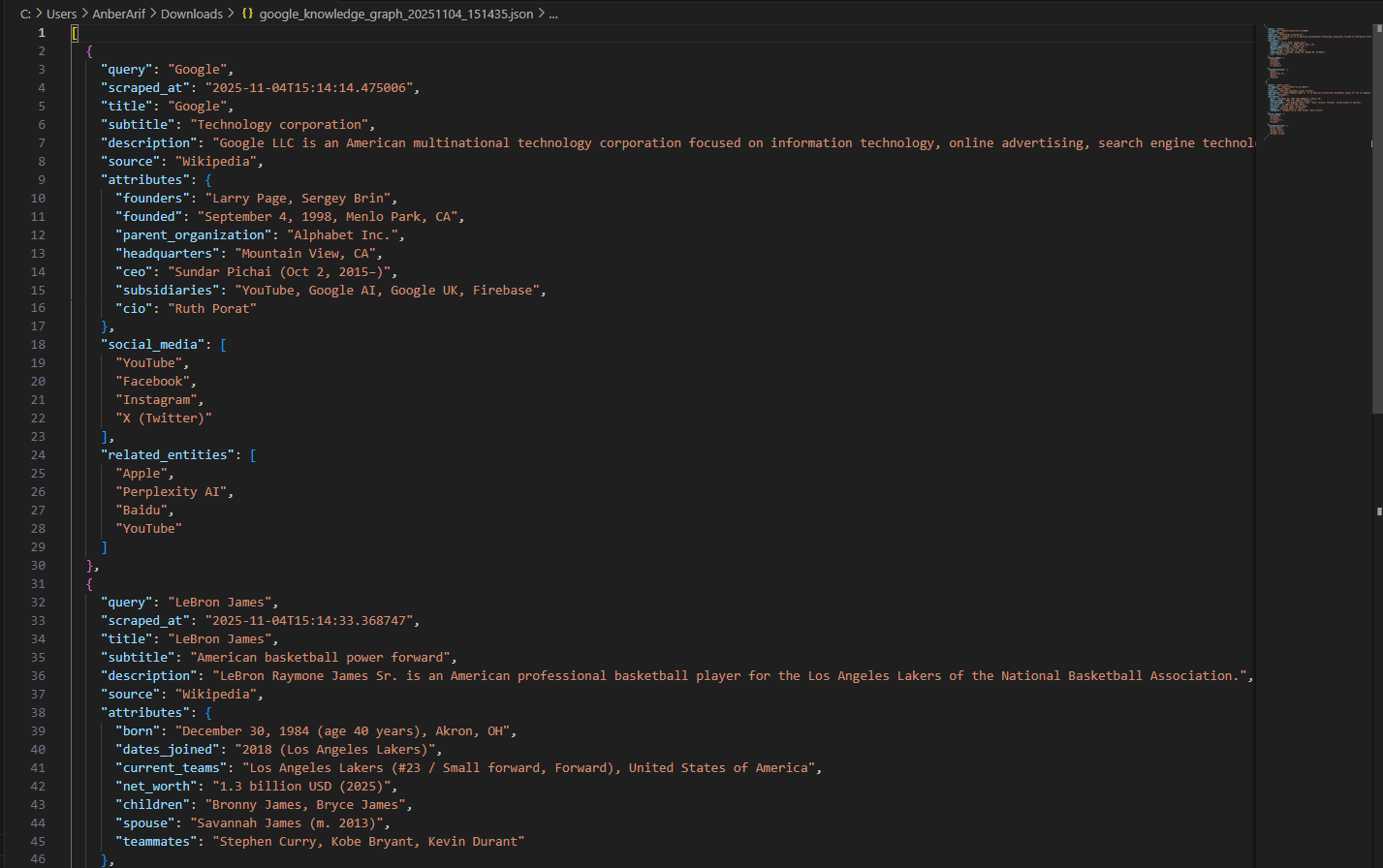
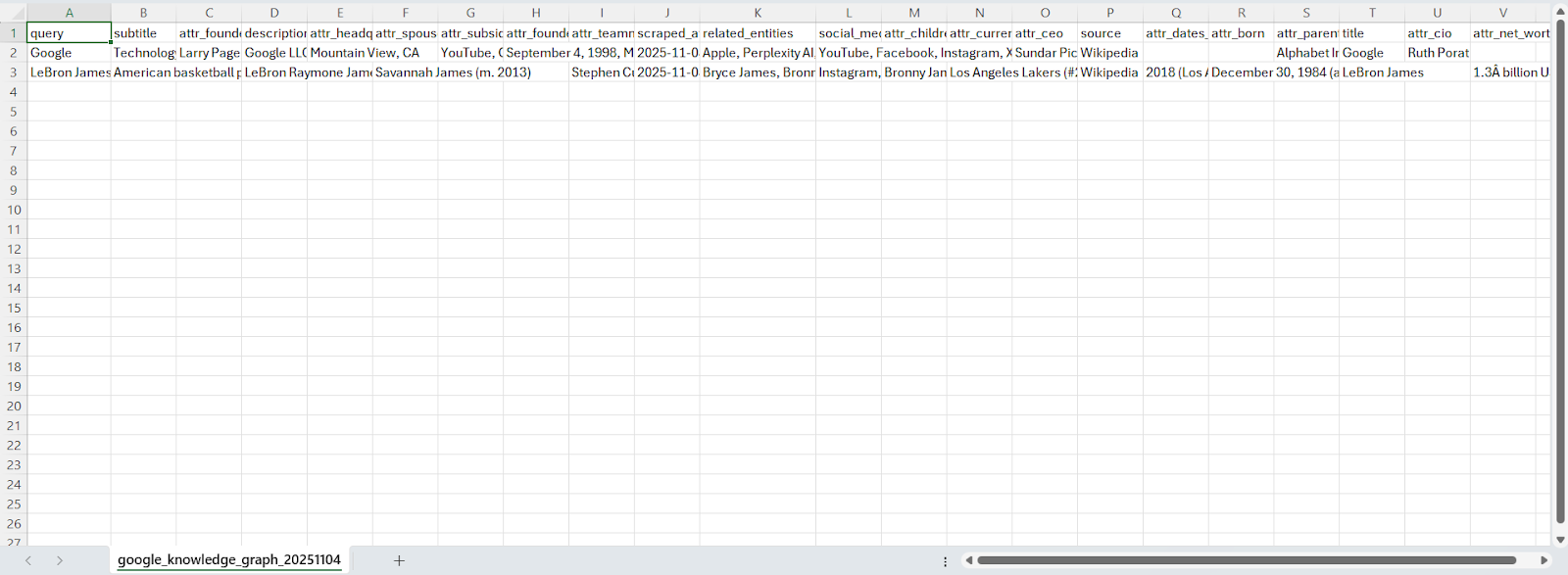
The generated files are as:
Wrapping up: Scrape Google Knowledge Graph
In this article, we built a Google Knowledge Graph scraper using Playwright and Webshare rotating residential proxies to collect structured entity data directly from Google search results. The solution extracts detailed knowledge graph information – including titles, subtitles, descriptions, source references, key attributes, social media profiles, and related entities – while minimizing detection through proxy rotation, headless browser automation, and stealth scripting.