TL;DR
- Learn how to scrape Google Finance stock data using Python.
- Use Webshare rotating residential proxies to bypass IP blocks and access real-time financial information.
- Extract and save key company data – including current stock price, financial statements, news stories, and the About section – into a clean JSON file.
Google Finance is one of the most trusted platforms for tracking live stock performance, financial statements, and market trends across global exchanges. In this guide, you’ll learn how to build a Google Finance web scraper in Python that collects structured data for a list of stock tickers.
Prerequisites
Before building and running the Google Finance scraper, ensure that your environment is correctly configured with all the necessary tools and dependencies.
- Python: Ensure you have Python 3.9+ installed. You can your version by running:
python --version- Required Python Packages: The scraper will use Playwright for browser automation and asyncio for asynchronous execution. Install all dependencies with:
pip install playwrightThe below libraries come pre-installed with Python but make sure they are available:
- asyncio – to handle asynchronous browser control
- json – to format and save scraped data
- sys – to manage runtime arguments and error handling
- Browser Installation: After installing Playwright, you must install the browser binaries (Chromium) before running the scraper:
playwright install chromium- Webshare Proxy Access: Because Google Finance can restrict automated access, it’s highly recommended to use Webshare rotating residential proxies. These help simulate real user behavior, rotate IPs automatically, and reduce the risk of being blocked during frequent scraping sessions.
Scraping Google Finance
Follow the steps below to build and run your Google Finance scraper that collects stock data, company details, financials, and news for multiple tickers.
Step 1: Prepare your ticker list
Start by defining the stock tickers you want to scrape. Use the format SYMBOL:EXCHANGE and separate each ticker with a semicolon. Example:
AMZN:NASDAQ; TSLA:NASDAQ; VOW:ETRStep 2: Launch the browser with Playwright
- Initialize Playwright in asynchronous mode and launch the Chromium browser in headless mode.
- Use a realistic user agent and enable rotating residential proxies from Webshare to simulate genuine browsing and prevent IP blocks.
Step 3: Visit the company page
- For each ticker, navigate to its Google Finance page such as: https://www.google.com/finance/quote/AMZN:NASDAQ
- Wait a few seconds to ensure that all content on the page is fully loaded before extracting data.
Step 4: Capture the company name and stock price
- Extract the company’s official name and its current stock price. This will form the basic snapshot of your output, representing the real-time price at the moment of scraping.
Step 5: Record price changes
- Collect the daily percentage change and the absolute change in stock price. These values provide important context to the price data, showing short-term market movement and how the stock is performing during the trading day.
Step 6: Gather key overview statistics
- Retrieve general stock metrics shown on the page such as market capitalization, P/E ratio, and other relevant financial ratios. These overview stats are stored as a dictionary for each ticker, making it easy to analyze or compare companies later.
Step 7: Collect recent news stories
- Scroll through the news section and extract up to six of the most recent articles related to the company.
- For each article, save the headline, source, and link so you can later track trends around that stock.
Step 8: Extract the About section
In the company overview area, gather important background information including:
- CEO name
- Headquarters location
- Number of employees
- Sector or industry
- Year founded
- Official website
This provides essential company context alongside financial data.
Step 9: Expand and scrape financial statements
- Locate and open each financial section – Income Statement, Balance Sheet, and Cash Flow – one by one.
- Once expanded, extract all available rows and values for each section to capture key financial data such as revenue, profit, assets, liabilities, and cash movements.
Step 10: Structure the scraped data
For every ticker, store the collected information in a single structured object that includes:
- Basic details (ticker, company name, current price)
- Market info (price change)
- Overview stats
- Financials (income statement, balance sheet, cash flow)
- News articles
- About section
Step 11: Loop through all tickers
- Iterate through your list of tickers, scraping each one sequentially.
- Add a short delay (around 2–3 seconds) between requests to avoid detection and maintain stable proxy rotation.
Step 12: Save the results to JSON
- After scraping all tickers, combine their data into a single list and save it as a formatted JSON file, for example: google_finance_data.json.
Note: This code uses await main() which works in Google Colab and Jupyter notebooks. For regular Python scripts, use this instead:
if __name__ == "__main__":
    asyncio.run(main())
Here’s the complete code:
import asyncio
from playwright.async_api import async_playwright
import json
import sys

class GoogleFinanceScraper:
    def __init__(self):
        self.base_url = "https://www.google.com/finance"
        self.proxy_url = 'http://p.webshare.io:80'
        self.proxy_username = 'your_username-rotate'
        self.proxy_password = 'your_password'

    async def setup_browser(self):
        playwright = await async_playwright().start()

        browser = await playwright.chromium.launch(
            headless=True,
            args=['--no-sandbox', '--disable-setuid-sandbox']
        )

        context = await browser.new_context(
            viewport={'width': 1920, 'height': 1080},
            user_agent='Mozilla/5.0 (Windows NT 10.0; Win64; x64) AppleWebKit/537.36 (KHTML, like Gecko) Chrome/120.0.0.0 Safari/537.36',
            proxy={
                'server': self.proxy_url,
                'username': self.proxy_username,
                'password': self.proxy_password
            }
        )

        page = await context.new_page()
        return playwright, browser, page

    async def scrape_ticker(self, ticker):
        playwright, browser, page = await self.setup_browser()

        try:
            url = f"{self.base_url}/quote/{ticker}"
            response = await page.goto(url, timeout=30000, wait_until='domcontentloaded')
            await page.wait_for_timeout(5000)

            data = {
                "ticker": ticker,
                "company_name": "",
                "current_price": "",
                "price_change": "",
                "price_change_amount": "",
                "market_status": "",
                "overview_stats": {},
                "financials": {
                    "income_statement": [],
                    "balance_sheet": [],
                    "cash_flow": []
                },
                "news": [],
                "about": {}
            }

            await self.scrape_basic_info(page, data)
            await self.scrape_financials(page, data)

            return data

        except Exception as e:
            return None

        finally:
            await browser.close()
            await playwright.stop()

    async def scrape_basic_info(self, page, data):
        company_el = await page.query_selector('.zzDege')
        if company_el:
            data["company_name"] = (await company_el.text_content() or "").strip()

        price_selectors = [
            '.YMlKec.fxKbKc',
            '.fxKbKc',
            '.YMlKec',
            '[data-field="regularMarketPrice"]',
            '.AHmHk'
        ]

        for selector in price_selectors:
            price_el = await page.query_selector(selector)
            if price_el:
                price_text = (await price_el.text_content() or "").strip()
                if price_text and '$' in price_text and len(price_text) < 20:
                    data["current_price"] = price_text
                    break

        change_el = await page.query_selector('.JwB6zf')
        if change_el:
            data["price_change"] = (await change_el.text_content() or "").strip()

        change_amt_el = await page.query_selector('.BAftM')
        if change_amt_el:
            data["price_change_amount"] = (await change_amt_el.text_content() or "").strip()

        status_el = await page.query_selector('.exOpGd')
        if status_el:
            data["market_status"] = (await status_el.text_content() or "").strip()

        await self.scrape_overview_stats(page, data)
        await self.scrape_news(page, data)
        await self.scrape_about_section(page, data)

    async def scrape_overview_stats(self, page, data):
        try:
            stat_labels = await page.query_selector_all('.mfs7Fc')
            stat_values = await page.query_selector_all('.P6K39c')

            if stat_labels and stat_values:
                for i, (label_el, value_el) in enumerate(zip(stat_labels, stat_values)):
                    if i < len(stat_values):
                        label = (await label_el.text_content() or "").strip()
                        value = (await value_el.text_content() or "").strip()

                        if label and value:
                            clean_label = label.lower().replace(' ', '_').replace('.', '').replace('-', '_')
                            data["overview_stats"][clean_label] = value

        except Exception as e:
            pass

    async def scrape_news(self, page, data):
        try:
            news_elements = await page.query_selector_all('.yY3Lee')

            for news_el in news_elements[:6]:
                news_data = {}

                headline_el = await news_el.query_selector('.Yfwt5')
                if headline_el:
                    news_data["headline"] = (await headline_el.text_content() or "").strip()

                source_el = await news_el.query_selector('.sfyJob')
                if source_el:
                    news_data["source"] = (await source_el.text_content() or "").strip()

                link_el = await news_el.query_selector('a')
                if link_el:
                    news_data["link"] = await link_el.get_attribute('href') or ""

                if news_data:
                    data["news"].append(news_data)

        except Exception as e:
            pass

    async def scrape_about_section(self, page, data):
        try:
            about_text_el = await page.query_selector('.bLLb2d')
            if about_text_el:
                about_text = (await about_text_el.text_content() or "").strip()
                if about_text:
                    data["about"]["description"] = about_text

            about_items = await page.query_selector_all('.LuLFhc')

            for item in about_items:
                label_el = await item.query_selector('.OspXqd')
                value_el = await item.query_selector('.oJCxTc')

                if label_el and value_el:
                    label = (await label_el.text_content() or "").strip()
                    value = (await value_el.text_content() or "").strip()

                    if label == "CEO":
                        data["about"]["ceo"] = value
                    elif label == "Headquarters":
                        data["about"]["headquarters"] = value
                    elif label == "Employees":
                        data["about"]["employees"] = value
                    elif label == "Sector":
                        data["about"]["sector"] = value
                    elif label == "Founded":
                        data["about"]["founded"] = value
                    elif label == "Website":
                        data["about"]["website"] = value

        except Exception as e:
            pass

    async def scrape_financials(self, page, data):
        """Scrape all financial statements by expanding and navigating through sections"""

        # First, try to find and expand the Income Statement section
        await self.expand_financial_section(page, "Income Statement")

        # Scrape income statement
        await self.scrape_income_statement(page, data)

        # Find and expand Balance Sheet section
        balance_sheet_expanded = await self.expand_financial_section(page, "Balance Sheet")
        if balance_sheet_expanded:
            await page.wait_for_timeout(2000)
            await self.scrape_balance_sheet(page, data)

        # Find and expand Cash Flow section
        cash_flow_expanded = await self.expand_financial_section(page, "Cash Flow")
        if cash_flow_expanded:
            await page.wait_for_timeout(2000)
            await self.scrape_cash_flow(page, data)

    async def expand_financial_section(self, page, section_name):
        """Find and click to expand a financial section"""
        try:
            # Look for expandable sections with the specific section name
            section_selectors = [
                f'div[role="button"]:has-text("{section_name}")',
                f'button:has-text("{section_name}")',
                f'.oX8Xbb:has-text("{section_name}")',
                f'[jsname="HSrbLb"]:has-text("{section_name}")',
                f'.ECi4Zd:has-text("{section_name}")'
            ]

            for selector in section_selectors:
                section_element = await page.query_selector(selector)
                if section_element:
                    # Check if section is already expanded
                    aria_expanded = await section_element.get_attribute('aria-expanded')
                    if aria_expanded != 'true':
                        await section_element.click()
                        await page.wait_for_timeout(2000)
                    return True
            return False
        except Exception as e:
            return False

    async def scrape_table_data(self, table, data_list):
        """Generic method to scrape data from financial tables"""
        try:
            rows = await table.query_selector_all('tr.roXhBd')
            if not rows:
                return

            for row in rows:
                cells = await row.query_selector_all('td, th')
                if len(cells) >= 3:
                    row_data = {}

                    label_cell = cells[0]
                    label_el = await label_cell.query_selector('.rsPbEe')
                    if label_el:
                        row_data["item"] = (await label_el.text_content() or "").strip()

                    value_cell = cells[1]
                    if value_cell:
                        row_data["value"] = (await value_cell.text_content() or "").strip()

                    change_cell = cells[2]
                    if change_cell:
                        row_data["yoy_change"] = (await change_cell.text_content() or "").strip()

                    if "item" in row_data and row_data["item"]:
                        data_list.append(row_data)

        except Exception as e:
            pass

    async def scrape_income_statement(self, page, data):
        try:
            # Look for income statement table within the Income Statement section
            income_section = await page.query_selector('.ECi4Zd:has-text("Income Statement")')
            if income_section:
                income_table = await income_section.query_selector('table.slpEwd')
                if income_table:
                    await self.scrape_table_data(income_table, data["financials"]["income_statement"])
        except Exception as e:
            pass

    async def scrape_balance_sheet(self, page, data):
        try:
            # Look for balance sheet table within the Balance Sheet section
            balance_section = await page.query_selector('.ECi4Zd:has-text("Balance Sheet")')
            if balance_section:
                balance_table = await balance_section.query_selector('table.slpEwd')
                if balance_table:
                    await self.scrape_table_data(balance_table, data["financials"]["balance_sheet"])
        except Exception as e:
            pass

    async def scrape_cash_flow(self, page, data):
        try:
            # Look for cash flow table within the Cash Flow section
            cash_flow_section = await page.query_selector('.ECi4Zd:has-text("Cash Flow")')
            if cash_flow_section:
                cashflow_table = await cash_flow_section.query_selector('table.slpEwd')
                if cashflow_table:
                    await self.scrape_table_data(cashflow_table, data["financials"]["cash_flow"])
        except Exception as e:
            pass

async def main():
    # Configure a list of tickers to scrape
    tickers_input = "AMZN:NASDAQ; TSLA:NASDAQ; VOW:ETR"
    tickers = [ticker.strip() for ticker in tickers_input.split(';')]

    print(f"Scraping data for tickers: {', '.join(tickers)}")

    scraper = GoogleFinanceScraper()

    all_data = []

    for ticker in tickers:
        print(f"Scraping {ticker}...")
        ticker_data = await scraper.scrape_ticker(ticker)
        if ticker_data:
            all_data.append(ticker_data)
            print(f"Successfully scraped {ticker}")
        else:
            print(f"Failed to scrape {ticker}")

        await asyncio.sleep(3)

    if all_data:
        with open('google_finance_data.json', 'w', encoding='utf-8') as f:
            json.dump(all_data, f, indent=2, ensure_ascii=False)
        print(f"Data saved to google_finance_data.json for {len(all_data)} tickers")
    else:
        print("No data was scraped.")

await main()
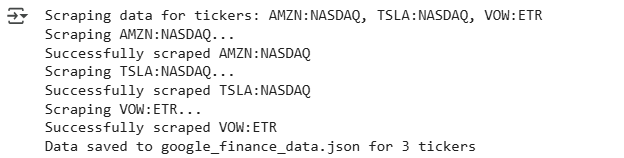
Here’s the output:
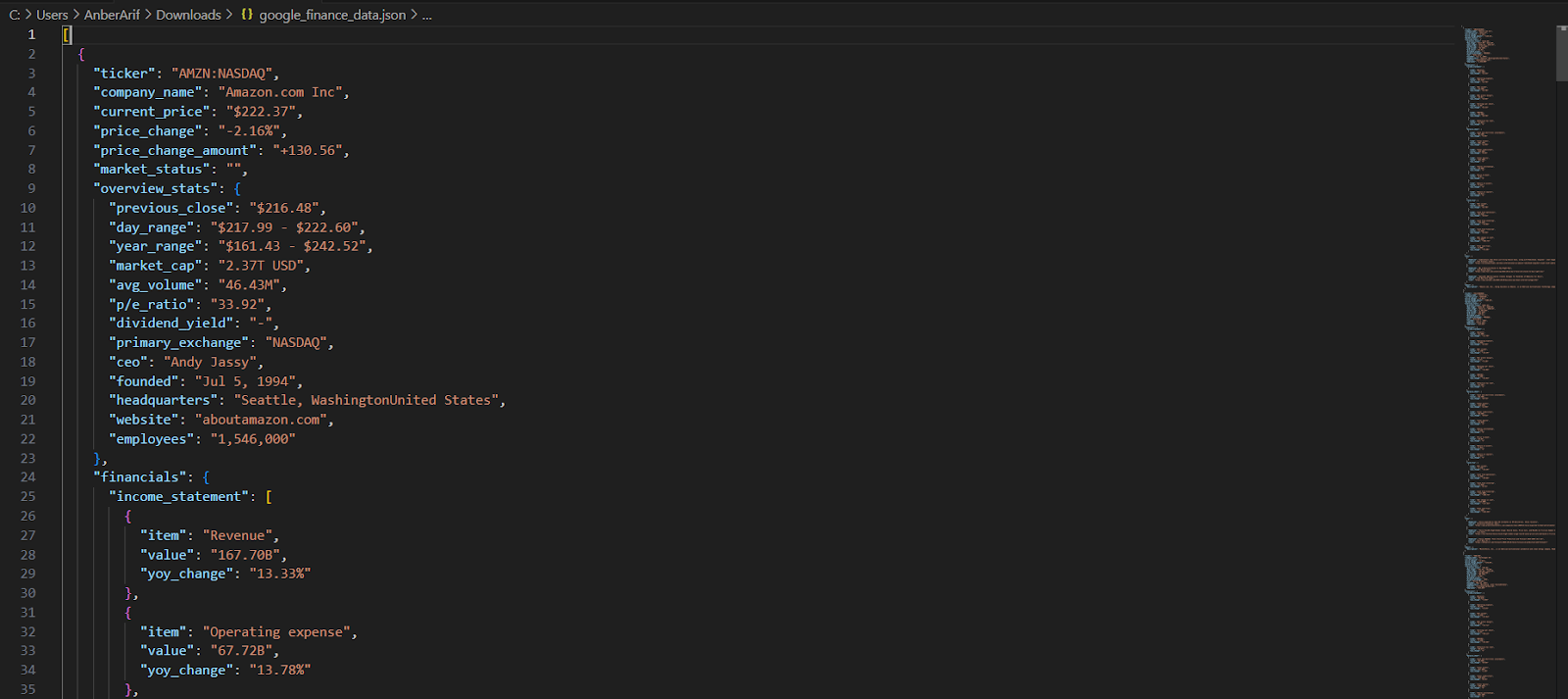
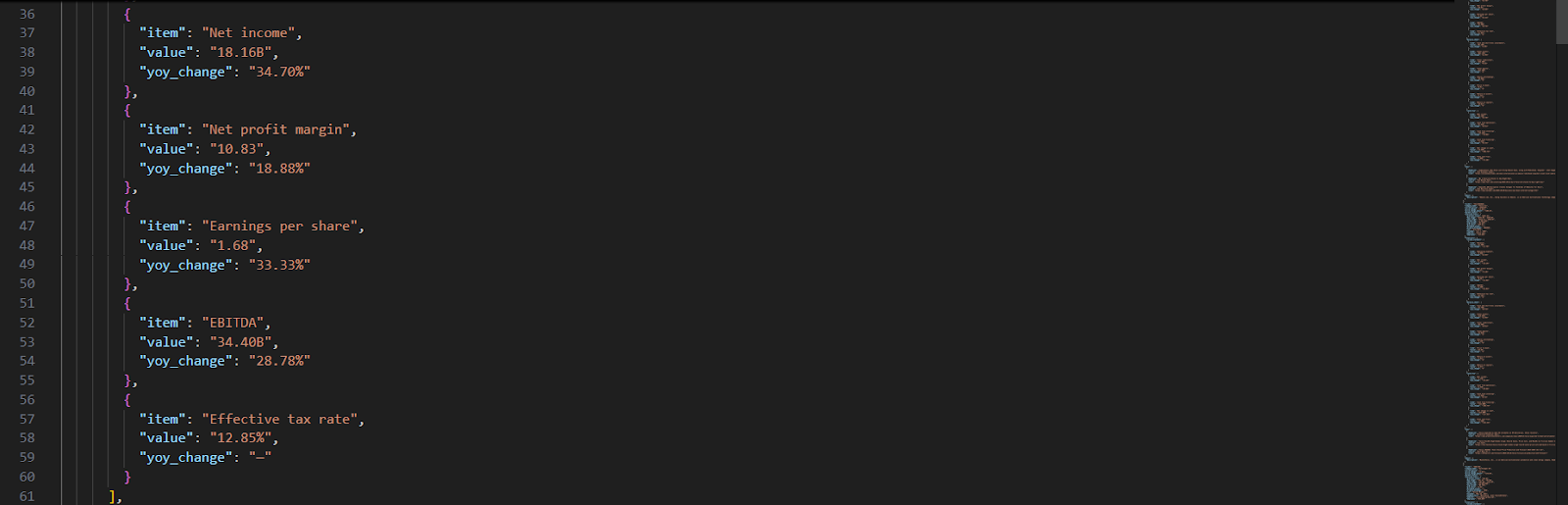
The generated json is as:
Wrapping up: Scrape Google Finance
In this article, we built a Google Finance scraper using Playwright and Webshare rotating residential proxies to reliably extract structured financial data from dynamically rendered pages. The scraper collects detailed information for any list of stock tickers – including current prices, market stats, company details, recent news, and full financial statements (income statement, balance sheet, and cash flow).