TL;DR
- Learn how to scrape Google Search (SERP) results using Python.
- Use Webshare rotating residential proxies to prevent IP blocks and ensure consistent access across regions.
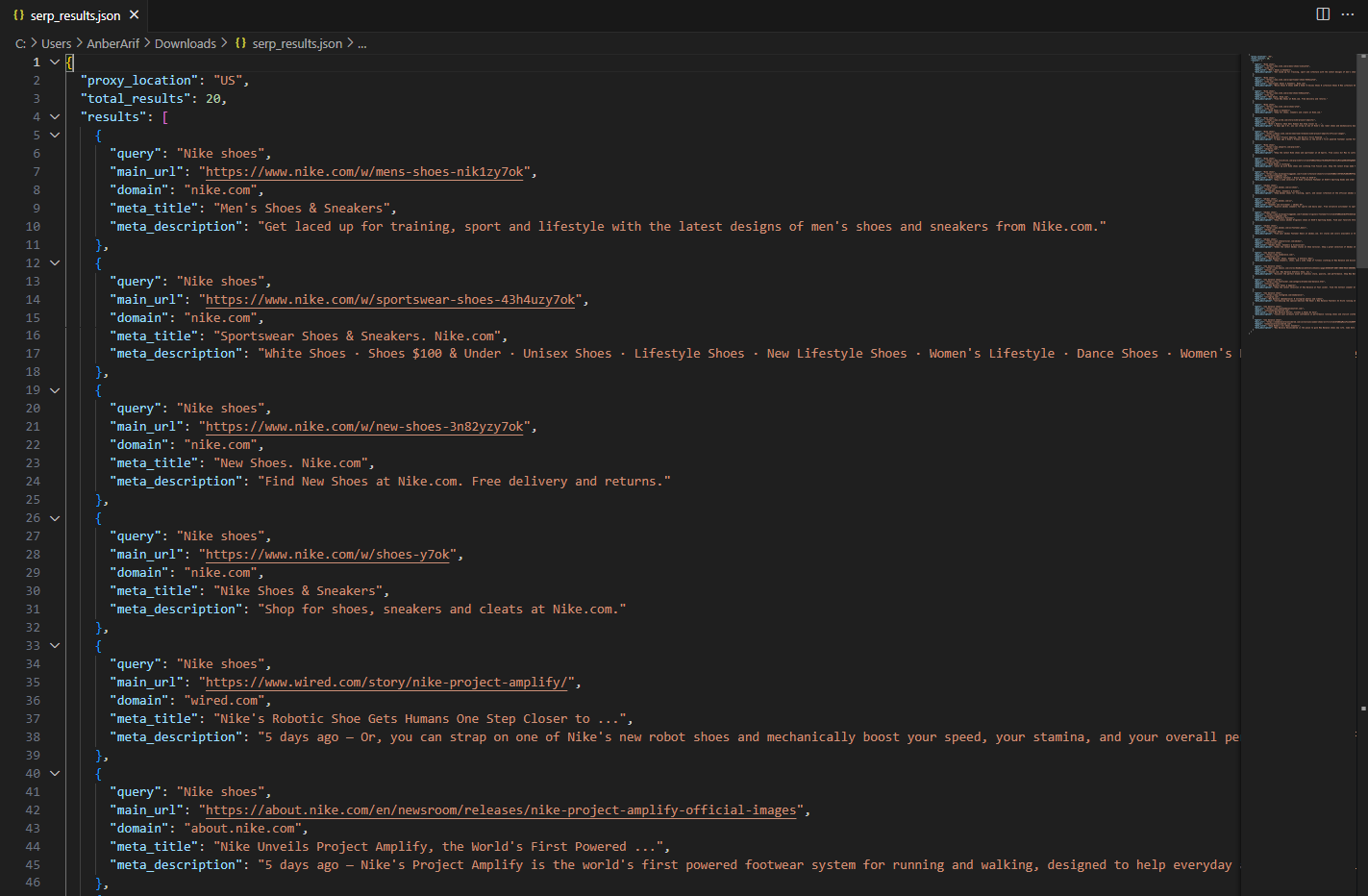
- Extract and store organic search data – including main URLs, domains, meta titles, and descriptions – into a structured JSON file.
Google’s Search Engine Results Page (SERP) displays the most relevant webpages for any query, along with rich metadata that reflects keyword visibility and ranking trends. In this guide, you’ll learn how to build a Google SERP scraper in Python that collects organic search positions (while excluding ads) and outputs a clean, ready-to-analyze dataset. If you’re new to the topic, start with what is web scraping and how scrapers work.
Prerequisites
Before building and running the Google SERP scraper, make sure your Python environment is properly configured with the necessary tools and dependencies.
- Python: Ensure that Python 3.9 or higher is installed on your system. You can verify your version by running:
python --version- Required Python Packages: This scraper uses Playwright for browser automation and asynchronous execution. Install the required dependencies with:
pip install playwright- Built-in Python Libraries: The following libraries are preinstalled with Python and require no additional setup:
- asyncio - for managing asynchronous browser sessions
- json - for saving structured output data
- urllib.parse - for extracting domains from URLs
- random - for generating natural human-like delays
- Playwright Browser Setup: After installing Playwright, you’ll need to install the browser binaries (Chromium) once:
playwright install chromium- Webshare Proxy Access: Since Google’s SERP data is region-specific and protected against frequent scraping, reliable access requires authenticated rotating proxies. Use Webshare residential proxies to rotate IPs and simulate traffic from specific geographic locations, ensuring stable and location-accurate SERP extraction without triggering rate limits.
Scraping Google Search Results with Python
Now that your environment is ready, let’s walk through the process of scraping Google’s organic SERP results step by step.
Step 1: Set up your scraper configuration
- Start by creating a class called GoogleSERPScraper that will hold your scraper logic and configuration settings.
- Inside the constructor, define your CSS selectors for result blocks, titles, URLs, and descriptions – these identify where Google’s organic results appear on the page.
- You’ll also add a proxy location (for example, ‘US’ or ‘UK’) and your Webshare proxy credentials. This allows your browser traffic to be routed through a specific region so you can access location-based search results while avoiding IP-based blocking.
Step 2: Launch the headless browser
- Initialize Playwright asynchronously and start a Chromium browser in headless mode.
- While launching, include arguments like --no-sandbox and --disable-blink-features=AutomationControlled to prevent detection.
- If you’re using proxies, extract the proxy server and credentials from your Webshare string and pass them into your Playwright context.
The browser context will also include:
- A realistic viewport
- A genuine Chrome user agent
- Locale adjustments based on proxy location
Lastly, inject a small script to remove the navigator.webdriver flag – this helps the browser appear like a real user session.
Step 3: Handle cookie pop-ups automatically
- Before you start searching, include a small helper function to close any cookie consent banners that appear on Google’s homepage.
- Use a list of common button selectors like ‘Accept all’ or ‘I agree’, and click the first one that becomes visible. This prevents the cookie dialog from blocking your search box later.
Step 4: Perform a search for each query
- Once the page is loaded, locate Google’s search input using the right selectors.
- Click inside the box, clear any prefilled text, and type the query one character at a time using the press() method.
- After entering the full query, press Enter to load the search results.
Here’s an example list of queries you can provide:
search_queries = ["Nike shoes", "adidas shoes", "new balance shoes"]Step 5: Wait for the results to load
- After submitting the query, wait until Google fully renders the search results section. This ensures the content is ready before you start extracting.
- If you encounter any blocking pages like unusual traffic or CAPTCHA warnings, the scraper will skip and move on safely.
Step 6: Extract organic search results
Once the results are loaded, loop through each result block (up to 10 per query) and collect:
- Main url
- Domain name
- Meta title
- Meta description
Use the urlparse library to extract domains like nike.com or adidas.com from full urls. Trim whitespace and skip any empty or incomplete entries.
Step 7: Apply delays between queries
- To mimic human browsing behavior, insert a small random delay (around 8-15 seconds) between each search. This helps prevent rate limiting or temporary blocks from Google.
await asyncio.sleep(random.uniform(8, 15))Step 8: Compile and save results
As each query finishes, store the collected data in a structured JSON format including:
- Proxy location used
- Total number of organic results
- A list of dictionaries containing each page’s title, description, URL, and domain
Note: This code uses await main() which works in Google Colab and Jupyter notebooks. For regular Python scripts, use this instead:
if __name__ == "__main__":
    asyncio.run(main())
Here’s the complete code:
import asyncio
import json
from urllib.parse import urlparse
from playwright.async_api import async_playwright
import random

class GoogleSERPScraper:
    def __init__(self, proxy_location="US"):
        self.selectors = {
            'ORGANIC_RESULTS': '#rso .MjjYud',
            'RESULT_BLOCKS': '.tF2Cxc',
            'TITLE': 'h3.LC20lb',
            'URL': '.yuRUbf a',
            'DESCRIPTION': '.VwiC3b'
        }
        self.proxy_details = "http://username-rotate:password@p.webshare.io:80"
        self.proxy_location = proxy_location

    def extract_domain(self, url):
        try:
            parsed = urlparse(url)
            domain = parsed.netloc
            if domain.startswith('www.'):
                domain = domain[4:]
            return domain
        except:
            return ""

    async def setup_browser(self):
        playwright = await async_playwright().start()

        launch_args = [
            '--no-sandbox',
            '--disable-dev-shm-usage',
            '--disable-blink-features=AutomationControlled',
        ]

        if self.proxy_details:
            proxy_server = self.proxy_details.split('@')[1]
            launch_args.append(f'--proxy-server={proxy_server}')

        browser = await playwright.chromium.launch(
            headless=True,
            args=launch_args
        )

        context_args = {
            'viewport': {'width': 1366, 'height': 768},
            'user_agent': 'Mozilla/5.0 (Windows NT 10.0; Win64; x64) AppleWebKit/537.36 (KHTML, like Gecko) Chrome/120.0.0.0 Safari/537.36',
            'locale': 'en-US' if self.proxy_location == "US" else 'en-GB'
        }

        if self.proxy_details:
            proxy_parts = self.proxy_details.split('://')[1].split('@')
            if len(proxy_parts) == 2:
                credentials = proxy_parts[0]
                context_args['http_credentials'] = {
                    'username': credentials.split(':')[0],
                    'password': credentials.split(':')[1]
                }

        context = await browser.new_context(**context_args)

        await context.add_init_script("""
            Object.defineProperty(navigator, 'webdriver', {
                get: () => undefined,
            });
        """)

        return playwright, browser, context

    async def human_like_delay(self):
        await asyncio.sleep(random.uniform(2, 4))

    async def handle_cookies(self, page):
        try:
            cookie_selectors = [
                'button:has-text("Accept all")',
                'button:has-text("I agree")',
                'button:has-text("Accept")',
                '#L2AGLb'
            ]

            for selector in cookie_selectors:
                try:
                    button = page.locator(selector).first
                    if await button.is_visible(timeout=3000):
                        await button.click()
                        await asyncio.sleep(1)
                        break
                except:
                    continue
        except:
            pass

    async def perform_search(self, page, query):
        try:
            search_selectors = [
                'textarea[name="q"]',
                'input[name="q"]',
                '.gLFyf'
            ]

            search_box = None
            for selector in search_selectors:
                try:
                    search_box = page.locator(selector).first
                    if await search_box.is_visible(timeout=10000):
                        break
                except:
                    continue

            if not search_box:
                return False

            await search_box.click()
            await asyncio.sleep(0.5)

            await search_box.press('Control+A')
            await asyncio.sleep(0.2)

            for char in query:
                await search_box.press(char)
                await asyncio.sleep(random.uniform(0.05, 0.1))

            await asyncio.sleep(1)
            await search_box.press('Enter')

            return True

        except Exception as e:
            print(f"Search error: {e}")
            return False

    async def wait_for_results(self, page):
        try:
            await page.wait_for_selector(self.selectors['ORGANIC_RESULTS'], timeout=15000)
            return True
        except:
            current_url = page.url
            if any(blocked in current_url for blocked in ['sorry', 'captcha', 'blocked']):
                print("Blocked by Google")
                return False
            return False

    async def extract_results(self, page, query):
        results = []

        try:
            organic_blocks = await page.query_selector_all(self.selectors['RESULT_BLOCKS'])

            for block in organic_blocks[:10]:
                try:
                    title_element = await block.query_selector(self.selectors['TITLE'])
                    title = await title_element.text_content() if title_element else ""

                    url_element = await block.query_selector(self.selectors['URL'])
                    url = await url_element.get_attribute('href') if url_element else ""

                    desc_element = await block.query_selector(self.selectors['DESCRIPTION'])
                    description = await desc_element.text_content() if desc_element else ""

                    if not title or not url:
                        continue

                    domain = self.extract_domain(url)

                    result_data = {
                        'query': query,
                        'main_url': url,
                        'domain': domain,
                        'meta_title': title.strip(),
                        'meta_description': description.strip() if description else ""
                    }

                    results.append(result_data)

                except:
                    continue

            return results

        except Exception as e:
            print(f"Extraction error: {e}")
            return []

    async def scrape_serp(self, query, context):
        print(f"Scraping: {query}")

        page = await context.new_page()

        try:
            await page.set_extra_http_headers({
                'Accept': 'text/html,application/xhtml+xml,application/xml;q=0.9,image/webp,*/*;q=0.8',
                'Accept-Language': 'en-US,en;q=0.5',
            })

            # Use location-specific Google domain
            google_domain = "https://www.google.com"
            if self.proxy_location != "US":
                google_domain = f"https://www.google.{self.proxy_location.lower()}"

            await page.goto(google_domain, wait_until='networkidle', timeout=60000)
            await self.human_like_delay()

            await self.handle_cookies(page)

            if not await self.perform_search(page, query):
                return []

            if not await self.wait_for_results(page):
                return []

            await self.human_like_delay()

            results = await self.extract_results(page, query)

            print(f"Found {len(results)} results for {query}")
            return results

        except Exception as e:
            print(f"Error scraping {query}: {e}")
            return []
        finally:
            await page.close()

    async def scrape_queries(self, queries):
        all_results = []
        playwright, browser, context = await self.setup_browser()

        try:
            for i, query in enumerate(queries):
                print(f"Query {i+1}/{len(queries)}")

                if i > 0:
                    delay = random.uniform(8, 15)
                    await asyncio.sleep(delay)

                results = await self.scrape_serp(query, context)
                all_results.extend(results)

            return {
                'proxy_location': self.proxy_location,
                'total_results': len(all_results),
                'results': all_results
            }

        finally:
            await context.close()
            await browser.close()
            await playwright.stop()

    def save_to_json(self, results, filename="serp_results.json"):
        with open(filename, 'w', encoding='utf-8') as f:
            json.dump(results, f, indent=2, ensure_ascii=False)
        print(f"Saved to {filename}")

async def main():
    # User configures proxy location
    proxy_location = "US"  # Change to "UK", "CA", etc. as needed

    scraper = GoogleSERPScraper(proxy_location=proxy_location)

    search_queries = ["Nike shoes", "adidas shoes", "new balance shoes"]

    print(f"Starting Google SERP scraping with proxy location: {proxy_location}")
    print(f"Queries: {search_queries}")

    results = await scraper.scrape_queries(search_queries)

    print(f"Scraping completed")
    print(f"Total results: {results['total_results']}")
    print(f"Proxy location used: {results['proxy_location']}")

    scraper.save_to_json(results)

await main()
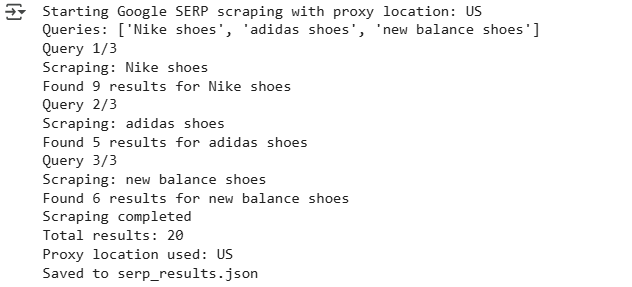
Here’s the console output:
The generated json is as:
Wrapping Up: Scrape Google Search Results
In this guide, we built a Google Search Results (SERP) scraper using Playwright and Webshare rotating residential proxies to collect organic search data at scale. The scraper extracts structured information – including result titles, descriptions, URLs, and domains – for any list of keywords, while avoiding ads and sponsored content.