TL;DR
- Learn how to scrape Google News search results using Python.
- Use Webshare rotating residential proxies to bypass IP blocks and access localized news feeds.
- Extract and save news article details – including titles, sources, publication dates, and URLs – into structured JSON and CSV files.
Google News aggregates articles from thousands of publishers worldwide, making it a powerful source for tracking real-time content, analyzing media sentiment, and identifying emerging trends. However, it doesn’t offer an official public API, which makes programmatic access especially valuable. So whether you're performing market research, conducting sentiment analysis on brand mentions, or building a real-time news monitoring dashboard, programmatic web scraping of Google News data becomes essential.
In this guide, you’ll learn how to scrape Google News in Python by pulling structured results from Google’s RSS feeds for one or multiple search queries. You’ll also see how to customize the scraper using parameters like language (hl), region (gl), and edition ID (ceid) to collect localized or topic-specific news data efficiently.
Prerequisites
Before building and running the Google News scraper, make sure your development environment is properly set up with all the required tools and dependencies.
- Python: Ensure you have Python 3.9+ installed. Verify your version by running:
python --version- Required Python Packages: The scraper uses Playwright for browser automation and asynchronous web requests, while other modules handle XML parsing, text cleaning, and structured data export. Install the required package using:
pip install playwright- Built-in Python Modules: The following libraries are part of Python’s standard library and do not require installation. They are used for managing asynchronous tasks, formatting timestamps, handling XML data, and exporting results:
- asyncio - Manages concurrent browser operations and task scheduling.
- datetime - Handles publication timestamps and file naming.
- json and csv - Save scraped news data in structured formats.
- time and random - Add randomized delays between requests to mimic real users.
- urllib.parse - Builds and encodes dynamic query URLs.
- re - Cleans HTML tags and unwanted text patterns.
- xml.etree.ElementTree (ET) - Parses and navigates XML elements within Google News RSS feeds.
- Playwright Browser Setup: After installing Playwright, you’ll need to install the Chromium browser:
playwright install chromium- Webshare Proxy Access: Since Google News enforces request rate limits and regional content variations, using Webshare rotating residential proxies ensures stable access and helps you collect localized results. Configure your proxy country and credentials to simulate real-user traffic and minimize the risk of IP blocks.
Scraping Google News RSS Feed
Now that your environment is ready, let’s walk through the process of scraping Google News search results step by step. In this section, you’ll set up your browser, configure your proxy, run the scraper for multiple queries, and finally export the data into structured files.
Step 1: Initialize the scraper
- Start by creating an instance of the GoogleNewsScraper class. This class handles everything – from browser setup to data extraction and saving the results.
scraper = GoogleNewsScraper()- This initializes your base URL (https://news.google.com/rss) and prepares Playwright for use later.
Step 2: Define your search queries
- Next, prepare a list of topics or keywords you want to collect news for. For example:
search_queries = ["Python coding", "vibe coding"]- You can add any number of queries here – each one will be scraped separately, and the results will be tagged with their respective query names.
Step 3: Configure your Webshare proxy
- Because Google may limit frequent or automated requests, using rotating proxies is crucial. This scraper supports country-based proxy rotation, letting you target specific geographic regions (e.g., US, FR, DE, UK).
- Specify whether proxying is enabled, your desired country, and authentication password in the configuration.
- Each request will use a randomized proxy user linked to that region, helping you avoid rate limits and retrieve localized news feeds reliably.
Step 4: Set your search parameters
Google News RSS supports several useful parameters that control language, region, and edition output:
- hl - Interface language (e.g., en-US, fr, es)
- gl - Geographic location (e.g., US, FR, GB)
- ceid - Edition ID, a combination of country and language (US:en)
- pagination - Number of pages (RSS feeds don’t officially paginate, but this helps manage query batching)
Adjust these values to focus on the specific language or country edition you need – for example, setting hl='fr' and gl='FR' retrieves French-language articles from France.
Step 5: Launch the browser and start scraping
Once everything is configured, run the scraper. Here’s what happens behind the scenes:
- Playwright launches a headless Chromium browser with anti-detection features (e.g., disabling navigator.webdriver) to reduce blocking.
- Your configured Webshare proxy routes all requests through the selected region.
- For each query, the scraper constructs the corresponding Google News RSS URL such as: https://news.google.com/rss/search?q=python+coding&hl=en-US&gl=US&ceid=US:en.
- The XML feed is downloaded and parsed using ElementTree, extracting each article’s title, link, publication date, source, and description.
- The scraper cleans the text, removes HTML tags, decodes entities, and applies fallback parsing logic if malformed XML is encountered.
- Randomized delays (2-5 seconds) are inserted between queries to emulate human browsing behavior.
Step 6: Export the results
- After scraping completes, all collected articles are consolidated into a list. You can export the data into both JSON and CSV files, automatically timestamped for versioning and easy downstream analysis.
Here’s the complete code:
import asyncio
import json
import csv
import time
import xml.etree.ElementTree as ET
from urllib.parse import urlencode, quote, unquote
from datetime import datetime
from playwright.async_api import async_playwright
import random
import re

class GoogleNewsScraper:
    def __init__(self):
        self.browser = None
        self.page = None
        self.base_url = "https://news.google.com/rss"

    async def setup_browser(self, proxy_config=None):
        """Setup browser with anti-detection measures"""
        playwright = await async_playwright().start()

        launch_options = {
            'headless': True,
            'args': [
                '--no-sandbox',
                '--disable-setuid-sandbox',
                '--disable-blink-features=AutomationControlled',
                '--disable-dev-shm-usage',
            ]
        }

        # proxy configuration with country selection
        if proxy_config and proxy_config.get('enabled', True):
            country = proxy_config.get('country', 'US').lower()
            username = f"username-{country}-rotate" # enter your username


            launch_options['proxy'] = {
                'server': 'http://p.webshare.io:80',
                'username': username,
                'password': proxy_config.get('password', 'password') # enter your password
            }

        self.browser = await playwright.chromium.launch(**launch_options)

        # Create context
        context = await self.browser.new_context(
            viewport={'width': 1920, 'height': 1080},
            user_agent='Mozilla/5.0 (Windows NT 10.0; Win64; x64) AppleWebKit/537.36 (KHTML, like Gecko) Chrome/120.0.0.0 Safari/537.36'
        )

        # Add stealth scripts
        await context.add_init_script("""
            Object.defineProperty(navigator, 'webdriver', {get: () => undefined});
        """)

        self.page = await context.new_page()

        # Set headers for RSS content
        await self.page.set_extra_http_headers({
            'Accept': 'application/rss+xml, text/xml, */*',
            'Accept-Language': 'en-US,en;q=0.9',
        })

    async def random_delay(self, min_seconds=1, max_seconds=3):
        """Random delay between requests"""
        delay = random.uniform(min_seconds, max_seconds)
        await asyncio.sleep(delay)

    async def scrape_news_rss(self, query, search_config):
        """Scrape news from Google RSS feed with configurable parameters"""
        all_articles = []

        for page in range(search_config.get('pagination', 1)):
            search_params = {
                'q': query,
                'hl': search_config.get('hl', 'en-US'),
                'gl': search_config.get('gl', 'US'),
                'ceid': f"{search_config.get('gl', 'US')}:{search_config.get('hl', 'en').split('-')[0]}"
            }

            # Add pagination for pages beyond first
            if page > 0:
                search_params['start'] = page * 10

            search_url = f"{self.base_url}/search?{urlencode(search_params)}"
            print(f"Scraping page {page + 1}: {search_url}")

            try:
                # Navigate to RSS URL
                await self.page.goto(search_url, wait_until='domcontentloaded', timeout=30000)
                await self.random_delay(1, 2)

                # Get the raw XML content
                content = await self.page.content()

                # Parse RSS XML content
                articles = await self.parse_rss_xml(content, query, page + 1)
                all_articles.extend(articles)

                print(f"Found {len(articles)} articles on page {page + 1}")

                # Stop if no more articles
                if not articles and page > 0:
                    break

            except Exception as e:
                print(f"Error scraping page {page + 1} for '{query}': {e}")
                break

        return all_articles

    async def parse_rss_xml(self, xml_content, query, page_num):
        """Parse RSS XML content and extract articles"""
        articles = []

        try:
            # Clean the XML content first
            xml_content = self.clean_xml_content(xml_content)

            # Parse XML content
            root = ET.fromstring(xml_content)

            # Find all item elements
            for item in root.findall('.//item'):
                article_data = await self.extract_article_from_xml(item, query, page_num)
                if article_data:
                    articles.append(article_data)

        except ET.ParseError as e:
            print(f"XML parsing error: {e}")
            # Fallback: try to extract from raw text
            articles = await self.fallback_parse(xml_content, query, page_num)
        except Exception as e:
            print(f"Error parsing RSS XML: {e}")

        return articles

    def clean_xml_content(self, content):
        """Clean XML content before parsing"""
        # Remove any null bytes or invalid characters
        content = content.replace('\x00', '')
        # Ensure proper XML declaration
        if not content.startswith('<?xml'):
            content = '<?xml version="1.0" encoding="UTF-8"?>' + content
        return content

    async def extract_article_from_xml(self, item_element, query, page_num):
        """Extract article data from XML item element"""
        try:
            # Extract title
            title_elem = item_element.find('title')
            title = title_elem.text if title_elem is not None else ""

            # Extract link - this is the Google redirect URL
            link_elem = item_element.find('link')
            url = link_elem.text if link_elem is not None else ""

            # Extract source
            source_elem = item_element.find('source')
            source = source_elem.text if source_elem is not None else ""

            # Extract publication date
            pub_date_elem = item_element.find('pubDate')
            pub_date = pub_date_elem.text if pub_date_elem is not None else ""

            # Extract description and clean HTML
            desc_elem = item_element.find('description')
            raw_description = desc_elem.text if desc_elem is not None else ""
            clean_description = self.clean_html(raw_description)

            # Validate and clean data
            clean_title = self.clean_text(title)
            clean_source = self.clean_text(source)
            clean_date = self.clean_date(pub_date)

            # Only return if we have at least a title
            if not clean_title:
                return None

            return {
                'query': query,
                'page': page_num,
                'title': clean_title,
                'source': clean_source,
                'url': url,  # Single URL field
                'publication_date': clean_date,
                'description': clean_description,
                'scraped_at': datetime.now().isoformat()
            }

        except Exception as e:
            print(f"Error extracting article from XML: {e}")
            return None

    def clean_html(self, text):
        """Remove HTML tags from text"""
        if not text:
            return ""

        # Remove HTML tags
        clean = re.sub('<[^<]+?>', '', text)
        # Decode HTML entities
        clean = unquote(clean)
        # Remove extra whitespace
        clean = ' '.join(clean.split())
        return clean.strip()

    def clean_date(self, date_string):
        """Clean and validate date string"""
        if not date_string:
            return ""

        # Remove any extra spaces
        date_string = ' '.join(date_string.split())

        # Basic date validation - if date is too far in future, might be invalid
        try:
            # Try to parse the date to check whether it's reasonable
            current_year = datetime.now().year
            if str(current_year + 2) in date_string:  # If date is 2+ years in future
                return "Invalid date"
        except:
            pass

        return date_string

    def clean_text(self, text):
        """Clean and normalize text"""
        if not text:
            return ""
        # Remove extra whitespace and newlines
        return ' '.join(text.split()).strip()

    async def fallback_parse(self, content, query, page_num):
        """Fallback parsing method if XML parsing fails"""
        articles = []
        try:
            # Simple text-based extraction as fallback
            lines = content.split('\n')
            current_article = {}

            for line in lines:
                line = line.strip()
                if '<item>' in line:
                    current_article = {}
                elif '</item>' in line and current_article:
                    if 'title' in current_article:
                        articles.append({
                            'query': query,
                            'page': page_num,
                            'title': current_article.get('title', ''),
                            'source': current_article.get('source', ''),
                            'url': current_article.get('link', ''),  # Single URL field
                            'publication_date': current_article.get('pubDate', ''),
                            'description': self.clean_html(current_article.get('description', '')),
                            'scraped_at': datetime.now().isoformat()
                        })
                    current_article = {}
                elif '<title>' in line and '</title>' in line:
                    current_article['title'] = self.clean_text(
                        line.replace('<title>', '').replace('</title>', '')
                    )
                elif '<link>' in line and '</link>' in line:
                    current_article['link'] = self.clean_text(
                        line.replace('<link>', '').replace('</link>', '')
                    )
                elif '<source>' in line and '</source>' in line:
                    current_article['source'] = self.clean_text(
                        line.replace('<source>', '').replace('</source>', '')
                    )
                elif '<pubDate>' in line and '</pubDate>' in line:
                    current_article['pubDate'] = self.clean_text(
                        line.replace('<pubDate>', '').replace('</pubDate>', '')
                    )
                elif '<description>' in line and '</description>' in line:
                    current_article['description'] = line.replace('<description>', '').replace('</description>', '')

        except Exception as e:
            print(f"Fallback parsing also failed: {e}")

        return articles

    async def scrape_queries(self, queries, proxy_config=None, search_config=None):
        """Scrape news for multiple search queries"""
        all_articles = []

        # Default configuration
        if search_config is None:
            search_config = {
                'hl': 'en-US',
                'gl': 'US',
                'pagination': 1
            }

        await self.setup_browser(proxy_config)

        try:
            for i, query in enumerate(queries):
                print(f"\n{'='*50}")
                print(f"Processing query {i+1}/{len(queries)}: {query}")
                print(f"{'='*50}")

                articles = await self.scrape_news_rss(query, search_config)
                all_articles.extend(articles)

                print(f"Found {len(articles)} articles for '{query}'")

                # Random delay between queries
                if i < len(queries) - 1:
                    delay = random.uniform(2, 5)
                    print(f"Waiting {delay:.1f} seconds before next query...")
                    await asyncio.sleep(delay)

        finally:
            await self.close()

        return all_articles

    async def close(self):
        """Close browser"""
        if self.browser:
            await self.browser.close()

    def save_to_json(self, articles, filename):
        """Save articles to JSON file"""
        with open(filename, 'w', encoding='utf-8') as f:
            json.dump(articles, f, indent=2, ensure_ascii=False)
        print(f"Saved {len(articles)} articles to {filename}")

    def save_to_csv(self, articles, filename):
        """Save articles to CSV file"""
        if not articles:
            print("No articles to save")
            return

        # Simplified fieldnames with single URL field
        fieldnames = ['query', 'page', 'title', 'source', 'url', 'publication_date', 'description', 'scraped_at']

        with open(filename, 'w', newline='', encoding='utf-8') as f:
            writer = csv.DictWriter(f, fieldnames=fieldnames)
            writer.writeheader()
            writer.writerows(articles)
        print(f"Saved {len(articles)} articles to {filename}")

async def main():
    # === USER CONFIGURATION ===

    # 1. User inputs list of search queries
    search_queries = ["Python coding", "vibe coding"]

    # 2. User configures Webshare proxy with country selection
    country_code = "US"     # User can change this to FR, DE, GB, etc.
    proxy_config = {
        'enabled': True,           # Enable/disable proxy
        'country': country_code,
        'password': 'password'     # enter your password
    }

    # 3. User configures search parameters
    search_config = {
        'hl': 'en-US',             # Interface language (en-US, fr, es, de, etc.)
        'gl': country_code,                # Geographic location
        'pagination': 1            # Number of pages to scrape
    }

    # Initialize scraper
    scraper = GoogleNewsScraper()

    print("Starting Google News RSS Scraper")
    print(f"Queries: {search_queries}")
    print(f"Proxy Country: {proxy_config.get('country', 'US')}")
    print(f"Search Config: {search_config}")
    print("=" * 60)

    # Scrape news with user configuration
    start_time = time.time()
    articles = await scraper.scrape_queries(
        queries=search_queries,
        proxy_config=proxy_config,
        search_config=search_config
    )
    end_time = time.time()

    # Save results
    if articles:
        timestamp = datetime.now().strftime("%Y%m%d_%H%M%S")
        json_filename = f"google_news_{timestamp}.json"
        csv_filename = f"google_news_{timestamp}.csv"

        scraper.save_to_json(articles, json_filename)
        scraper.save_to_csv(articles, csv_filename)

        # Print summary
        print(f"\n{'='*60}")
        print("SCRAPING COMPLETED!")
        print(f"{'='*60}")
        print(f"Total articles found: {len(articles)}")
        print(f"Time taken: {end_time - start_time:.1f} seconds")

        for query in search_queries:
            count = len([a for a in articles if a['query'] == query])
            print(f"   - '{query}': {count} articles")

    else:
        print("No articles found!")

await main()
Note: This code uses await main() which works in Google Colab and Jupyter notebooks. For regular Python scripts, use this instead:
if __name__ == "__main__":
    asyncio.run(main())
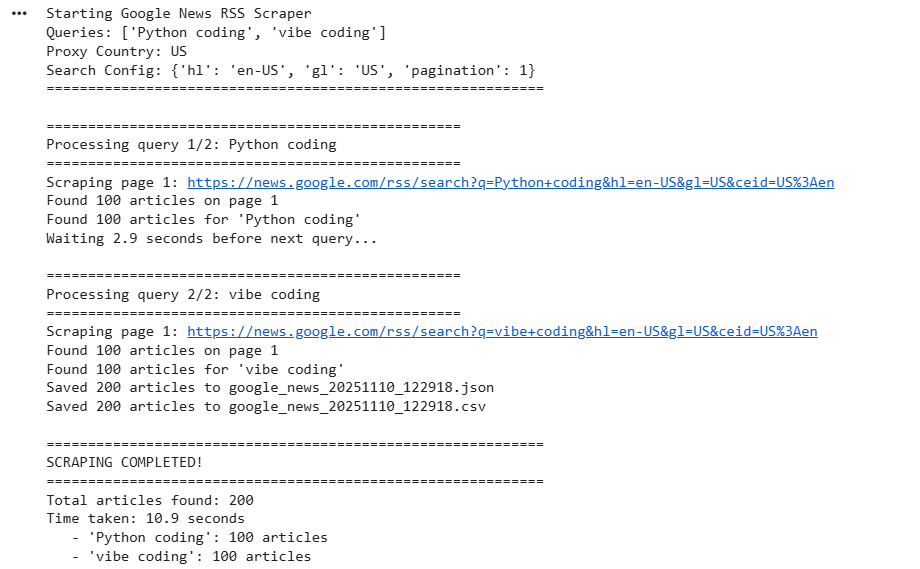
Here’s the console output:
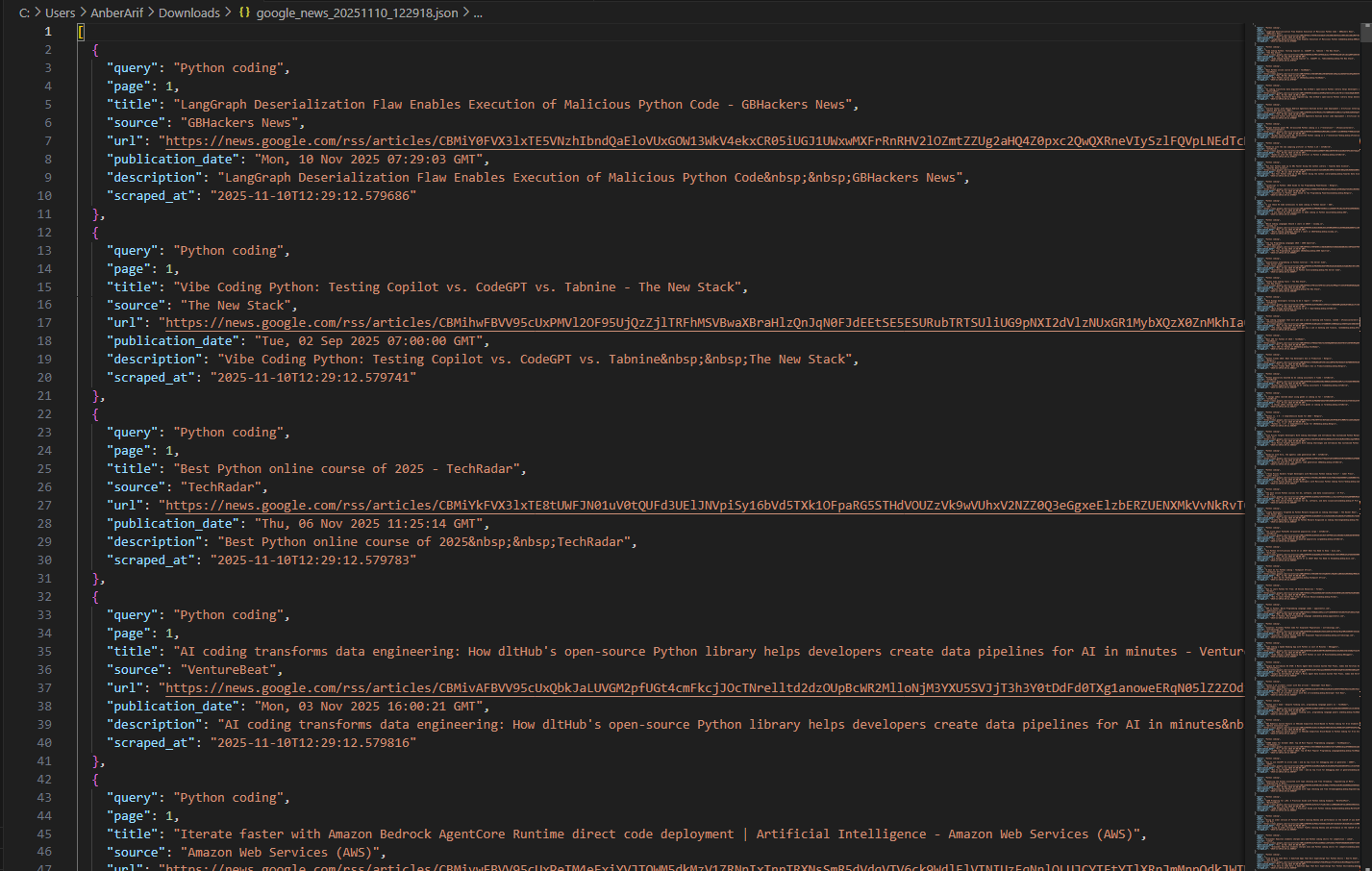
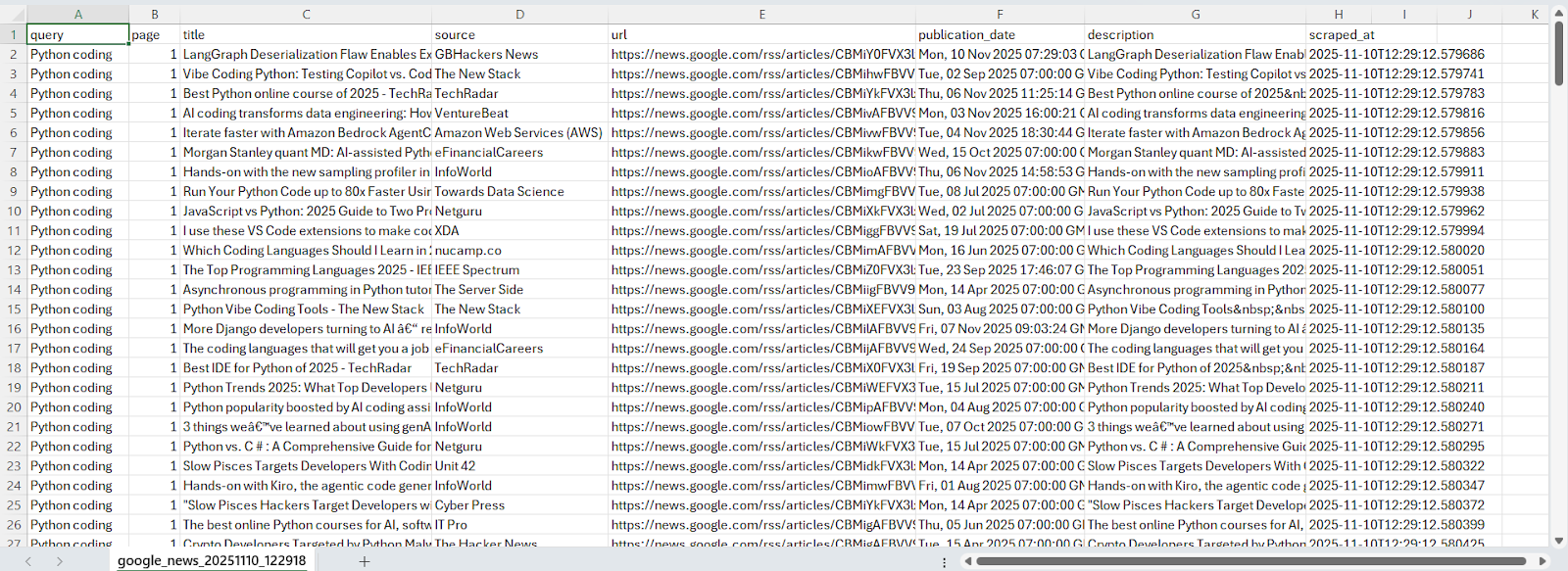
The generated files are as:
Wrapping up: Scrape Google News
In this article, we built a Google News scraper using Playwright and Webshare rotating residential proxies to collect real-time news data safely and efficiently. The scraper retrieves structured article details – including titles, sources, publication dates, and URLs – directly from Google News RSS feeds. By combining asynchronous scraping, proxy-based geo-targeting, and anti-detection browser automation, the scraper efficiently aggregates localized and query-specific Google News results without triggering rate limits or access blocks.