TL;DR
- Learn how to scrape Google Flights search results using Python.
- Use Webshare rotating residential proxies to avoid IP blocks and detection.
- Extract and save flight details – including prices, departure & arrival times, number of stops, and airlines to a JSON file.
Google Flights is one of the most comprehensive flight comparison platforms, showing real-time fares and schedules from hundreds of airlines and travel partners. In this guide, you’ll learn how to build a Google Flights web scraper in Python, capable of collecting structured flight data directly from search results.
Prerequisites
Before building and running the Google Flights scraper, ensure that your environment is properly set up with all the necessary tools and dependencies.
- Python: Ensure you have Python 3.9+ installed. You can check this by running:
python --version- Required Python Packages: The scraper will use several key libraries for asynchronous scraping, data modeling, and browser automation. Install all dependencies:
pip install playwright pydantic python-dotenvOptionally, if your Python environment doesn’t already include these built-ins, make sure they are available:
- asyncio (built into Python)
- datetime (built into Python)
- json, random, time, enum, and typing (all built-in standard libraries)
- urllib.parse (built-in)
After installing Playwright, you must install the browser binaries (Chromium) once:
playwright install chromium- Webshare Proxy Access: Because Google Flights is a dynamic and protected platform, accessing data reliably requires the use of authenticated rotating proxies. Use Webshare rotating residential proxies to simulate user traffic from different countries and avoid IP-based blocking.
Scraping Google Flights
Now that you’ve set up your environment, let’s walk through the process of scraping flight data from Google Flights using Python and Playwright.
Step 1: Define data models
Start by defining Pydantic models to represent your scraping configuration and results.
- Configuration model: includes countries, flight type (round-trip or one-way), departure/arrival dates, and origin/destination cities.
- Results model: stores details like airline, timings, stops, emissions, price, proxy country used, and a timestamp of when the data was scraped.
Use Enums for fixed values (e.g., flight type) and proper data validation for consistency.
Step 2: Configure proxy management
- Create a ProxyManager class to handle proxy setup and rotation across multiple countries (e.g., US, GB, FR).
- Each proxy should use authenticated credentials (username and password) provided by Webshare.
Step 3: Initialize the scraper
- Create a GoogleFlightsScraper class containing the main scraping logic – from building search URLs to launching browsers and parsing flight data.
The scraper uses a predefined Google Flights base URL and dynamically constructs search URLs based on user inputs such as cities, dates, and flight type.
Step 4: Launch Playwright with country-specific proxy
- For each country, launch a headless Chromium instance via Playwright using that country’s proxy credentials.
Playwright handles JavaScript-heavy pages, disables unnecessary resources (e.g., images, fonts), and uses custom headers, randomized delays, and stealth settings to mimic real user behavior.
Step 5: Generate dynamic search urls
- Based on flight type (round-trip or one-way), dynamically build the Google Flights search URL with parameters for origin, destination, and travel dates.
Step 6: Wait for page load and extract results
- After loading the page, wait for flight result selectors to appear before scraping.
- Add short randomized delays to simulate human interaction and avoid detection.
- Once ready, extract structured flight data from the visible flight cards.
Step 7: Extract flight data
- Iterate through each flight card to parse key details – airline, timings, duration, stops, emissions, and price.
- Each record is stored as a FlightResult object tagged with the proxy’s country, and duplicates are removed.
Step 8: Handle multiple countries and combine results
- Repeat scraping for all configured countries (e.g., US, GB, FR) using separate proxies.
- Merge all localized results into one dataset and remove duplicates based on airline, time, and price.
Step 9: Save results to JSON and display output
- Save the consolidated flight data as a JSON file with a timestamp.
- Print a clean summary table showing airline, timings, duration, stops, price, and source country.
- If no flights are found, notify the user and skip saving.
Here’s the complete code:
import asyncio
import json
import random
import time
from datetime import datetime
from typing import List, Dict, Optional, Literal
from enum import Enum
from urllib.parse import quote
from pydantic import BaseModel
from playwright.async_api import async_playwright

# Define data models
class FlightType(str, Enum):
    ROUND_TRIP = "round-trip"
    ONE_WAY = "one-way"

class FlightConfig(BaseModel):
    countries: List[str]
    flight_type: FlightType
    departure_date: str
    return_date: Optional[str] = None
    departure_city: str
    arrival_city: str

class FlightResult(BaseModel):
    airline: str
    departure_time: str
    arrival_time: str
    total_flight_time: str
    stops: int
    emissions: Optional[str] = None
    price: str
    country: str
    scraped_at: datetime

class ProxyManager:
    def __init__(self):
        self.proxies = {}

    async def initialize_proxies(self):
        proxy_configs = [
            {
                'country': 'US',
                'proxy_url': 'http://p.webshare.io:80',
                'username': 'your_username-US-rotate', # enter your username
                'password': 'your_password' # enter your password
            },
            {
                'country': 'FR',
                'proxy_url': 'http://p.webshare.io:80',
                'username': 'your_username-FR-rotate',
                'password': 'your_password'
            },
            {
                'country': 'GB',
                'proxy_url': 'http://p.webshare.io:80',
                'username': 'your_username-GB-rotate',
                'password': 'your_password'
            }
        ]

        for config in proxy_configs:
            await self.add_proxy(
                config['country'],
                config['proxy_url'],
                config['username'],
                config['password']
            )

    async def add_proxy(self, country: str, proxy_url: str, username: str, password: str):
        self.proxies[country] = {
            'server': proxy_url,
            'username': username,
            'password': password
        }

    def get_proxy_for_country(self, country: str) -> Dict:
        if country not in self.proxies:
            raise ValueError(f"No proxy for country: {country}")
        return self.proxies[country]

class GoogleFlightsScraper:
    def __init__(self, proxy_manager):
        self.proxy_manager = proxy_manager
        self.base_url = "https://www.google.com/travel/flights"

    async def scrape_flights(self, config: FlightConfig) -> List[FlightResult]:
        all_results = []
        seen_flights = set()

        for country in config.countries:
            try:
                print(f"Scraping from {country}...")
                country_results = await self._scrape_with_country_proxy(config, country)

                if country_results:
                    unique_results = []
                    for flight in country_results:
                        flight_key = (
                            flight.airline,
                            flight.departure_time,
                            flight.arrival_time,
                            flight.price
                        )
                        if flight_key not in seen_flights:
                            seen_flights.add(flight_key)
                            unique_results.append(flight)

                    print(f"Found {len(unique_results)} unique flights from {country}")
                    all_results.extend(unique_results)
                else:
                    print(f"No flights from {country}")

                delay = random.uniform(3, 7)
                await asyncio.sleep(delay)

            except Exception as e:
                print(f"Error from {country}: {str(e)}")
                continue

        return all_results

    async def _scrape_with_country_proxy(self, config: FlightConfig, country: str) -> List[FlightResult]:
        proxy_config = self.proxy_manager.get_proxy_for_country(country)

        async with async_playwright() as p:
            try:
                browser = await p.chromium.launch(
                    headless=True,
                    proxy={
                        'server': proxy_config['server'],
                        'username': proxy_config['username'],
                        'password': proxy_config['password']
                    },
                    args=[
                        '--disable-blink-features=AutomationControlled',
                        '--no-sandbox',
                        '--disable-dev-shm-usage'
                    ]
                )

                context = await browser.new_context(
                    user_agent="Mozilla/5.0 (Windows NT 10.0; Win64; x64) AppleWebKit/537.36 (KHTML, like Gecko) Chrome/119.0.0.0 Safari/537.36",
                    viewport={'width': 1920, 'height': 1080}
                )

                await context.route("**/*", lambda route: route.abort()
                                  if route.request.resource_type in ["image", "stylesheet", "font"]
                                  else route.continue_())

                page = await context.new_page()

                try:
                    url = self._build_flights_url(config)
                    await page.goto(url, wait_until='domcontentloaded', timeout=60000)

                    await page.wait_for_selector('.yR1fYc', timeout=15000)
                    await asyncio.sleep(3)

                    flights = await self._extract_flight_data(page, config, country)
                    return flights

                except Exception as e:
                    return []
                finally:
                    await browser.close()

            except Exception as e:
                return []

    def _build_flights_url(self, config: FlightConfig) -> str:
        if config.flight_type == FlightType.ROUND_TRIP and config.return_date:
            url = (f"{self.base_url}?q=Flights%20from%20{config.departure_city}%20to%20{config.arrival_city}"
                   f"&curr=USD&departure={config.departure_date}&return={config.return_date}")
        else:
            url = (f"{self.base_url}?q=One-way%20flights%20from%20{config.departure_city}%20to%20{config.arrival_city}"
                   f"&curr=USD&departure={config.departure_date}&type=ONE_WAY")
        return url

    async def _extract_flight_data(self, page, config: FlightConfig, country: str) -> List[FlightResult]:
        flights = []
        seen_flights = set()

        flight_elements = await page.query_selector_all('.yR1fYc')

        if not flight_elements:
            return []

        for i, element in enumerate(flight_elements[:15]):
            try:
                flight_data = await self._parse_flight_element(element, country)
                if flight_data:
                    flight_key = (
                        flight_data.airline,
                        flight_data.departure_time,
                        flight_data.arrival_time,
                        flight_data.price
                    )
                    if flight_key not in seen_flights:
                        seen_flights.add(flight_key)
                        flights.append(flight_data)
            except Exception:
                continue

        return flights

    async def _parse_flight_element(self, element, country: str) -> FlightResult:
        try:
            # Airline
            airline_elem = await element.query_selector('.sSHqwe')
            airline = await airline_elem.text_content() if airline_elem else "Unknown"

            # Departure time with date from tooltip
            departure_time = "Unknown"
            dep_tooltips = await element.query_selector_all('div[jsname="bN97Pc"] span.eoY5cb')
            if len(dep_tooltips) >= 1:
                dep_tooltip = await dep_tooltips[0].text_content()
                if dep_tooltip and 'on' in dep_tooltip:
                    departure_time = dep_tooltip.replace(' ', ' ').strip()

            # Arrival time with date from tooltip
            arrival_time = "Unknown"
            if len(dep_tooltips) >= 2:
                arr_tooltip = await dep_tooltips[1].text_content()
                if arr_tooltip and 'on' in arr_tooltip:
                    arrival_time = arr_tooltip.replace(' ', ' ').strip()

            # Flight duration
            duration_elem = await element.query_selector('.gvkrdb')
            total_flight_time = await duration_elem.text_content() if duration_elem else "Unknown"

            # Stops
            stops = 0
            stops_elem = await element.query_selector('.EfT7Ae')
            if stops_elem:
                stops_text = await stops_elem.text_content()
                if stops_text:
                    if "nonstop" in stops_text.lower():
                        stops = 0
                    elif "stop" in stops_text.lower():
                        import re
                        stop_match = re.search(r'(\d+)\s*stop', stops_text)
                        stops = int(stop_match.group(1)) if stop_match else 1

            # Emissions
            emissions = None
            emissions_elem = await element.query_selector('.AdWm1c.lc3qH.ogfYpf.PtgtFe')
            if emissions_elem:
                emissions_text = await emissions_elem.text_content()
                if emissions_text:
                    emissions = emissions_text.strip()

            # Price
            price = "Unknown"
            price_elem = await element.query_selector('.YMlIz.FpEdX span')
            if price_elem:
                price_text = await price_elem.text_content()
                if price_text and any(char in price_text for char in ['$', '€', '£']):
                    price = price_text.strip()

            return FlightResult(
                airline=airline.strip() if airline else "Unknown",
                departure_time=departure_time,
                arrival_time=arrival_time,
                total_flight_time=total_flight_time.strip() if total_flight_time else "Unknown",
                stops=stops,
                emissions=emissions,
                price=price,
                country=country,
                scraped_at=datetime.now()
            )

        except Exception:
            return None

def save_results_to_json(results: List[FlightResult], filename: str = None):
    if not filename:
        timestamp = datetime.now().strftime("%Y%m%d_%H%M%S")
        filename = f'flight_results_{timestamp}.json'

    output = [result.model_dump() for result in results]

    with open(filename, 'w', encoding='utf-8') as f:
        json.dump(output, f, indent=2, default=str, ensure_ascii=False)

    return filename

def print_results_summary(results: List[FlightResult]):
    if not results:
        print("No results found")
        return

    print(f"Found {len(results)} unique flights:")
    print("=" * 140)
    print(f"{'#':<2} {'Airline':<25} {'Departure':<20} {'Arrival':<20} {'Duration':<12} {'Stops':<6} {'Price':<10} {'Country':<6}")
    print("-" * 140)

    for i, flight in enumerate(results, 1):
        print(f"{i:<2} {flight.airline:<25} {flight.departure_time:<20} {flight.arrival_time:<20} "
              f"{flight.total_flight_time:<12} {flight.stops:<6} {flight.price:<10} {flight.country:<6}")

async def main():
    print("Starting Google Flights Scraper...")

    proxy_manager = ProxyManager()
    await proxy_manager.initialize_proxies()

    flight_config = FlightConfig(
        countries=["US", "GB", "FR"],
        flight_type=FlightType.ROUND_TRIP,
        departure_date="2025-12-01",
        return_date="2025-12-30",
        departure_city="Boston",
        arrival_city="Paris"
    )

    print(f"Search: {flight_config.departure_city} to {flight_config.arrival_city}")
    print(f"Dates: {flight_config.departure_date} to {flight_config.return_date}")

    scraper = GoogleFlightsScraper(proxy_manager)
    results = await scraper.scrape_flights(flight_config)

    if results:
        print_results_summary(results)
        filename = save_results_to_json(results)
        print(f"Results saved to: {filename}")
    else:
        print("No flights found")

await main()
Step 10: Run the scraper
- The asynchronous main() function automates the entire workflow – from proxy setup and configuration to scraping flight data and saving results.
- Users only need to define their preferences (countries, cities, dates, flight type); the script manages everything else.
Note: This code uses await main() which works in Google Colab and Jupyter notebooks. For regular Python scripts, use this instead:
if __name__ == "__main__":
    asyncio.run(main())
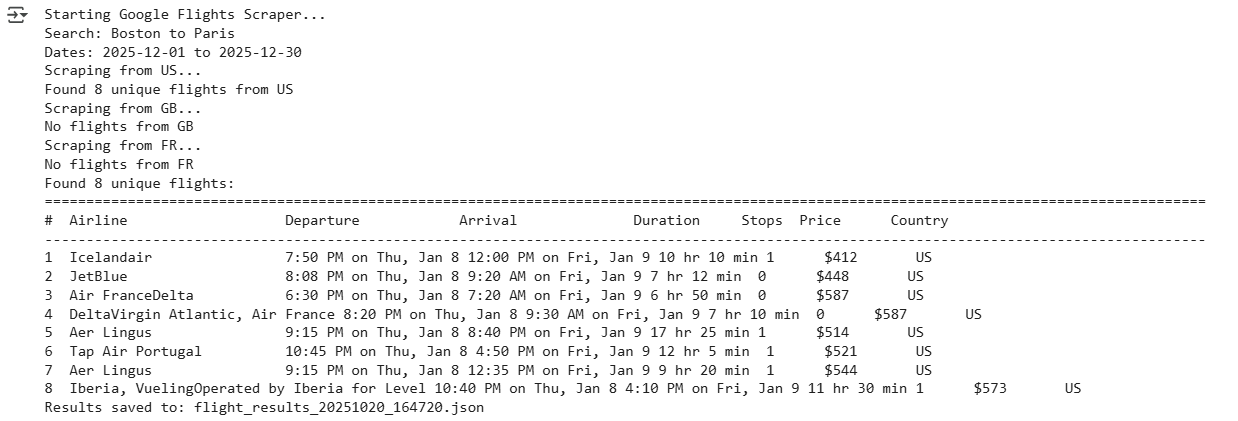
Here’s the output:
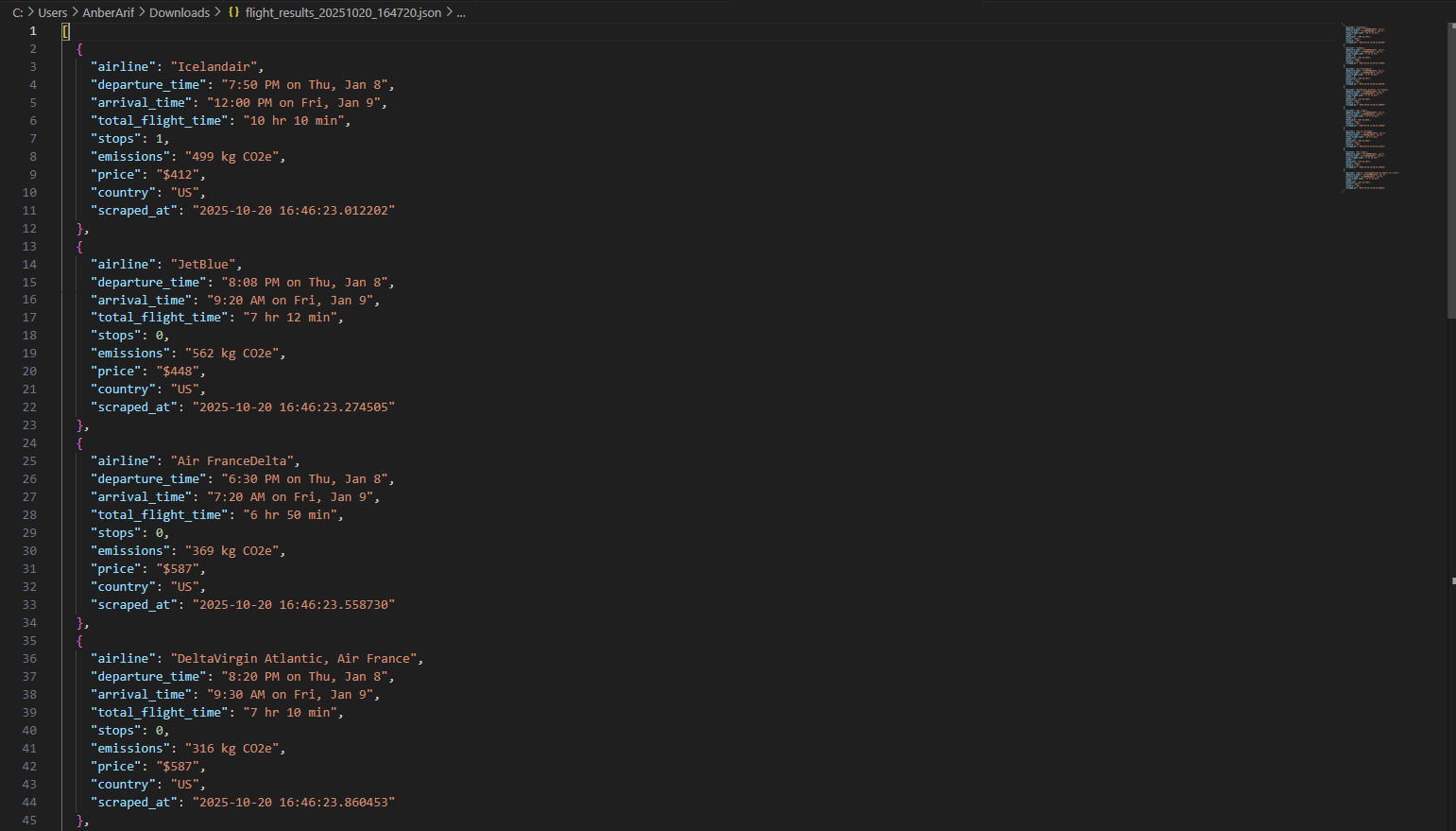
The generated json is as:
Wrapping up: Scrape Google Flights
In this article, we built a Google Flights scraper using Webshare rotating residential proxies with Playwright to handle JavaScript rendering. The solution extracts comprehensive flight data – airlines, times, durations, stops, emissions, and prices – while avoiding detection through proxy rotation and headless browser automation.