TL;DR
- Learn how to scrape Google Shopping search results using Python.
- Use Webshare rotating residential proxies to bypass Google’s anti-bot systems and avoid IP bans.
- Extract and save product data into structured JSON and CSV files.
Google Shopping is one of the largest e-commerce aggregation platforms, displaying real-time product listings, prices, and seller information from thousands of online stores. In this guide, you’ll learn how to build a Google Shopping web scraper in Python that can handle search queries, paginate through results, and collect product data – all while using proxies to stay undetected.
Prerequisites
Before building and running the Google Shopping scraper, make sure your development environment is set up with the necessary tools and dependencies.
- Python: Ensure you have Python 3.9+ is installed on your system. You can verify your version by running:
python --version- Required Python Packages: This scraper uses playwright for browser automation and asyncio for asynchronous execution. Install all dependencies with:
pip install playwright- Built-in Standard Libraries: The script also relies on several Python built-ins, which are included by default in most environments:
- asyncio - Manages concurrent browser operations and task scheduling.
- datetime - Handles publication timestamps and file naming.
- json and csv - Save scraped news data in structured formats.
- time and random - Add randomized delays between requests to mimic real users.
- typing - For type hinting (Optional, List).
- Playwright Browser Setup: After installing Playwright, you’ll need to install the Chromium browser:
playwright install chromium- Webshare Proxy Access: Because Google Shopping is heavily protected and dynamically rendered, you’ll need to use authenticated rotating residential proxies to access data reliably. Configure your Webshare proxy credentials and set your target country code to simulate real user traffic and avoid detection or IP blocking.
Scraping Google Shopping
Now that your environment is ready, let’s walk through the main steps to build and run your Google Shopping scraper.
Step 1: Define your search queries and configuration
Start by deciding which search terms you want to scrape – for example, “smartphone”. You’ll also set up two key configurations:
- Proxy Configuration - Include your Webshare proxy details (host, port, username, and password).
- Search Configuration - Specify your target country (country_code), maximum number of items per page, and number of pages (pagination) you want to scrape.
Step 2: Launch the scraper with Playwright
- Start by launching Playwright using the async_playwright() context manager. You’ll be running Chromium in headless mode so it operates silently in the background.
- If you’re using Webshare proxies, attach your proxy credentials to the browser’s launch configuration at this stage.
Next, set a custom user-agent string to mimic genuine browser traffic and use an initialization script to disable Playwright’s automation flags.
Step 3: Generate human-like interaction
- Before loading the Google Shopping page, make your scraper behave more like a real user.
- Use the generate_human_like_behavior() function to introduce randomness – move the mouse cursor to random coordinates, scroll up or down by varying amounts, and pause for short random intervals.
Step 4: Navigate to the Google Shopping page
- Now, build the Google Shopping search URL using the following format: https://www.google.com/search?q={query}&gl={country_code}&tbm=shop. For example, if your query is “smartphone” and your country code is “US”, this URL will load U.S. based shopping results for that keyword.
- If you’ve enabled pagination, configure it to move through multiple pages automatically. Once the page loads, wait a few seconds to ensure that all dynamic content has fully rendered.
Step 5: Handle cookie consent pop-ups
- Google often displays cookie consent or “Accept All” pop-ups when you first load a Shopping page. Be ready to detect and dismiss them automatically.
- Look for common button labels such as “I agree”, “Accept all”, or similar variations, and click them once they appear.
Step 6: Scroll through and collect product results
After the consent screen is handled, scroll down the page a few times to make sure all product listings are visible. Next, locate the product containers – these hold details like product names, sellers, and prices. For each visible product, extract the following details:
- The product title or description
- The search query that produced it
- The page number and country code
- A timestamp of when it was scraped
Organize all this information into a list of dictionaries so you can easily save or analyze it later.
Step 7: Add retry logic for reliability
- Not every page will load perfectly on the first try. To handle timeouts or temporary network errors, set up retry logic.
- Run each scraping attempt up to three times before moving on.
- If a page fails, wait for a random period (2-5 seconds) and try again.
Step 8: Save results to JSON and CSV
- Once all queries and pages have been processed, it’s time to save your results. Use the helper functions save_to_json() and save_to_csv() to export your data into clean, reusable files.
- Each file should include a timestamp in its name so you can easily keep track of when each scraping session was run.
Here’s the complete code:
import time
import random
import asyncio
import json
import csv
from typing import Optional, List
from datetime import datetime
from playwright.async_api import async_playwright, TimeoutError


async def generate_human_like_behavior(page) -> None:
    x = random.randint(100, 800)
    y = random.randint(100, 600)
    await page.mouse.move(x, y)

    delta = random.randint(-300, 300)
    await page.evaluate(f'window.scrollBy(0, {delta})')

    await asyncio.sleep(random.uniform(0.3, 0.7))


async def get_shopping_results(
    query: str,
    country_code: str = "US",
    max_items: int = 10,
    pagination: int = 1,
    headless: bool = True,
    proxy_host: Optional[str] = None,
    proxy_port: Optional[int] = None,
    proxy_username: Optional[str] = None,
    proxy_password: Optional[str] = None
) -> List[dict]:
    """
    Scrape item descriptions from Google Shopping using Playwright

    Args:
        query: Search term for Google Shopping
        country_code: Country code for search results (e.g., US, GB, FR)
        max_items: Maximum number of items to return per page
        pagination: Number of pages to scrape
        headless: Run browser in headless mode
        proxy_host: Proxy server host
        proxy_port: Proxy server port
        proxy_username: Proxy username
        proxy_password: Proxy password
    """
    all_results = []

    for page_num in range(pagination):
        start = page_num * 10
        search_url = f'https://www.google.com/search?start={start}&q={query}&gl={country_code}&tbm=shop'

        print(f"Scraping page {page_num + 1} for query: {query}")

        results = await scrape_single_page(
            search_url, query, page_num + 1, country_code, max_items, headless,
            proxy_host, proxy_port, proxy_username, proxy_password
        )

        all_results.extend(results)

        if len(results) < max_items:
            break

        if page_num < pagination - 1:
            await asyncio.sleep(random.uniform(2, 4))

    return all_results


async def scrape_single_page(
    search_url: str,
    query: str,
    page_num: int,
    country_code: str,
    max_items: int,
    headless: bool,
    proxy_host: Optional[str],
    proxy_port: Optional[int],
    proxy_username: Optional[str],
    proxy_password: Optional[str]
) -> List[dict]:
    """
    Scrape a single page of Google Shopping results
    """
    results = []
    MAX_RETRIES = 3

    for attempt in range(1, MAX_RETRIES + 1):
        print(f"Attempt {attempt}/{MAX_RETRIES} for page {page_num}")

        try:
            async with async_playwright() as playwright:
                launch_args = {
                    'headless': headless,
                    'args': [
                        '--no-sandbox',
                        '--disable-blink-features=AutomationControlled',
                    ]
                }

                if proxy_host and proxy_port:
                    proxy_config = {'server': f'{proxy_host}:{proxy_port}'}
                    if proxy_username and proxy_password:
                        proxy_config['username'] = proxy_username
                        proxy_config['password'] = proxy_password
                    launch_args['proxy'] = proxy_config

                browser = await playwright.chromium.launch(**launch_args)
                context = await browser.new_context(
                    viewport={'width': 1280, 'height': 800},
                    user_agent=(
                        'Mozilla/5.0 (Windows NT 10.0; Win64; x64) '
                        'AppleWebKit/537.36 (KHTML, like Gecko) '
                        'Chrome/96.0.4664.110 Safari/537.36'
                    )
                )

                await context.add_init_script(
                    "() => { Object.defineProperty(navigator, 'webdriver', { get: () => undefined }); }"
                )

                page = await context.new_page()

                await generate_human_like_behavior(page)

                await page.goto(search_url, wait_until='networkidle', timeout=15000)
                await page.wait_for_timeout(3000)

                consent_selectors = [
                    'button#L2AGLb',
                    "button:has-text('Accept all')",
                    "button:has-text('I agree')"
                ]

                for selector in consent_selectors:
                    try:
                        btn = page.locator(selector).first
                        if await btn.is_visible(timeout=2000):
                            await btn.click()
                            await page.wait_for_timeout(1000)
                            break
                    except:
                        continue

                await generate_human_like_behavior(page)

                for _ in range(2):
                    await page.evaluate('window.scrollBy(0, document.body.scrollHeight)')
                    await page.wait_for_timeout(500)

                await page.wait_for_selector("div[jsname='ZvZkAe'], div.njFjte", timeout=10000)
                containers = await page.query_selector_all(
                    "div[jsname='ZvZkAe'], div.njFjte, div.i0X6df > div.sh-dgr__content"
                )
                containers = containers[:max_items]

                for item in containers:
                    aria_label = await item.get_attribute('aria-label') or ''
                    if aria_label.strip():
                        results.append({
                            'query': query,
                            'page': page_num,
                            'title': aria_label.strip(),
                            'country_code': country_code,
                            'scraped_at': datetime.now().isoformat()
                        })

                await browser.close()

                if results:
                    print(f"Successfully scraped {len(results)} items from page {page_num}")
                    return results
                else:
                    print(f"No items found on page {page_num}")
                    return []

        except TimeoutError:
            print(f"Timeout on attempt {attempt} for page {page_num}")
        except Exception as e:
            print(f"Error on attempt {attempt} for page {page_num}: {e}")

        if attempt < MAX_RETRIES:
            wait_time = random.uniform(2, 5)
            print(f"Waiting {wait_time:.1f} seconds before retry")
            await asyncio.sleep(wait_time)

    print(f"Failed to scrape page {page_num} after {MAX_RETRIES} attempts")
    return []


def save_to_json(data: List[dict], filename: str):
    """Save scraped data to JSON file"""
    with open(filename, 'w', encoding='utf-8') as f:
        json.dump(data, f, indent=2, ensure_ascii=False)
    print(f"Saved {len(data)} items to {filename}")


def save_to_csv(data: List[dict], filename: str):
    """Save scraped data to CSV file"""
    if not data:
        print("No data to save")
        return

    fieldnames = ['query', 'page', 'title', 'country_code', 'scraped_at']

    with open(filename, 'w', newline='', encoding='utf-8') as f:
        writer = csv.DictWriter(f, fieldnames=fieldnames)
        writer.writeheader()
        writer.writerows(data)

    print(f"Saved {len(data)} items to {filename}")


async def main():
    # User configuration
    search_queries = ["smartphone"]

    proxy_config = {
        'host': 'p.webshare.io',
        'port': 80,
        'username': 'username-rotate', # Enter your username
        'password': 'password' # Enter your password
    }

    search_config = {
        'country_code': 'US',
        'max_items': 10,
        'pagination': 1
    }

    all_results = []

    print("Starting Google Shopping Scraper")
    start_time = time.time()

    for query in search_queries:
        print(f"Processing query: {query}")

        items = await get_shopping_results(
            query=query,
            country_code=search_config['country_code'],
            max_items=search_config['max_items'],
            pagination=search_config['pagination'],
            headless=True,
            proxy_host=proxy_config['host'],
            proxy_port=proxy_config['port'],
            proxy_username=proxy_config['username'],
            proxy_password=proxy_config['password']
        )

        all_results.extend(items)
        print(f"Found {len(items)} items for query: {query}")

        if query != search_queries[-1]:
            wait_time = random.uniform(3, 7)
            print(f"Waiting {wait_time:.1f} seconds before next query")
            await asyncio.sleep(wait_time)

    end_time = time.time()
    print(f"Scraping completed in {end_time - start_time:.2f} seconds")
    print(f"Total items scraped: {len(all_results)}")

    if all_results:
        timestamp = datetime.now().strftime("%Y%m%d_%H%M%S")
        json_filename = f"shopping_results_{timestamp}.json"
        csv_filename = f"shopping_results_{timestamp}.csv"

        save_to_json(all_results, json_filename)
        save_to_csv(all_results, csv_filename)

        print("First few results:")
        for idx, item in enumerate(all_results[:3], 1):
            print(f"Result {idx}: {item['title'][:80]}...")
    else:
        print("No results were extracted")


await main()
Note: This code uses await main() which works in Google Colab and Jupyter notebooks. For regular Python scripts, use this instead:
if __name__ == "__main__":
    asyncio.run(main())
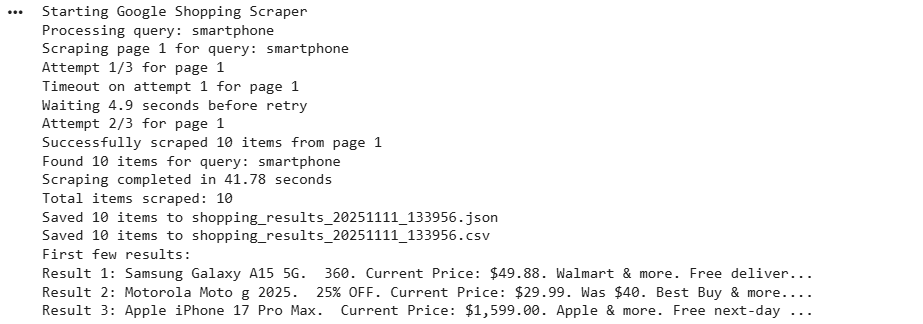
Here’s the console output:
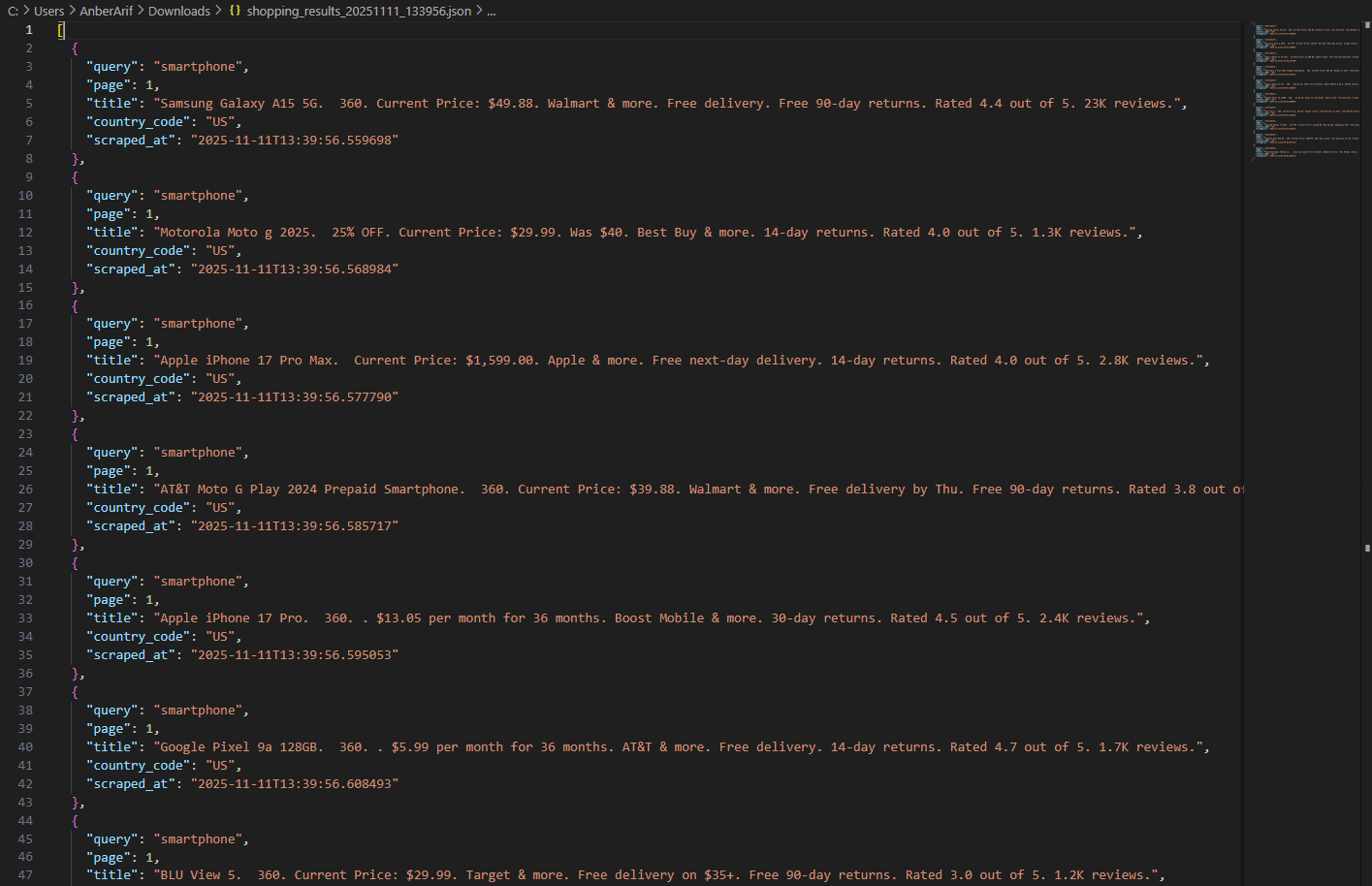
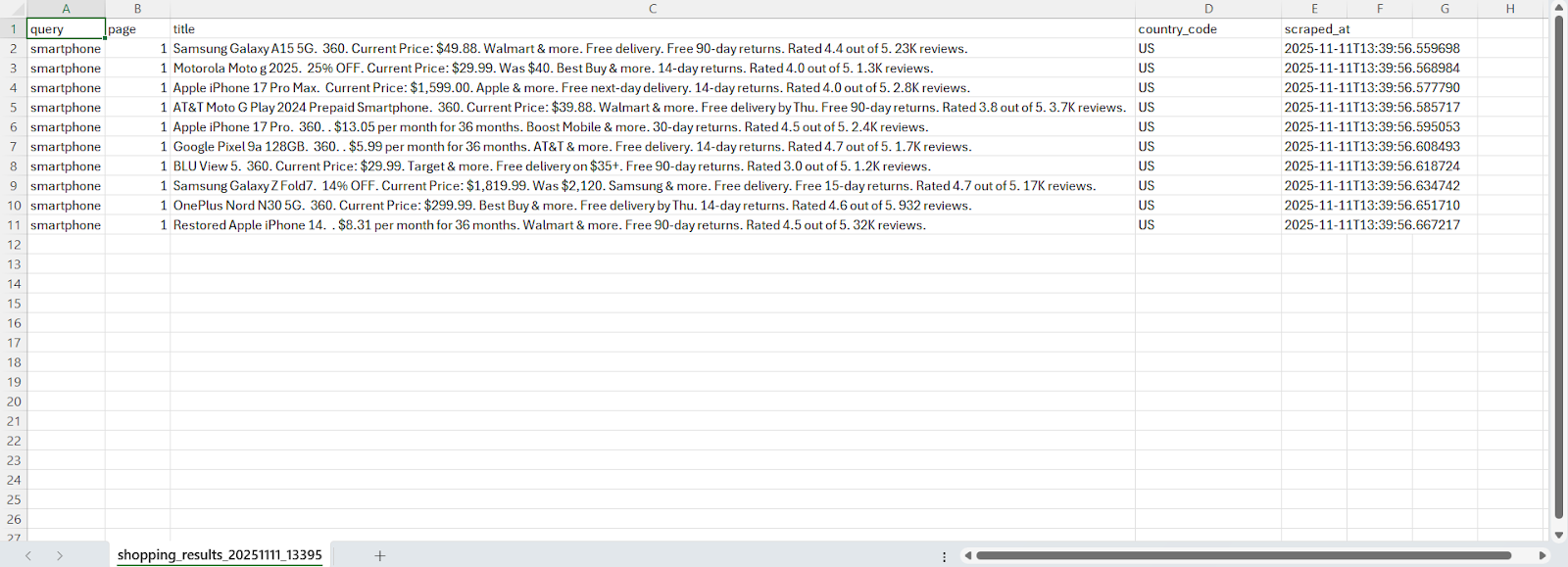
The generated files are as:
Wrapping Up: Scrape Google Shopping
In this article, you learnt how to build a Google Shopping scraper using Playwright and Webshare rotating residential proxies to collect real-time product data directly from Google’s shopping search results. The scraper handles queries, rotates proxies for undetected access, and mimics real human interactions to bypass anti-bot detection. It extracts product details and saves them into JSON and CSV files for further analysis.