TL;DR
- Learn how to scrape Google Scholar search results using Python.
- Use Webshare rotating residential proxies to avoid IP bans and ensure uninterrupted data collection.
- Extract and save detailed research data – including paper titles, author names, publication info, citation counts, and profile URLs – into a structured JSON file.
Google Scholar is one of the most trusted platforms for exploring academic publications, author profiles, and citation metrics across disciplines. In this guide, you’ll learn how to build a multi-modal Google Scholar scraper in Python that can collect structured research data directly from search results.
Prerequisites
Before building and running the Google Scholar scraper, ensure your environment is properly configured with all the required tools and dependencies.
- Python: Make sure you have Python 3.9+ installed. You can verify your version by running:
python --version- Required Python Packages: The scraper will use a few essential libraries for asynchronous scraping, browser automation, and data modeling. Install all dependencies with:
pip install playwright- Built-in Standard Libraries: The following modules are part of Python’s standard library and do not require separate installation, but make sure they are available in your environment:
- asyncio - for managing asynchronous tasks
- json - for formatting and saving scraped data
- random - for adding slight delays or randomness between requests to mimic human behaviour
- re - for parsing and cleaning text using regular expressions
- Playwright Browser Setup: After installing Playwright, you need to install the browser binaries (Chromium) once:
playwright install chromium- Webshare Proxy Access: Since Google Scholar has strict rate limits and anti-bot mechanisms, it’s recommended to use Webshare rotating residential proxies. These help simulate genuine user behavior from different locations and reduce the chance of IP bans or CAPTCHAs during large-scale scraping.
Scraping Google Scholar
Follow the steps below to build and execute the Google Scholar scraper using Playwright and Python.
Step 1: Initialize your scraper
- Start by creating an instance of the GoogleScholarScraper class.
- If you have a Webshare proxy, pass your proxy credentials when initializing – this helps you avoid IP bans during scraping. If you don’t have a proxy, you can skip it, but scraping may stop after a few requests if Google blocks your IP.
Step 2: Set up the browser
- Next, set up the browser session using Playwright. When the script runs, it will automatically launch a headless Chromium browser.
- You don’t have to open anything manually – just ensure you’ve already installed the Playwright browser binaries. The scraper automatically:
- Disables images and fonts to speed things up
- Uses a realistic desktop user-agent string
- Applies your proxy settings and credentials if provided
Step 3: Define your search query
- Now, configure what you want to search for on Google Scholar. Provide your search term, date filter (optional), and sorting rule – for example:
- Use relevance to get the most relevant results
- Use date to get the latest papers first
You can also choose how many results you want to collect using the max_results parameter.
Step 4: Run the search
- Once your parameters are ready, run the scraper to navigate to Google Scholar. The script automatically builds the full search URL and opens it in the headless browser.
- Wait a few seconds for the page to load – the scraper uses short, random pauses between actions to look more natural.
- If you encounter a CAPTCHA, give it a few seconds; the script will attempt to continue automatically.
Step 5: Collect search results
After the page loads, the scraper will start collecting the search results that appear. You don’t need to click anything – it will automatically loop through each result and gather:
- The paper title and direct link
- The authors and publication information
- The abstract snippet
- The citation count and Cited by link
- Related article links and author profile urls
Step 6: Extract citation formats
- For each search result, the scraper opens the Cite dialog to extract formatted references.
- It automatically gathers all available citation formats (MLA, APA, Chicago, Harvard, and Vancouver). You don’t need to handle any of this manually – the scraper opens and closes the citation popup for every paper automatically.
Step 7: Add delays
- While scraping, the tool intentionally waits for a few seconds (2-4 s) between each request.
- You don’t need to change anything here – these random pauses are built in to mimic human browsing and keep your session stable.
Step 8: Review and save the results
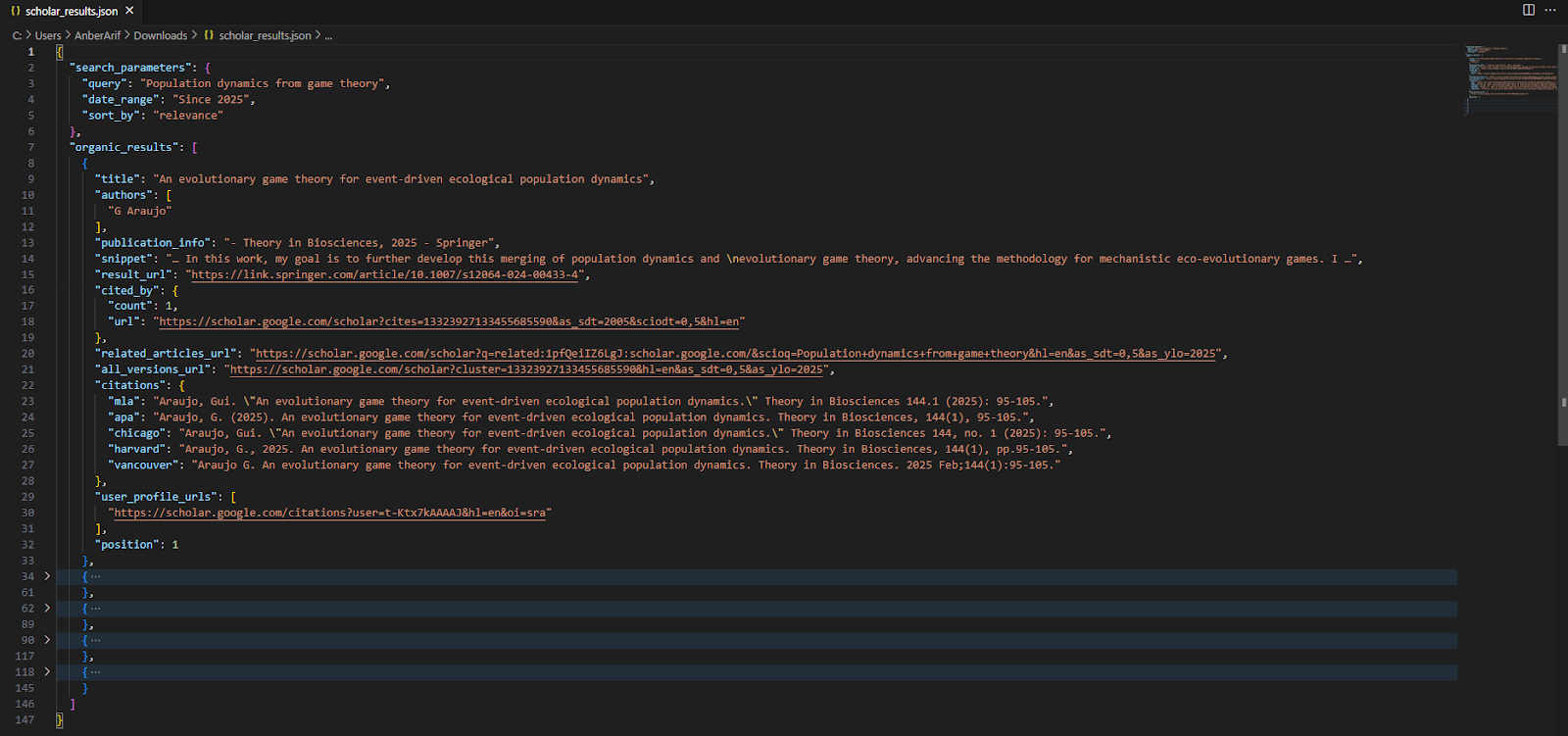
Once all results are scraped, the scraper compiles them into a JSON structure that includes:
- Your search parameters
- A list of organic results with all extracted data
The script will automatically save the output as scholar_results.json in your working directory.
Here’s the complete code:
import asyncio
from playwright.async_api import async_playwright
import json
import random
import re

class GoogleScholarScraper:
    def __init__(self, proxy_details=None):
        self.results = []
        self.proxy_details = proxy_details

    async def setup_browser(self):
        playwright = await async_playwright().start()

        # Browser launch arguments
        launch_args = [
            '--no-sandbox',
            '--disable-dev-shm-usage',
            '--disable-blink-features=AutomationControlled',
        ]

        # Add proxy server if provided
        if self.proxy_details:
            launch_args.append(f'--proxy-server={self.proxy_details.split("@")[1].split(":")[0]}:{self.proxy_details.split("@")[1].split(":")[1]}')

        browser = await playwright.chromium.launch(
            headless=True,
            args=launch_args
        )

        # Create context with proxy authentication if provided
        context_args = {
            'viewport': {'width': 1920, 'height': 1080},
            'user_agent': 'Mozilla/5.0 (X11; Linux x86_64) AppleWebKit/537.36 (KHTML, like Gecko) Chrome/120.0.0.0 Safari/537.36',
        }

        if self.proxy_details:
            # Extract proxy credentials
            proxy_parts = self.proxy_details.split('://')[1].split('@')
            if len(proxy_parts) == 2:
                credentials = proxy_parts[0]
                server = proxy_parts[1]
                context_args['http_credentials'] = {
                    'username': credentials.split(':')[0],
                    'password': credentials.split(':')[1]
                }

        context = await browser.new_context(**context_args)

        await context.route("**/*", lambda route: route.abort()
                          if route.request.resource_type in ["image", "font"]
                          else route.continue_())

        page = await context.new_page()
        return playwright, browser, context, page

    async def human_like_delay(self):
        """Add random delays to mimic human behavior"""
        await asyncio.sleep(random.uniform(2, 4))

    async def extract_citation_data(self, page, cite_button):
        """Extract citation formats by clicking the cite button"""
        citations = {
            'mla': '',
            'apa': '',
            'chicago': '',
            'harvard': '',
            'vancouver': ''
        }

        try:
            # Click the cite button
            await cite_button.click()
            await asyncio.sleep(2)

            # Wait for citation popup to appear
            await page.wait_for_selector('#gs_cit', timeout=10000)

            # Extract citation formats
            citation_rows = await page.query_selector_all('#gs_citt tr')

            for row in citation_rows:
                # Get the citation type (MLA, APA, etc.)
                type_element = await row.query_selector('.gs_cith')
                if type_element:
                    citation_type = (await type_element.text_content()).strip().lower()

                    # Get the citation text
                    citation_element = await row.query_selector('.gs_citr')
                    if citation_element:
                        citation_text = await citation_element.text_content()
                        citation_text = citation_text.strip() if citation_text else ""

                        # Map to our citation format
                        if citation_type == 'mla':
                            citations['mla'] = citation_text
                        elif citation_type == 'apa':
                            citations['apa'] = citation_text
                        elif citation_type == 'chicago':
                            citations['chicago'] = citation_text
                        elif citation_type == 'harvard':
                            citations['harvard'] = citation_text
                        elif citation_type == 'vancouver':
                            citations['vancouver'] = citation_text

            # Close the citation popup
            close_btn = await page.query_selector('#gs_cit-x')
            if close_btn:
                await close_btn.click()
                await asyncio.sleep(1)

        except Exception as e:
            print(f"Error extracting citations: {e}")

        return citations

    def parse_authors_from_citation(self, citation_text):
        """Extract author names from citation text"""
        try:
            # Try to extract authors from MLA format
            if citation_text:
                # MLA format: "Author1, Author2, et al. Title..."
                # Look for pattern like "Author1, Author2, and Author3." or "Author1, Author2, et al."
                match = re.match(r'^([^\.]+?)(?:\s+et al\.|\.)', citation_text)
                if match:
                    authors_part = match.group(1).strip()
                    # Split by commas and clean up
                    authors = [author.strip() for author in authors_part.split(',')]
                    # Remove "and" from the last author if present
                    if authors and ' and ' in authors[-1]:
                        last_authors = authors[-1].split(' and ')
                        authors = authors[:-1] + [author.strip() for author in last_authors]
                    return [author for author in authors if author]
        except Exception as e:
            print(f"Error parsing authors from citation: {e}")

        return []

    async def parse_scholar_result(self, page, result_element):
        """Parse individual Google Scholar result"""
        try:
            # Extract title and URL
            title_element = await result_element.query_selector('a[data-clk]')
            title = await title_element.text_content() if title_element else ""
            title = title.strip() if title else ""

            result_url = await title_element.get_attribute('href') if title_element else ""

            # Extract authors and publication info - FIXED PARSING
            authors_element = await result_element.query_selector('.gs_a')
            authors_text = await authors_element.text_content() if authors_element else ""
            authors_text = authors_text.strip() if authors_text else ""

            # Parse authors
            authors = []
            publication_info = ""

            if authors_element:
                # Extract author links and text
                author_links = await authors_element.query_selector_all('a[href*="/citations?user="]')
                author_names = []
                for link in author_links:
                    author_name = await link.text_content()
                    if author_name and author_name.strip():
                        author_names.append(author_name.strip())

                # Get the full text and remove author names to get publication info
                full_text = authors_text
                for author in author_names:
                    # Remove author name from the text
                    full_text = full_text.replace(author, '', 1)

                # Clean up the publication info
                publication_info = re.sub(r'\s+-\s+', ' - ', full_text).strip()
                publication_info = re.sub(r'\s+,', ',', publication_info)  # Fix spaces before commas
                publication_info = re.sub(r'\s+', ' ', publication_info)   # Fix multiple spaces

                authors = author_names

            # If no authors found via links, fall back to text parsing
            if not authors and authors_text:
                parts = authors_text.split(' - ', 1)
                if len(parts) > 1:
                    author_part = parts[0]
                    publication_info = parts[1]
                    authors = [author.strip() for author in author_part.split(',')]
                else:
                    publication_info = authors_text

            # Extract snippet
            snippet_element = await result_element.query_selector('.gs_rs')
            snippet = await snippet_element.text_content() if snippet_element else ""
            snippet = snippet.strip() if snippet else ""

            # Extract cited by information
            cited_by_element = await result_element.query_selector('a[href*="cites="]')
            cited_by_count = 0
            cited_by_url = ""

            if cited_by_element:
                cited_by_text = await cited_by_element.text_content()
                cited_by_text = cited_by_text.strip() if cited_by_text else ""

                if 'Cited by' in cited_by_text:
                    try:
                        count_text = cited_by_text.replace('Cited by', '').strip()
                        cited_by_count = int(count_text) if count_text.isdigit() else 0
                    except ValueError:
                        cited_by_count = 0

                cited_by_url = await cited_by_element.get_attribute('href')
                if cited_by_url and not cited_by_url.startswith('http'):
                    cited_by_url = 'https://scholar.google.com' + cited_by_url

            # Extract related articles
            related_element = await result_element.query_selector('a:has-text("Related articles")')
            related_articles_url = await related_element.get_attribute('href') if related_element else ""
            if related_articles_url and not related_articles_url.startswith('http'):
                related_articles_url = 'https://scholar.google.com' + related_articles_url

            # Extract all versions
            versions_element = await result_element.query_selector('a:has-text("All")')
            all_versions_url = await versions_element.get_attribute('href') if versions_element else ""
            if all_versions_url and not all_versions_url.startswith('http'):
                all_versions_url = 'https://scholar.google.com' + all_versions_url

            # Extract user profile URLs
            profile_elements = await result_element.query_selector_all('.gs_a a[href*="/citations?user="]')
            user_profile_urls = []
            for profile_element in profile_elements:
                profile_url = await profile_element.get_attribute('href')
                if profile_url and not profile_url.startswith('http'):
                    profile_url = 'https://scholar.google.com' + profile_url
                user_profile_urls.append(profile_url)

            # Extract citation data
            cite_button = await result_element.query_selector('a.gs_or_cit')
            citations_data = await self.extract_citation_data(page, cite_button) if cite_button else {
                'mla': '', 'apa': '', 'chicago': '', 'harvard': '', 'vancouver': ''
            }

            # If we got citations but no authors from the main element, try to extract from citations
            if not authors and citations_data.get('mla'):
                authors_from_citation = self.parse_authors_from_citation(citations_data['mla'])
                if authors_from_citation:
                    authors = authors_from_citation

            return {
                'title': title,
                'authors': authors,
                'publication_info': publication_info,
                'snippet': snippet,
                'result_url': result_url,
                'cited_by': {
                    'count': cited_by_count,
                    'url': cited_by_url
                },
                'related_articles_url': related_articles_url,
                'all_versions_url': all_versions_url,
                'citations': citations_data,
                'user_profile_urls': user_profile_urls
            }

        except Exception as e:
            print(f"Error parsing result: {e}")
            return None

    async def scrape_scholar(self, query, since_year=None, sort_by="relevance", max_results=10):
        """Main function to scrape Google Scholar results"""
        playwright, browser, context, page = await self.setup_browser()

        try:
            # Build search URL
            search_url = "https://scholar.google.com/scholar"
            params = {
                'q': query,
                'hl': 'en',
                'as_sdt': '0,5'
            }

            if since_year:
                params['as_ylo'] = since_year

            if sort_by == "date":
                params['scisbd'] = '1'

            param_string = '&'.join([f'{k}={v}' for k, v in params.items()])
            full_url = f"{search_url}?{param_string}"

            print(f"Navigating to: {full_url}")

            await page.goto(full_url, wait_until='domcontentloaded', timeout=30000)
            await self.human_like_delay()

            # Check for CAPTCHA
            if await page.query_selector('form#captcha-form'):
                print("CAPTCHA detected. Trying to continue...")
                await asyncio.sleep(5)

            # Wait for results to load
            try:
                await page.wait_for_selector('.gs_ri', timeout=15000)
            except:
                print("No results found or page structure different")
                content = await page.content()
                if "sorry" in content.lower():
                    print("Google is showing a blocking page")
                    return {
                        'search_parameters': {
                            'query': query,
                            'date_range': f"Since {since_year}" if since_year else "Any time",
                            'sort_by': sort_by
                        },
                        'organic_results': [],
                        'error': 'Google blocking detected'
                    }

            results = []
            result_elements = await page.query_selector_all('.gs_ri')

            print(f"Found {len(result_elements)} results")

            for i, result_element in enumerate(result_elements[:max_results]):
                print(f"Processing result {i+1}...")

                result_data = await self.parse_scholar_result(page, result_element)
                if result_data:
                    result_data['position'] = i + 1
                    results.append(result_data)
                    print(f"Extracted: {result_data['title'][:50]}...")
                    if result_data['citations']['mla']:
                        print(f"Got citation data")
                else:
                    print(f"Failed to extract result {i+1}")

                await self.human_like_delay()

            return {
                'search_parameters': {
                    'query': query,
                    'date_range': f"Since {since_year}" if since_year else "Any time",
                    'sort_by': sort_by
                },
                'organic_results': results
            }

        except Exception as e:
            print(f"Error during scraping: {e}")
            return {
                'search_parameters': {
                    'query': query,
                    'date_range': f"Since {since_year}" if since_year else "Any time",
                    'sort_by': sort_by
                },
                'organic_results': [],
                'error': str(e)
            }
        finally:
            await browser.close()
            await playwright.stop()

async def main():
    # Your proxy details
    PROXY_DETAILS = "http://username-rotate:password@p.webshare.io:80"

    # Initialize scraper with proxy
    scraper = GoogleScholarScraper(proxy_details=PROXY_DETAILS)

    # Your search parameters
    results = await scraper.scrape_scholar(
        query="Population dynamics from game theory",
        since_year=2025,
        sort_by="relevance",
        max_results=5
    )

    # Save results to JSON file
    with open('scholar_results.json', 'w', encoding='utf-8') as f:
        json.dump(results, f, indent=2, ensure_ascii=False)

    print("Scraping completed")
    print(f"Found {len(results['organic_results'])} results")

    # Print detailed results
    for result in results['organic_results']:
        print(f"Result {result['position']}:")
        print(f"Title: {result['title']}")
        print(f"Authors: {result['authors']}")
        print(f"Publication: {result['publication_info']}")
        print(f"Cited by: {result['cited_by']['count']}")
        if result['citations']['mla']:
            print(f"MLA: {result['citations']['mla'][:100]}...")
        print(f"Author Profiles: {len(result['user_profile_urls'])}")
        print()

await main()
This scraper uses await main(), which runs smoothly in Google Colab or Jupyter notebooks where asynchronous code can be awaited directly.
If you’re running the script as a standalone Python file, replace it with the following block instead:
if __name__ == "__main__":
    asyncio.run(main())
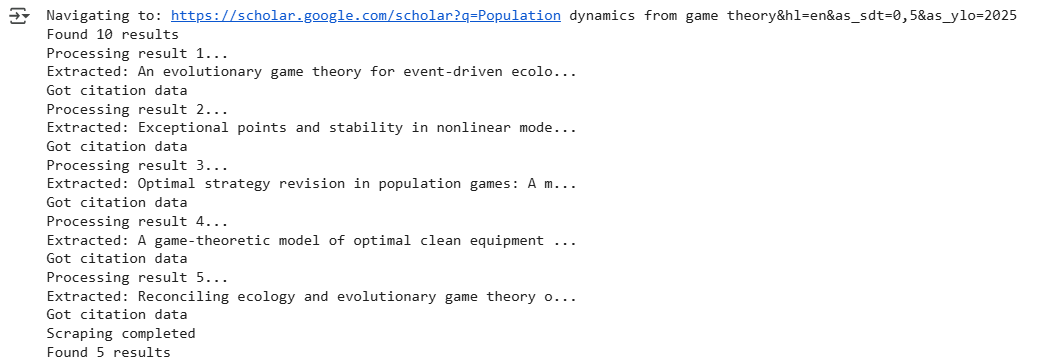
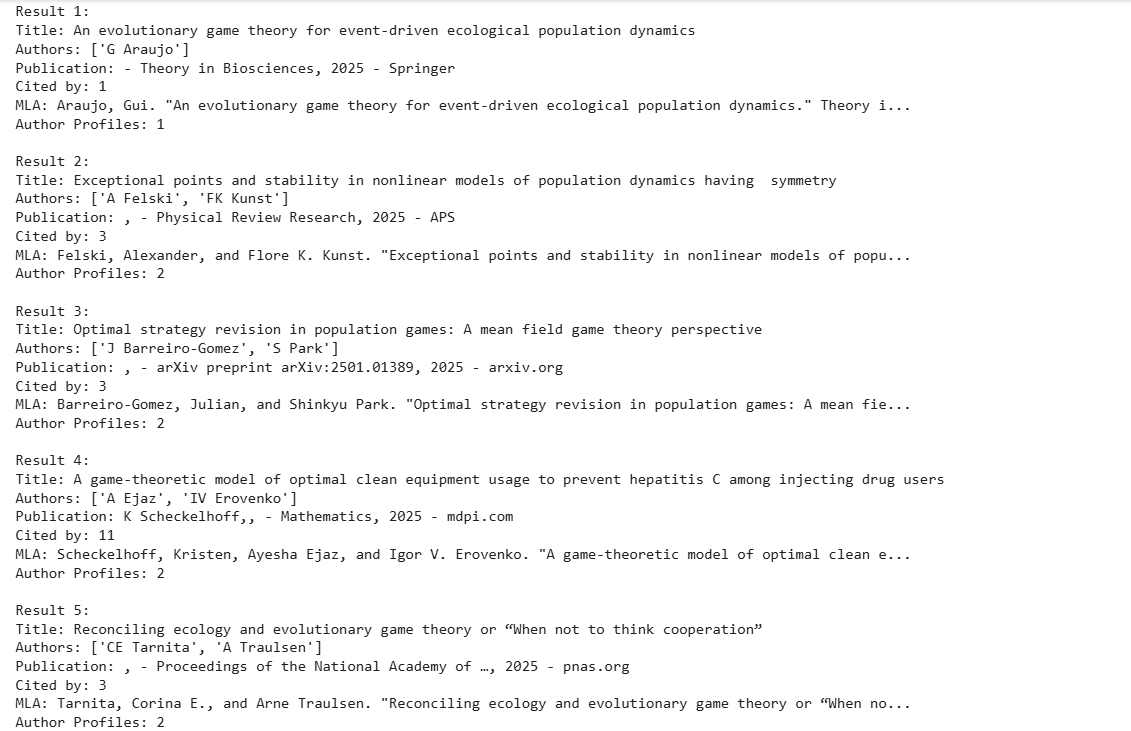
Here’s the console output:
The generated json is as:
Wrapping up: Scrape Google Scholar
In this guide, we built a Google Scholar scraper using Playwright and Webshare rotating residential proxies to collect academic research data safely and efficiently. The scraper extracts structured information – including paper titles, author names, publication details, citation counts, citation formats, and author profile URLs – directly from Google Scholar search results.